Bambu Lab vs Flashforge: Which Brand Suits a Beginner?
Choose a printer by its features, not just the brand: Bambu Lab offers the A1 and enclosed P1S, while Flashforge offers the Adventurer 5M and multicolor AD5X.
On this page (5 sections)
For a beginner, Bambu Lab vs Flashforge comes down to the model and the features you need: the Bambu Lab A1 emphasizes automatic calibration, the P1S adds an enclosure, the Flashforge Adventurer 5M keeps to a focused feature set, and the AD5X supports multicolor printing. Start with the kinds of objects you want to make, then compare the setup, materials, and color options that matter for those projects.
These four printers are not interchangeable just because they come from two brands. A printer with an enclosure, a multicolor system, or a particular app may suit one home printer better than another.
If you're still deciding whether 3D printing fits your home and routine, start with questions to ask before buying a 3D printer. For more model comparisons, see our 3D printer matchups.
Is Bambu Lab or Flashforge better for beginners?
Neither brand is automatically better for every beginner; choose the individual printer that fits your first projects and how you want to set it up. The A1 and Adventurer 5M offer automatic calibration features, while the P1S adds an enclosure and the AD5X supports multicolor printing.
The Bambu Lab A1 handles calibration processes automatically, including Z-offset and bed leveling, and has a simplified touchscreen. Its described features also include a print status monitoring system and LAN-only mode as a connection option.
The Flashforge Adventurer 5M has automatic bed leveling and one-click printing. Its Flash Studio app can monitor print progress, adjust settings, and send status alerts remotely.
These features can reduce some early setup choices, but they do not remove the need to select a model, filament, and print settings. You'll also need a suitable place for the printer and a little time to learn how your chosen slicer and printer settings work together.
For a broader overview of that learning curve, read whether a 3D printer is easy to use for beginners. Our first-day 3D printer setup guide can help you plan the next step after choosing.
What are the key differences between these four printers?
The A1 and Adventurer 5M focus on accessible setup features, the P1S adds an enclosure, and the AD5X adds multicolor support. Compare the practical differences rather than treating either brand as one uniform experience.
| Printer | Setup and calibration | Enclosure | Color options |
|---|---|---|---|
| Bambu Lab A1 | Full-auto calibration; simplified touchscreen | Not specified | Multicolor with required AMS lite |
| Bambu Lab P1S | Automatic bed leveling; described as set up in 15 minutes | Enclosed design | Up to 16 colors with required Bambu Lab AMS |
| Flashforge Adventurer 5M | Automatic bed leveling; one-click printing | Not specified | Multicolor feature not specified |
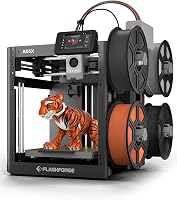
| Flashforge AD5X | One-click auto leveling; automatic filament feeding and retraction | Not specified | Up to 4 colors simultaneously |
The table gives you a starting point, not a substitute for matching the printer to the objects and materials you have in mind. An enclosure, for example, matters more if you expect to use materials suited to that design than if you mostly plan simple PLA projects.
Which Bambu Lab model is the simpler starting point?
The A1 is a good Bambu Lab starting point if you want automatic calibration and an easy-to-use interface. It has a simplified touchscreen, a 1-Clip quick-swap nozzle, and active motor noise canceling.
The A1 can print in multiple colors when paired with AMS lite. AMS lite is required for multicolor printing and may need to be bought separately, so factor that extra system into your plans if color is central to your projects.
For everyday single-color parts, decorations, and practical household prints, you can focus on the printer and basic filament choices first. You do not need to choose a multicolor setup just because the printer supports one.
Choose the A1 if automated calibration and its described interface fit your plans. If you'd like to compare Bambu Lab sizes, see our A1 Mini vs A1 guide.
When does the Bambu Lab P1S make more sense?
The P1S makes more sense if you want an enclosure and expect to use its supported filaments. Its enclosed design is intended to improve print performance for advanced filaments.
Supported filaments include PLA, PETG, TPU, PVA, PET, ABS, and ASA; it is also described as capable with PA and PC. Carbon and glass fiber reinforced polymer are not recommended for this model, so don't assume the enclosure makes every material a good fit.
The P1S supports multicolor and multimaterial printing when connected to Bambu Lab AMS, with support for up to 16 colors. That extra system suits a person who already has color-separated designs in mind, but it adds a setup decision and filament handling to learn.
If your first projects are simple single-color objects, consider whether the enclosure and broader material range are worth prioritizing now. You can also compare the Bambu Lab P1S review and our P1S vs P2S guide before choosing.
Is Flashforge better if you want a straightforward printer?
The Adventurer 5M suits you if you want automatic bed leveling and one-click printing without making multicolor printing the deciding feature. It also has a direct-drive extruder and remote monitoring through Flash Studio.
Its described features include quick nozzle changes, a dual-sided PEI platform, and a 280°C direct-drive extruder. Flash Studio can help you check progress and adjust settings remotely, which may be useful if you want app-based print monitoring.
The Adventurer 5M's described features do not include multicolor printing. That makes it a sensible model to compare if you expect to print mainly in one color and want the features it does include, rather than paying attention to a color system you may not use.
Our Adventurer 5M vs AD5X comparison breaks down that Flashforge decision.
When should you choose the Flashforge AD5X?
Choose the AD5X if you want to print with up to 4 colors at once. Its feature set also includes one-click auto leveling, automatic filament feeding and retraction, and remote monitoring through the Flash Maker app.
Multicolor printing can make sense for labels, colored decorations, and models designed with separate color regions. It also brings more moving parts to the workflow: plan which colors your model needs, load the filaments, and allow time to configure and manage a multicolor job.
The AD5X has a 0.4 mm nozzle pre-installed and supports nozzle sizes from 0.25 mm to 0.8 mm. A smaller nozzle can suit finer detail, while a larger one can help with bigger, sturdier models; choose based on the shape and finish you need rather than changing nozzles without a clear reason.
For mostly single-color prints, compare the Adventurer 5M before choosing. You can also read our Flashforge AD5X vs Adventurer 5M guide for a closer look at that choice.
Which brand suits your first 3D printing projects?
Match the printer to what you expect to print and the setup decisions you want to handle. A focused single-color model may be enough for practical parts, while an enclosure or multicolor system is more useful when you can name projects that need it.
| Your priority | Model to compare first | Why it may fit |
|---|---|---|
| Automatic calibration and a touchscreen | Bambu Lab A1 | Full-auto calibration and a simplified interface |
| An enclosure and varied filament choices | Bambu Lab P1S | Enclosed design and several supported filaments |
| One-click printing | Flashforge Adventurer 5M | Automatic bed leveling and remote app monitoring |
| Multicolor printing | Flashforge AD5X | Supports up to 4 colors simultaneously |
Think of your first few prints before you buy. If you plan to make organizers, replacement knobs, or simple desk items, a single-color setup may be enough; if your designs depend on distinct colored sections, compare the multicolor systems and their required accessories.
Then consider your learning preference. Automatic leveling and calibration can make the first setup less manual, but you will still need to learn how to prepare a model, select a material, and respond when a print does not stick or finish as expected.
The guide to what you need to start 3D printing at home covers supporting items and choices beyond the printer itself.
What should you consider before buying?
Decide on color, materials, space, and the first projects you plan to print before choosing a model. Those choices help you tell whether a feature is useful for your routine or simply another option to configure.
Start with color. The A1 needs AMS lite for multicolor printing, and the P1S needs Bambu Lab AMS.
The AD5X supports up to 4 colors. If you do not have a project that needs multiple colors, keep that decision separate from your first printer choice.
Next, decide which filaments you expect to use. The P1S lists several material options, including ABS and ASA, and has an enclosure.
Learn each filament's requirements before printing, and choose a printer based on materials you actually intend to use rather than a long list of possibilities.
Measure the place where the printer will sit and make sure you can reach the areas you need for routine use. Keep the space organized so filament and tools are easy to find, and think about noise and where a print can run without getting in the way of daily life.
Finally, compare the controls and monitoring options. A touchscreen, remote app, or LAN-only connection may affect how you prefer to start and check jobs, but none replaces learning basic print preparation.
The PLA vs PETG guide can help you think through common filament choices before deciding which features matter most.
How should you set up and care for your first printer?
Start with the printer's own setup guidance, keep the first job simple, and make changes one at a time. These habits help you learn which settings and routines work for your chosen model without turning every print into a new experiment.
Give yourself enough room to unpack and assemble the printer according to its instructions. Keep small parts together, remove packaging as directed, and check that the printer is stable before you begin; avoid improvising with parts or steps that the manufacturer does not specify.
Before a first print, read the printer and filament guidance, prepare a simple model, and use the recommended starting settings. A small, uncomplicated object makes it easier to spot a bed adhesion or setup issue than a large multicolor design with several settings to manage.
Keep the build surface clean and handle it as the manufacturer directs. Dust, fingerprints, or residue can interfere with adhesion, so use the recommended cleaning method and let the surface dry before printing.
Avoid harsh cleaners or tools unless the printer's instructions say they are suitable.
Store filament in a way that keeps it clean and dry. If a spool has been exposed to damp air or prints show symptoms associated with moisture, review a guide to drying 3D printer filament and follow the filament maker's temperature guidance.
For routine care, check the nozzle and build surface for residue, watch for loose scraps around the printer, and follow the maintenance schedule for your model. A quick check before a job can prevent a small obstruction or dirty surface from spoiling a longer print.
Noise is also part of placement. If you share a room or print near a work area, our 3D printer noise reduction tips can help you plan the space and reduce avoidable vibration.
What common first-print mistakes should you avoid?
The most common avoidable mistake is changing too many variables before you know what caused a problem. Keep the model, filament, and starting profile simple, then troubleshoot one issue at a time.
A complex first print may combine several challenges: a large footprint, delicate parts, multiple colors, and a material you have never used. Begin with a straightforward model and the printer's recommended filament so you can learn the basic workflow first.
Don't assume automatic leveling means every print will stick without preparation. Check that the build surface is clean, use the right starting settings, and make sure the printer is set up according to its instructions.
Avoid choosing an advanced material just because the printer supports it. Material compatibility depends on the printer and the filament's requirements, so consult both sets of guidance before loading a new spool.
With multicolor printing, don't forget the required hardware. AMS lite is needed for multicolor use on the A1, and the P1S needs Bambu Lab AMS.
The AD5X supports up to 4 colors. Confirm which system you need before planning a color project.
If a print fails, resist the urge to change several settings at once. Check the bed, filament path, model orientation, and selected profile in a consistent order, then adjust one setting and note what changed.
Bambu Lab vs Flashforge: which should you pick?
Pick the Bambu Lab A1 for its automatic calibration and touchscreen, the P1S for an enclosure and broader material plans, the Adventurer 5M for a focused single-color setup, or the AD5X for up to 4-color printing. Your first projects should decide which of those features deserves priority.
If you want a beginner-friendly starting point and do not need an enclosure, compare the A1 with the Adventurer 5M. If advanced filament plans make an enclosure useful, consider the P1S; if color is a core part of your designs, compare the AD5X with the Bambu Lab systems and include their required accessories in your decision.
For mostly simple single-color prints, skip paying attention to multicolor features you don't expect to use. For material plans that don't call for an enclosure, don't let that feature alone determine your choice.
Before settling on a model, check the setup guidance, materials you intend to print, and the space available at home. If you're choosing your first machine, use our beginner guide to 3D printers for home use to check how a printer fits your space and routine.
Frequently asked questions
Is Bambu Lab or Flashforge easier for a beginner?
Both brands offer beginner-friendly features in these models. The Bambu Lab A1 has full-auto calibration and a simplified touchscreen, while the Flashforge Adventurer 5M has automatic bed leveling and one-click printing.
Choose based on the controls and features you expect to use.
Which brand has a multicolor 3D printer?
Both brands offer multicolor options among these models. The Bambu Lab A1 needs AMS lite for multicolor printing, and the P1S needs Bambu Lab AMS.
The Flashforge AD5X supports up to 4 colors at once, so compare the system each model requires before you decide.
Should a beginner choose an enclosed 3D printer?
An enclosure may suit you if you plan to use filaments such as ABS or ASA. The Bambu Lab P1S has an enclosed design and lists both materials among its supported filaments.
Check the printer and filament guidance before using any material, and choose an enclosure only if it fits your actual plans.
Is the Flashforge Adventurer 5M multicolor?
The Adventurer 5M's described features do not include multicolor printing. The Flashforge AD5X supports up to 4 colors simultaneously, while the Bambu Lab A1 can print multiple colors with AMS lite.
If color is a priority, compare those systems and their required accessories.