Flashforge AD5X vs Adventurer 5M: Color or Simplicity? (October 2026)
Choose the Flashforge AD5X if you want up to 4 colors in one print; choose the Adventurer 5M if you mostly print in one color. Both have a 220 x 220 x 220 mm build volume and support speeds up to 600 mm/s.
On this page (8 sections)
- Flashforge AD5X vs Adventurer 5M: which difference matters most?
- Who should choose the AD5X for multicolor printing?
- Is the Adventurer 5M a better fit for everyday prints?
- How should you compare their speed and nozzle options?
- Which temperature and filament options fit your plans?
- What setup and care habits help either printer?
- What common buying and printing mistakes should you avoid?
- Which Flashforge should you choose?
Choose the Flashforge AD5X for prints with up to 4 colors, or the Adventurer 5M for mostly single-color work and quick nozzle changes. In this flashforge ad5x vs adventurer 5m comparison, both printers have a 220 x 220 x 220 mm build volume and support speeds up to 600 mm/s.
The choice turns on how you plan to use color. The AD5X has a multicolor system, while the Adventurer 5M focuses on a simpler single-color workflow with a quick-change nozzle.

Flashforge AD5X vs Adventurer 5M: which difference matters most?
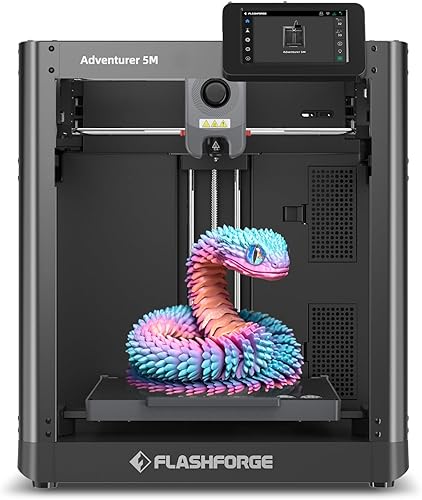
The AD5X is the multicolor pick; the Adventurer 5M is the better fit if you want quick nozzle swaps. Their shared print space and headline speed leave your project type as the main deciding factor.
For signs, labeled parts, decorative models or classroom pieces with distinct colored sections, the AD5X can print up to 4 colors simultaneously. Its automatic filament feeding and retraction help with the material changes, but you still need to prepare each file with its color assignments.
For brackets, organizers, prototypes and other functional pieces that will be printed in one color, the Adventurer 5M avoids adding multicolor preparation to the routine. Its detachable nozzle changes take 3 seconds, and its dual-sided PEI platform gives you two surface options.
Both models use a CoreXY structure, support automatic bed leveling and offer remote monitoring by app. Neither printer's maximum speed alone tells you how quickly a particular model will finish; complexity, material and settings all matter.
Who should choose the AD5X for multicolor printing?
Choose the AD5X if color is part of the design, rather than an occasional finishing choice. It supports up to 4 colors in a print, which can make labels, accents or separated model sections part of the printed object.
This is useful for decorative signs, visual teaching aids, color-coded organizers and projects where painting would be an extra step. It can also help make small features easier to distinguish, depending on the design and settings.
The trade-off is preparation. You'll need to assign colors in your slicer and load the intended filaments.
You also need to account for the transitions between them. Color changes may add time and use material, so multicolor is most valuable when the result depends on it.
Skip the AD5X if nearly everything you print is a one-color utility part. You would be choosing a multicolor workflow without using its main distinction often.
For a wider comparison of beginner-friendly color options, read our guide to the best multi-color 3D printers for beginners. It can help you decide whether color flexibility belongs in your first printer or a later upgrade.
Is the Adventurer 5M a better fit for everyday prints?
Choose the Adventurer 5M when most of your work is single-color and you value changing nozzles quickly. Automatic bed leveling, a dual-sided PEI platform and 3-second detachable nozzle changes support a straightforward routine.
A 0.4 mm nozzle is included. Optional sizes range from 0.25 mm to 0.8 mm.
A smaller nozzle can suit finer details, while a wider nozzle can be useful for larger, sturdy parts where speed matters more than small surface features.
The Adventurer 5M also has a high-flow nozzle and a stated 35-second warm-up to 200°C. Those features may appeal if you want to move from setup to a print without a long manual calibration routine.
Skip it if you expect to print multicolor designs regularly. It does not have the AD5X's described multicolor system, so color would need to come from separate prints or finishing work.
A first print still calls for sensible file preparation, filament settings and a clean build surface. Our first-day 3D printer setup guide explains the basic sequence before you start.
How should you compare their speed and nozzle options?
Both reach a stated maximum of 600 mm/s, so speed should not decide this matchup by itself. Real print time depends on the model, material, layer height, cooling and other slicer settings.
Both list acceleration of 20,000 mm/s², vibration compensation, dual-fan cooling and support for nozzle sizes from 0.25 mm to 0.8 mm. The AD5X describes its cooling as a dual-channel fan system, while the Adventurer 5M has dual-fan cooling.
Each includes a 0.4 mm nozzle. Consider a smaller option for fine features or a wider one for larger parts.
Choose a nozzle based on the model and the detail you need. Swapping hardware without adjusting the print profile can lead to poor results.
The Adventurer 5M's detachable nozzle is designed for a 3-second change. That helps if you expect to switch nozzle sizes often, though you still need to select matching slicer settings and follow the printer's change instructions.
For context on choosing around speed, see our guide to fast 3D printers. It explains why a high maximum speed is only one part of a useful home setup.
Which temperature and filament options fit your plans?
The AD5X has a 300°C maximum extruder temperature, compared with 280°C for the Adventurer 5M. Check the printer and filament instructions together before choosing a material, since a temperature limit alone does not mean every filament is suitable.
The described material options for the AD5X include PLA, luminous PLA, silk PLA, PETG-CF and rapid PETG. The Adventurer 5M's described options include PLA, luminous PLA, silk PLA and PETG-CF.
If you expect to use ordinary PLA for models and household organizers, either printer's described setup covers that material. If you want a specialty filament, confirm its requirements and the printer's guidance before buying the spool.
Our PLA vs PETG guide lays out the practical differences between two common choices. Start with the material you actually expect to print, then pick a printer and settings that fit it.
What setup and care habits help either printer?
Start with a stable, clear work surface, install the printer according to its instructions and run its automatic leveling step before printing. Automatic leveling helps with bed calibration, but it does not replace clean surfaces, correct settings or basic checks.
Before a first print, check that the build plate is seated and clean, the filament path is ready and the selected profile matches the nozzle and material. Use a small, familiar model first so you can spot a first-layer problem before committing to a long print.
Keep the build surface free of dust, oils and loose filament. Let it cool as directed before removing a print, and avoid scraping the plate with tools that could damage it.
For routine care, inspect the nozzle if extrusion becomes inconsistent, clear loose filament from around moving areas and follow the manufacturer's maintenance guidance. On the AD5X, confirm that each color is routed and assigned correctly; on the Adventurer 5M, confirm that the nozzle and profile match after a swap.
If a print lifts at the corners or fails to stick, check plate cleanliness, first-layer settings and filament condition before changing several settings at once. Our guide to fixing 3D prints that won't stick walks through the common checks.
What common buying and printing mistakes should you avoid?
The most common mistake is buying for a headline feature you will rarely use. A multicolor setup pays off when color is part of many projects; if your queue is mostly one-color parts, the Adventurer 5M's simpler workflow is a more direct match.
Another mistake is treating 600 mm/s as a promise that every model will print quickly. Fine details, material limits, cooling, layer settings and multicolor changes can all affect the final duration.
Don't assume that changing a nozzle is only a hardware task. The nozzle size and slicer profile need to agree, or the printer may use settings that do not suit the installed nozzle.
Finally, don't choose solely by extruder temperature. Match your filament to the printer's instructions and the material's requirements, and think about the parts you intend to make before buying specialty filament.
Which Flashforge should you choose?
Pick the AD5X for regular multicolor projects; pick the Adventurer 5M for single-color printing and quick nozzle changes. That decision rule matters more than their shared build volume and maximum speed.
The AD5X is the clear fit for signs, color-coded models and projects where up to 4 colors are useful. The Adventurer 5M suits a home workspace focused on practical one-color prints, especially if you expect to swap nozzle sizes.
For a wider brand comparison, see Bambu Lab vs Flashforge for beginners. If your question is how printer size fits your desk and projects, compare the Bambu Lab A1 Mini and A1 as another way to think about printer needs.
For the flashforge ad5x vs adventurer 5m choice, make a short list of the models you expect to print in the first few months. Choose the AD5X if several need multiple colors; choose the Adventurer 5M if almost all are single-color and quick nozzle changes better match your routine.
Frequently asked questions
What is the main difference between the Flashforge AD5X and Adventurer 5M?
The AD5X supports up to 4 colors simultaneously, while the Adventurer 5M is designed around single-color printing. Both have a 220 x 220 x 220 mm build volume and support speeds up to 600 mm/s, so the main choice is color workflow versus quick nozzle changes.
Are the Flashforge AD5X and Adventurer 5M the same size?
Their printable spaces match at 220 x 220 x 220 mm. The AD5X measures 16 x 14 x 18 inches, while the Adventurer 5M measures 15.83 x 14.29 x 17.64 inches, so check your shelf or desk clearance before choosing.
Which Flashforge printer is faster?
Both support speeds up to 600 mm/s and list acceleration of 20,000 mm/s². Those maximum figures do not predict every job's duration: model shape, material, layer settings and, on the AD5X, color changes all affect print time.
Can the Adventurer 5M print in multiple colors?
The Adventurer 5M's described features do not include a multicolor system. Choose the AD5X if you want up to 4 colors in one print, and plan for color assignment and filament changes as part of preparing those jobs.
Which printer should a beginner choose?
Choose the Adventurer 5M if you mainly want single-color prints and value quick nozzle changes. Choose the AD5X if multicolor output is a clear goal and you are ready to manage that workflow.
Both include automatic bed leveling, which simplifies one part of setup.