8 Best Fast 3D Printers That Stay Easy to Use (October 2026)
The best fast 3D printers for easy home printing include the Bambu Lab P2S Combo for speed with multi-color, the Bambu Lab P1S for enclosed high-speed printing, and the Elegoo Centauri Carbon for a larger build area.
On this page (4 sections)
The Bambu Lab P2S Combo is the best fast 3D printer for most buyers, with a stated speed of up to 600 mm/s, automatic calibration and AI failure detection. For an enclosed option, consider the P1S; for a larger stated build volume, look at the Elegoo Centauri Carbon.
Maximum speed is a useful starting point, but it doesn't predict the time for every print. Setup tools, build volume, enclosure and whether you want multi-color printing can matter just as much.
If this is your first printer, read our plain guide to choosing a 3D printer for home use before you decide. Our beginner's multi-color printer guide explains when a color system adds value, and this easy-use guide covers the steps that remain part of the process.
Our picks at a glance
-
1
-
2
-
3

How we chose these fast 3D printers
We compared stated speed, setup and calibration features, build volume, monitoring tools and material or color options. Our score weighs specs and features against what someone searching for a fast 3D printer is likely to need.
A high maximum speed alone did not decide the order. We gave more weight to combinations that pair speed with useful setup features, and treated unclear or mismatched product details cautiously.
| Product | Best for | Speed | Setup | Multi-color | Our score |
|---|---|---|---|---|---|
| Bambu Lab P2S Combo | speed with multi-color | Up to 600 mm/s | Ready to print in 15 minutes | Combo includes AMS 2 Pro | 8.9 |
| Bambu Lab P1S | enclosed high-speed printing | Up to 500 mm/s | Set up in 15 minutes | Requires Bambu Lab AMS | 8.8 |
| Elegoo Centauri Carbon | a larger build area | Up to 500 mm/s | Arrives fully assembled and pre-calibrated | 8.2 | |
| Creality K2 Combo | multi-color capacity | Up to 600 mm/s | Combo includes one CFS unit | 8.1 | |
| Flashforge AD5M | open-frame simplicity | Up to 600 mm/s | Printing can start in 10 minutes | 7.9 | |
| Flashforge Adventurer 5M Pro | enclosed home printing | Up to 600 mm/s | One-click auto leveling | 7.8 | |
| Creality K1C | a fast Creality option | Up to 600 mm/s | 7.5 | ||
| Flashforge Creator 5 | multi-material toolheads | Up to 600 mm/s | 7.4 |
The best fast 3D printers for easy home use
The P2S Combo is the strongest all-around fit here because it pairs a high stated speed with automatic calibration and failure detection. The other picks suit different priorities, from an enclosed printer to a larger build area or multiple toolheads.
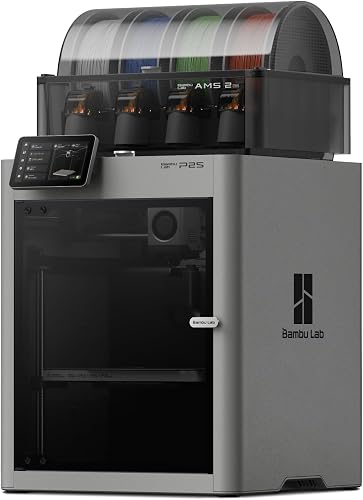
Bambu Lab P2S Combo: Best for speed with multi-color
- Up to 600 mm/s
- Automatic calibration
- AI failure detection
- AMS 2 Pro multi-color system
Automatic calibration and AI failure detection help reduce setup and monitoring work. The Combo includes AMS 2 Pro for multi-color or multi-material printing.
Pros
- Automatic calibration
- AI failure detection
- AMS 2 Pro has built-in filament drying
Cons
- Multi-color requires the Combo version
- Weighs 47.5 lb
The Bambu Lab P2S Combo is a strong choice if you want speed without taking on every setup step manually. Bambu Lab says it's ready to print in 15 minutes, with automatic calibration, quick-swap nozzles and AI failure detection.
Its stated maximum is 600 mm/s. The Combo includes the AMS 2 Pro for multi-color or multi-material printing, plus built-in filament drying up to 65 °C.
The P2S printer on its own does not support multi-color printing, so choose the Combo if that feature matters.
Adaptive airflow balances cooling and heat retention. Bambu Lab says the system can maintain a 50 °C chamber for engineering-grade materials.
These features add material flexibility, though its 47.5 lb weight is worth considering when choosing a permanent spot.
Choose it if you want a fast printer with assisted setup and an included multi-color system. If you only need single-color printing, compare its features with the P1S before deciding.
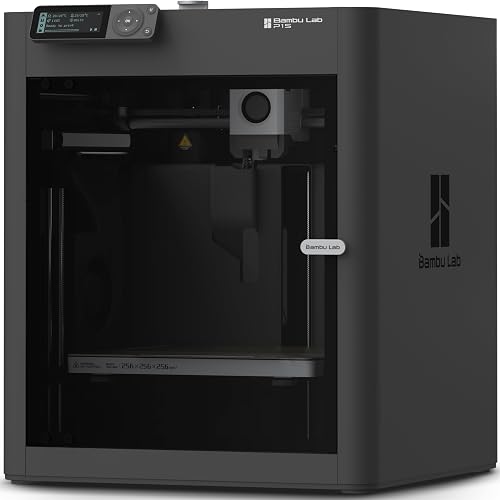
Bambu Lab P1S: Best for enclosed high-speed printing
- Up to 500 mm/s
- Automatic bed leveling
- Enclosed design
- Optional AMS connection for multi-color
An enclosed body and automatic bed leveling suit buyers who want a fast printer with fewer manual setup steps. Add a Bambu Lab AMS if multi-color printing is important.
Pros
- Enclosed body
- Automatic bed leveling
- Several supported filament options
Cons
- Multi-color requires a separate AMS
- Carbon and glass fiber reinforced polymers are not recommended
The Bambu Lab P1S suits buyers who want an enclosed printer with automatic bed leveling and a stated speed of up to 500 mm/s. Bambu Lab says it can be set up in 15 minutes.
Its enclosure is designed to improve printing with advanced filaments. Supported materials include PLA, PETG, TPU, PVA, PET, ABS and ASA; PA and PC are listed as capable, while carbon or glass fiber reinforced polymers are not recommended.
The P1S supports multi-color and multi-material printing when connected to a Bambu Lab AMS. That makes it a useful alternative to the P2S Combo if you want an enclosed printer and are willing to add the color system separately.
Choose the P1S if you value an enclosure and automatic leveling more than the highest speed figure in this group. For a printer that includes the AMS 2 Pro, compare the P2S Combo.
Elegoo Centauri Carbon: Best for a larger build area
- Up to 500 mm/s
- 256 x 256 x 256 mm build volume
- Pre-assembled and pre-calibrated
- Built-in camera
The 256 mm cubed build volume gives larger projects more room, while the printer arrives assembled and pre-calibrated. Its camera supports real-time monitoring and time-lapse capture.
Pros
- Large stated build volume
- Auto bed leveling
- Built-in camera and dual LED lighting
Cons
- Weighs 38.5 lb
- Advanced filament support may be more than a first-time user needs
The Elegoo Centauri Carbon combines a stated speed of up to 500 mm/s with a 256 x 256 x 256 mm build volume. It arrives fully assembled and pre-calibrated, with auto bed leveling and touchscreen controls.
A built-in chamber camera and dual LED lighting support real-time monitoring and time-lapse capture. The printer also has an enclosed chamber, a 320 °C nozzle and features aimed at advanced filaments, including carbon fiber reinforced filament.
This may suit you if you want room for larger parts and expect to explore more than basic PLA printing. It weighs 38.5 lb, so plan where it will sit before unpacking.
Choose it for the larger stated build volume and ready-to-print setup. If multi-color printing is your priority, compare it with the P2S Combo or K2 Combo.
Creality K2 Combo: Best for multi-color capacity

- Up to 600 mm/s
- 260 x 260 x 260 mm build volume
- One CFS unit included
- AI camera and auto leveling
The K2 Combo pairs a large build area with one CFS unit for multi-color printing. The system can support up to 16 colors when connected to four CFS units.
Pros
- Large stated build volume
- AI camera and auto leveling
- Silent Mode
Cons
- Weighs 65.9 lb
- Up to 16 colors requires four CFS units
The Creality K2 Combo pairs a stated speed of up to 600 mm/s with a 260 x 260 x 260 mm build volume. It is 95% pre-assembled, with auto leveling and an AI camera for watching prints.
The Combo includes one CFS unit. Creality says connecting up to four CFS units enables printing in as many as 16 colors, so the maximum color count requires extra CFS units beyond the one included.
Silent Mode and step-servo motors address noise, while the printer supports materials including PLA, PETG, ABS, PLA-CF and PET. It weighs 65.9 lb, making it the heaviest option here.
Choose the K2 Combo if you want a large build area and multi-color capability with a CFS included. Check that you have enough space for its weight and dimensions.
Flashforge AD5M: Best for open-frame simplicity

- Up to 600 mm/s
- One-click auto leveling
- 220 x 220 x 220 mm build volume
- Quick-swap nozzles
One-click auto leveling and quick-swap nozzles make this open printer a straightforward fast-printing option. Its smaller build volume suits everyday parts rather than large models.
Pros
- One-click auto leveling
- Quick-swap nozzles
- Power recovery and filament detection
Cons
- Open design is suitable for well-ventilated environments
- Smaller build volume than several picks here
The Flashforge AD5M is an open CoreXY printer with a stated speed of up to 600 mm/s and a 220 x 220 x 220 mm build volume. Flashforge says printing can start in 10 minutes, with one-click auto leveling.
Quick-swap nozzles, filament detection and power recovery add practical help for everyday printing. The flexible removable PEI steel plate supports PLA, PETG and TPU with a 0.4 mm nozzle; PLA-CF and PETG-CF are supported with a 0.6 mm nozzle.
Flashforge says the open printer is suitable for well-ventilated environments. Choose a location with ventilation and enough clearance around the printer.
Choose the AD5M if you want speed and automatic leveling in an open design. Its 220 mm cubed build volume may be limiting for projects that need more print area.
Flashforge Adventurer 5M Pro: Best for enclosed home printing

- Up to 600 mm/s
- Fully enclosed chamber
- One-click auto leveling
- Dual filtration system
The enclosure and dual filtration distinguish this fast printer for buyers who prefer a contained setup. It also has a built-in camera, mobile control and a quick-swap nozzle.
Pros
- Fully enclosed chamber
- One-click auto leveling
- Camera and mobile control
Cons
- Build volume is not stated
- Weighs 22 lb
The Flashforge Adventurer 5M Pro is an enclosed option with a stated maximum speed of up to 600 mm/s. It has one-click auto leveling, a quick-swap nozzle and a dual filtration system.
A built-in camera, mobile control and a 4.3 in touchscreen provide ways to check on print progress. Flashforge describes the printer as having low-noise motion control and lists support for PLA, PETG, ABS, ASA and PETG-CF.
Choose it if you want an enclosure with monitoring and filtration features. Confirm the build area and dimensions for your intended projects before choosing a spot.
Creality K1C: Best for a fast Creality option

- Up to 600 mm/s speed
- Direct extruder in product bullets
- AI camera and LiDAR in product bullets
- Steel transmission shaft in product bullets
The product title identifies the model as K1C and gives a maximum speed of 600 mm/s. Its bullets describe a direct extruder, AI camera and LiDAR, but refer to the K1 Max, so those features cannot be confirmed for the K1C.
Pros
- Product title gives a 600 mm/s maximum
- Direct extruder appears in the product bullets
Cons
- Product bullets refer to the K1 Max rather than K1C
- Build volume is not stated
The Creality K1C product title gives a maximum speed of up to 600 mm/s and names the printer as a K1C. Its product bullets describe a direct extruder, AI camera and LiDAR, but those details refer to the K1 Max.
That model-name mismatch makes it harder to compare the K1C fairly with the other printers here. Confirm the K1C’s exact features and build volume before you buy, especially if camera monitoring or print area is a deciding factor.
Consider it if you are already comparing Creality models and can confirm the configuration that fits your needs. For clearer feature information, compare the K2 Combo, which has a stated build volume and an included CFS unit.
Flashforge Creator 5: Best for multi-material toolheads

- Four independent toolheads
- Up to 600 mm/s
- 7-second tool swaps claimed
- Auto calibration
Four independent toolheads support multi-color and multi-material jobs without changing filament through one nozzle. This is a specialized choice for buyers who expect to use those capabilities.
Pros
- Four independent toolheads
- Supports multiple materials in a single job
- Automatic calibration
Cons
- Specialized system may be more than a first printer needs
- Weighs 30.8 lb
The Flashforge Creator 5 is the specialized pick for buyers who want four independent toolheads. Its design supports multi-color and multi-material printing, including PLA, PETG, TPU, PETG-CF and support materials in one job.
Flashforge claims tool changes can take 7 seconds and says the system can reduce filament waste compared with single-nozzle multi-color printers. It also lists a CoreXY system, automatic calibration and a maximum speed of 600 mm/s.
Those extra toolheads make the Creator 5 a specific choice for multi-material printing. Choose it if you plan to use multiple colors or materials often, including dedicated support filament.
What should you compare besides speed?
Compare the setup process, build volume and monitoring features before choosing by maximum speed alone. These details help show whether a printer fits your space and the projects you expect to make.
How much build volume do you need?
Build volume tells you how much room there is for a model in one piece, while the printer’s full dimensions tell you how much table space it needs. The Centauri Carbon and K2 Combo have stated build volumes above 250 mm on each side, while the AD5M has 220 mm on each side.
Measure your available surface and compare it with the printer's full dimensions. Build volume is the usable print area, not the space the machine itself occupies.
Which setup features reduce the learning curve?
Automatic bed leveling or calibration can remove some manual adjustment from the first setup. The P2S Combo and Centauri Carbon include automatic calibration or leveling, while the AD5M and Adventurer 5M Pro have one-click auto leveling.
These features don't remove the need to prepare a model and choose print settings. For the rest of the process, see our step-by-step 3D printer setup guide.
Do you need an enclosure or multi-color printing?
An enclosure may suit you if you want a contained printer or plan to use materials that benefit from a chamber. The P1S and Adventurer 5M Pro have enclosed designs, while the AD5M is open.
For multi-color printing, compare what comes in the box with the system's full capability. The P2S Combo includes AMS 2 Pro, and the K2 Combo includes one CFS unit.
The Creator 5 has four independent toolheads.
Does speed always shorten print time?
No. Maximum speed is one printer capability, while a finished job's time also depends on its shape, size, material and settings.
A small simple model and a tall detailed model won't necessarily take the same time at the same maximum speed.
Use the stated speed as one comparison point, then read our guide to how long it takes to 3D print something for factors that affect a real job.
Which fast 3D printer should you choose?
Choose the Bambu Lab P2S Combo if you want a fast printer with automatic calibration, AI failure detection and multi-color printing included. The P1S is a better fit if you want an enclosed printer and can add an AMS separately.
Pick the Elegoo Centauri Carbon or Creality K2 Combo when build volume is the priority. The Flashforge AD5M suits buyers who prefer an open design, while the Creator 5 is aimed at frequent multi-material printing.
If you're still deciding whether a printer fits your home and routine, start with our home 3D printer guide.
Our top 3 picks at a glance
-
1
-
2
-
3
Frequently asked questions
What is the fastest 3D printer?
Several printers in this roundup have stated maximum speeds of 600 mm/s, including the Bambu Lab P2S Combo, Flashforge AD5M and Creality K2 Combo. A maximum speed does not tell you how long a finished print will take, since model shape, material and print settings also matter.
Compare setup and calibration features alongside the speed figure.
Is a fast 3D printer easy for a beginner to use?
It can be, especially when it includes automatic bed leveling or calibration and clear monitoring tools. The Elegoo Centauri Carbon arrives assembled and pre-calibrated, while the Bambu Lab P2S Combo includes automatic calibration and AI failure detection.
You still need to choose a model, prepare the file and follow the printer's instructions.
Does a higher speed rating mean every print finishes faster?
No. The maximum speed is only one part of print time.
The model's size and shape, layer settings, material and printer setup all affect how long a job takes.
Use a speed rating to compare stated capability, then see our guide to how long 3D printing takes for the other factors.
Should I choose an enclosed fast 3D printer?
An enclosure may suit you if you want a contained printer or plan to use materials that benefit from a chamber. The Bambu Lab P1S and Flashforge Adventurer 5M Pro both have enclosed designs.
Check the materials supported by the specific model and allow room for its dimensions.