Is a 3D Printer Easy to Use for a Complete Beginner?
A 3D printer can be easy to use for a beginner when it handles bed leveling automatically and offers a clear path from model to print. You'll still load filament, prepare a model, and learn a few basic fixes.
On this page (7 sections)
- Is a 3D printer easy to use for a complete beginner?
- What makes a 3D printer easier to learn?
- What do you need to learn before your first print?
- What can go wrong with a first 3D print?
- Is a 3D printer hard to maintain?
- Which beginner-friendly 3D printer should you choose?
- Is a 3D printer easy to use after the first few prints?
A 3D printer can be easy to use for a beginner when it handles bed leveling automatically and gives you a clear path from model to print. You still need to load filament, choose a model, prepare it in slicing software, and learn how to spot a bad first layer.
For many first-time users, the harder part isn't pressing Print. It's figuring out why a print failed and choosing a sensible next step without changing everything at once.
Is a 3D printer easy to use for a complete beginner?
Yes, a 3D printer can be easy to use for a complete beginner when setup and software are straightforward. Automatic calibration cuts down on early adjustments, but you still need the right material, model, and print settings.
Most beginners start with a filament printer, also called an FDM printer. It melts plastic filament and builds an object layer by layer, so you can begin with a ready-made model instead of designing one yourself.
A typical first print involves setting up the printer, loading filament, choosing a model, preparing it in slicing software, and starting the print. Stay near the printer while the first layer goes down so you can spot a problem before it uses more time and material.
Automatic features reduce some setup work, but they can't promise that every model, filament, or first layer will work perfectly. If you're deciding whether the hobby fits your home, our guide to a 3D printer for home use covers the space, noise, and workflow to consider.
What makes a 3D printer easier to learn?
Automatic calibration, clear controls, and simple print preparation make a printer easier to learn. Prioritize those basics before paying attention to features you may not use.
Bed leveling helps set the distance between the nozzle and build surface. A guided setup and touchscreen can make basic tasks easier to find, while a supported model library can help you get started without learning 3D design first.
The Bambu Lab A1 has full-auto calibration, including bed leveling and Z-offset, plus a simplified touchscreen. It's a strong fit for a beginner who wants fewer manual setup steps and clear controls.
The Anycubic Kobra X combines automatic bed leveling with app control and a model library. Choose it if finding projects in an app and checking printer status remotely fit the way you want to work.
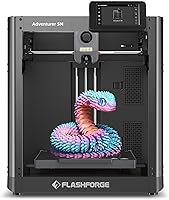
The Flashforge AD5M offers one-click auto leveling and a quick-swap nozzle. It suits a beginner who values straightforward leveling and easy nozzle changes; its open design calls for a well-ventilated location.
No feature removes the need to learn the basics. Read the setup guide and begin with a simple print so you can understand how your printer behaves before adding more settings or complex projects.
What do you need to learn before your first print?
Learn how to load filament, choose a model, prepare it, and start the print. You can handle each step without knowing how to design an object yourself.
A model file describes the object you want to print. Slicing software turns that model into instructions for your printer, including the layers and movements needed to build it.
For your first try, choose a small, ready-made model and use the printer's suggested profile. A complicated object with thin parts or supports makes it harder to tell whether a failure came from the printer, settings, or model.
A profile is a group of print settings for a printer and material. Pick the matching profile, check the preview, and use the default settings unless the printer's instructions say otherwise.
Filament is the plastic material fed into the printer. Check which materials and spool-loading steps your printer supports, and remember to buy filament separately if it isn't included.
Our guide to what you need to start 3D printing at home covers basic equipment and supplies. For a first-day walkthrough, see how to set up a 3D printer.
Is slicing software hard to use for a beginner?
Slicing software can feel unfamiliar at first, but a beginner can start with a saved profile and a ready-made model. You don't need to adjust every setting to make a first print.
Layer height affects how a model is built, while supports hold up parts that would otherwise print in midair. Learn these options when a project needs them, rather than trying to master every control before you begin.
A useful habit is to preview the sliced model before sending it to the printer. Look for missing sections or supports that seem wrong, and make sure the model fits the printer's build area.
What can go wrong with a first 3D print?
A first layer may fail to stick, filament may feed poorly, or a model may need different settings. These are common problems to investigate one at a time.
Start by checking the build surface and the first layer. If filament curls, shifts, or fails to attach, stop the print and follow the printer's guidance before trying again.
Automatic bed leveling helps set nozzle distance, but surface cleanliness and print settings still matter. Our guide to why a 3D printer is not sticking to the bed covers common causes and fixes.
Other useful habits include keeping filament stored as its manufacturer recommends, matching the print profile to the material, and removing finished prints as the printer's instructions allow. If results change, check the filament path and nozzle before changing several settings.
Changing one setting at a time makes troubleshooting clearer. If the next print improves or gets worse, you'll have a better idea which adjustment mattered.
Is a 3D printer hard to maintain?
Basic maintenance is manageable when you follow the printer's manual and keep the build surface clean. Care steps differ by model, so use the instructions for cleaning, nozzle care, and part replacement.
Before printing, check that the build surface is clear, filament is loaded correctly, and the printer has room to work without being bumped. When a print starts failing after a run of successful jobs, look for a change in the surface, filament feed, or nozzle before assuming a major fault.
Nozzle changes vary between printers. The Bambu Lab A1 has a 1-Clip quick-swap nozzle, and the Flashforge AD5M has quick-change nozzles, which can simplify that task.
Follow the model's instructions before removing a hot or worn part. Avoid forcing a print off the build surface, since the manual can explain the right removal method for that machine.
The Anycubic Kobra X supports remote control and live status monitoring through the Anycubic app and slicer. Those features can help you check a print, but they don't replace sensible printer placement or following its operating guidance.
Which beginner-friendly 3D printer should you choose?
Choose based on the setup and features you'll actually use. The Bambu Lab A1 is the clearest fit for guided setup, the Anycubic Kobra X for app-based control and a model library, and the Flashforge AD5M for one-click leveling and quick-swap nozzles.
The Bambu Lab A1 suits a beginner who wants full-auto calibration and a simplified touchscreen. Multi-color printing requires AMS lite, sold with the A1 Combo or separately, so skip that extra if your projects don't need multiple colors.
The Anycubic Kobra X suits someone who wants app control, a model library, and support for several filament types. Filament isn't included, so plan to get material separately; skip this model if you don't need its app workflow or multi-color options.
The Flashforge AD5M suits someone who wants one-click auto leveling and quick nozzle changes. Its open design is intended for a well-ventilated environment, so choose another setup if you don't have an appropriate place for it.
The product scores are 9 for the Bambu Lab A1, 8.4 for the Anycubic Kobra X, and 7.9 for the Flashforge AD5M. Compare their features against the way you plan to print, then choose the workflow that feels manageable.
Is a 3D printer easy to use after the first few prints?
A 3D printer gets easier to use as you learn its routine and recognize common print problems. Start small, use a supported material and default settings, then add more complex projects as you gain confidence.
Pick the Bambu Lab A1 for full-auto calibration and a simplified touchscreen, the Anycubic Kobra X for app control and a model library, or the Flashforge AD5M for one-click leveling and quick-swap nozzles. Read our 3D printer home-use guide before deciding where the printer will fit.
If you're ready to plan your first setup, start with what you need to begin 3D printing at home. The easiest path is to follow the printer's instructions, make a simple first print, and learn one new setting at a time.
Frequently asked questions
Is a 3D printer easy for a beginner to use?
It can be, especially when the printer handles bed leveling and calibration automatically. You'll still load filament, choose a model, prepare it in slicing software, and check the first layer.
Start with a simple PLA print and the printer's suggested profile, then change one setting at a time as you learn.
How long does it take to learn 3D printing?
You can often learn the basic steps in a few short sessions, but getting consistent results takes practice. Begin with a ready-made model and the printer's suggested settings.
When a print fails, check the first layer and change one setting at a time so you can see what helped.
Do beginners need to calibrate a 3D printer?
Many beginner printers automate bed leveling and other setup checks, which reduces manual calibration. Follow the setup guide, keep the build surface clean, and check that the first layer is sticking.
Automatic leveling can't correct every issue with filament, the model, or print settings.
Is a 3D printer difficult to maintain?
Routine care is usually manageable: keep the build surface clean, remove finished prints carefully, and check the nozzle and filament path when results change. Exact maintenance depends on the printer.
Follow its manual before cleaning, changing a nozzle, or replacing parts.