Bambu Lab P1S Review: The Enclosed Step-Up Printer (October 2026)
In this Bambu Lab P1S review, the P1S Combo suits home makers who want an enclosed printer, automatic bed leveling and an included AMS for multicolor printing. Choose it when those features match your projects; consider the P2S for filament drying or another alternative for a different priority.
On this page (9 sections)
- What does the Bambu Lab P1S review say about the Combo?
- Is the P1S Combo the right choice for multicolor printing?
- How does the P1S compare with the P2S Combo?
- Which P1S alternatives suit different projects?
- How much room and setup time does the P1S need?
- How should you set up and care for the P1S Combo?
- What common P1S buying and printing mistakes should you avoid?
- Who should buy the Bambu Lab P1S Combo?
- Frequently asked questions
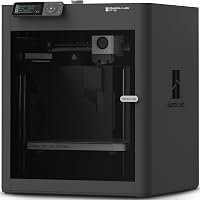
The Bambu Lab P1S Combo is an enclosed 3D printer with automatic bed leveling and an included AMS for multicolor printing. This Bambu Lab P1S review focuses on who benefits from that combination, how it compares with alternatives, and what to plan for before buying.
It suits a home maker who expects to print more than basic single-color models and wants the option of materials such as PETG or ABS. If your projects are mostly simple PLA models, you may not need an enclosure or multicolor setup; start with our guide to 3D printers for home use and match a printer to your actual plans.
What does the Bambu Lab P1S review say about the Combo?
The P1S Combo is a good fit when an enclosure, automatic bed leveling and an AMS all solve a real need in your workspace. Its main appeal is bringing those features together, rather than offering one standout reason for every buyer.
Bambu Lab P1S Combo: Best for multicolor home projects

- Enclosed design
- Automatic bed leveling
- AMS included for multicolor printing
- Ideal for PLA, PETG, TPU, PVA, PET, ABS and ASA
The P1S Combo pairs an enclosed printer with an AMS for multicolor printing. It suits shoppers who want automatic bed leveling and a range of stated filament options.
Pros
- Enclosed body for advanced filaments
- Automatic bed leveling
- AMS supports up to 16 colors
- Setup takes 15 minutes
Cons
- AMS is required for multicolor printing
- Carbon and glass fiber reinforced polymers are not recommended
The enclosed body is intended to improve print performance with advanced filaments. The P1S is described as ideal for PLA, PETG, TPU, PVA, PET, ABS and ASA, and capable with PA and PC; carbon and glass fiber reinforced polymers are not recommended.
Setup takes 15 minutes, according to the product information. Treat that as an initial setup estimate, not a promise that every new user will be ready to manage any material or model in that time.
Is the P1S a useful step up for a first-time printer owner?
The P1S can be a reasonable first printer if you already know you want an enclosure and expect to use more than basic PLA. Automatic bed leveling removes one setup task, while the Combo includes an AMS for color projects.
Skip the extra capability if you mainly want a low-complexity way to learn how models, slicer settings and filament work. Our guide to what you need to start 3D printing helps you plan the rest of a first setup.
Is the P1S Combo the right choice for multicolor printing?
Choose the P1S Combo if up to 16 colors fits the designs you plan to make and you want the AMS included. The AMS is required for multicolor printing, so the Combo is the relevant configuration for that use.
Color can help distinguish labels, signs, decorative models or parts with separate visual elements. It also adds filament changes to the workflow, so a multicolor job deserves more planning than a simple one-color print.
The Flashforge AD5X is a better match if four colors cover your needs. It includes 1-click auto leveling and supports up to four colors; the P1S Combo makes more sense when you want its higher stated color capacity and enclosed design.
How does the P1S compare with the P2S Combo?
The P2S Combo is worth considering if adaptive airflow and filament drying are priorities in your routine. The P1S Combo is the simpler fit when its enclosed design and AMS already cover the features you need.
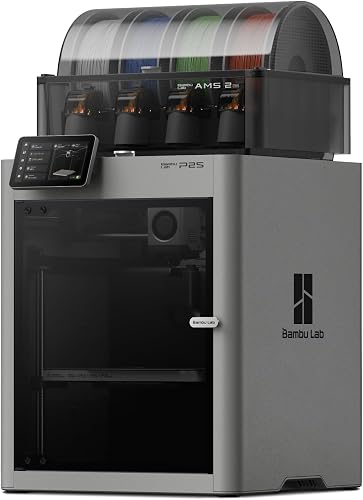
Bambu Lab P2S Combo: Best for drying filament in place
- Adaptive airflow system
- AMS 2 Pro included
- Built-in filament drying in AMS
- AI failure detection
The P2S Combo includes adaptive airflow and an AMS 2 Pro with filament drying. Consider it if those features matter more to you than the P1S Combo.
Pros
- Adaptive airflow system
- AMS 2 Pro has built-in filament drying
- Automatic calibration and AI failure detection
Cons
- Combo is required for multicolor printing
- Larger and heavier than the P1S Combo
The P2S Combo includes an AMS 2 Pro that dries filament up to 65 °C. Its adaptive airflow system balances cooling and heat retention, and the printer also has automatic calibration and AI failure detection.
Those extra features matter most if you expect to manage filament drying or want the P2S airflow system for your material choices. They matter less if you print mainly familiar materials and do not need those additions.
See our Bambu Lab P1S vs P2S comparison for a closer feature-by-feature decision, or our broader Bambu Lab vs Flashforge guide for brand alternatives.
Which P1S alternatives suit different projects?
The AD5X and Centauri Carbon solve different buying problems: the AD5X offers four-color printing, while the Centauri Carbon offers a larger stated build volume. Choose based on the models you want to make, not on a feature count alone.
Flashforge AD5X: Best for four-color models

- Up to 4 colors simultaneously
- CoreXY structure
- 1-click auto leveling
- 220 x 220 x 220 mm build volume
The AD5X supports up to four colors and has 1-click auto leveling. It suits shoppers focused on multicolor printing who don't need the P1S Combo's stated 16-color capacity.
Pros
- Supports up to four colors
- 1-click auto leveling
- Remote monitoring through Flash Maker app
Cons
- Smaller stated build volume than the Centauri Carbon
- An enclosed design is not specified
The AD5X has a 220 x 220 x 220 mm build volume, 1-click auto leveling and a 300 °C direct-drive extruder. Its up-to-four-color capacity is a practical middle ground if you want multiple colors but don't need the P1S Combo's stated capacity.
Elegoo Centauri Carbon: Best for larger home prints

- Enclosed chamber
- 256 x 256 x 256 mm build volume
- Automatic calibration
- Built-in chamber camera
The Centauri Carbon is a fully assembled, pre-calibrated enclosed alternative with a stated 256 mm cubed build volume. Choose it if you want automatic calibration and a built-in camera.
Pros
- Fully assembled and pre-calibrated
- Larger stated build volume
- Built-in camera and dual LED lighting
Cons
- No multicolor system is specified
- Supports carbon fiber reinforced filament
The Centauri Carbon arrives fully assembled and pre-calibrated, with automatic calibration and a built-in chamber camera. Its stated 256 x 256 x 256 mm build volume gives you more room for larger models than the AD5X's stated dimensions.
The Centauri Carbon also supports carbon fiber reinforced filament, a different material direction from the P1S guidance. For a focused comparison of the two enclosed options, read Elegoo Centauri Carbon vs Bambu P1S.
How much room and setup time does the P1S need?
Plan for the P1S Combo's physical footprint and for access to the printer and AMS. It measures 15.31 x 18.03 x 15.31 in and weighs 40.8 lb, so choose a sturdy surface and check the route from delivery to its final spot.
Leave room to reach filament, cables and the printer controls. Measure the shelf or table as well as nearby walls, doors and cabinets before setting it in place.
Think about household routines when choosing a room. Printing can be noisy, and a location where the machine can run without interrupting work or sleep is easier to live with; our 3D printer noise reduction guide covers practical placement ideas.
How should you set up and care for the P1S Combo?
Start with a compatible filament and a simple model, then learn one part of the workflow at a time. Automatic bed leveling helps with setup, but it doesn't replace learning how to prepare a file, load filament and check a print.
Use the printer instructions when placing the machine, loading material and starting the first job. After a print, let parts and the bed cool as directed before removing anything, and keep the build area clear of scraps that could affect the next print.
Store filament clean and dry, and follow the spool and printer guidance for each material. If filament becomes brittle or extrusion looks inconsistent, see our practical guide on how to dry 3D printer filament.
For early prints, change only one setting at a time if the result needs adjustment. Switching materials, model settings and multiple slicer options together makes it harder to identify what caused a problem.
What common P1S buying and printing mistakes should you avoid?
The most common buying mistake is paying for multicolor capacity without a color project in mind. If you expect to print mostly single-color utility parts, the AMS may not be central to your decision.
Another mistake is treating the 15-minute setup statement as a complete learning plan. Give yourself time to understand the slicer, filament loading, first-layer checks and routine care before relying on the printer for a complex or time-sensitive model.
Don't assume every filament is a good match just because the printer is enclosed. Check material compatibility first, especially for carbon or glass fiber reinforced polymers, which are not recommended for the P1S.
Finally, avoid choosing by maximum speed claims alone. A fast printer only helps if the model, material and settings suit your needs; the right choice is the machine whose enclosure, color workflow, material range and workspace fit how you'll print.
Who should buy the Bambu Lab P1S Combo?
Buy the P1S Combo if you want an enclosed home printer with an included AMS, plan to explore multicolor models, and value automatic bed leveling. Its material guidance covers several common filaments, with some advanced options listed as capable and reinforced polymers not recommended.
Choose the P2S Combo if its adaptive airflow and AMS 2 Pro drying features matter enough to justify choosing that model. Pick the AD5X if four-color projects are sufficient, or the Centauri Carbon if its larger stated build volume, pre-calibrated setup and camera fit your priorities.
Skip the P1S Combo if you only need a basic single-color printer or don't expect to use the AMS. For a first machine, decide what you will print, what materials you expect to use and how much workspace you can spare; if those answers point to an enclosure and color flexibility, the P1S is a strong step-up option.
Frequently asked questions
Is the Bambu Lab P1S a good beginner printer?
The P1S Combo can suit a beginner who wants an enclosed printer with automatic bed leveling. Setup takes 15 minutes, but you'll still need to learn slicer settings, filament handling and routine upkeep, so decide whether its enclosure and AMS fit your first projects.
Does the Bambu Lab P1S print multiple colors?
The P1S Combo includes an AMS and supports up to 16 colors. The AMS is required for multicolor printing, so choose the Combo if you want that capability and plan for the extra filament changes that color projects involve.
What filaments can the P1S use?
The P1S is ideal for PLA, PETG, TPU, PVA, PET, ABS and ASA, and is capable with PA and PC. Carbon and glass fiber reinforced polymers are not recommended, so check material compatibility before choosing a spool.
Should I choose the P1S or P2S?
Choose the P1S Combo if its enclosed design, automatic bed leveling and AMS multicolor setup meet your needs. The P2S Combo adds adaptive airflow and an AMS 2 Pro with filament drying, so compare those features in our P1S vs P2S comparison before deciding.
Frequently asked questions
Is the Bambu Lab P1S a good beginner printer?
The P1S Combo can suit a beginner who wants an enclosed printer with automatic bed leveling. Setup takes 15 minutes, but you'll still need to learn slicer settings, filament handling and routine upkeep, so decide whether its enclosure and AMS fit your first projects.
Does the Bambu Lab P1S print multiple colors?
The P1S Combo includes an AMS and supports up to 16 colors. The AMS is required for multicolor printing, so choose the Combo if you want that capability and plan for the extra filament changes that color projects involve.
What filaments can the P1S use?
The P1S is ideal for PLA, PETG, TPU, PVA, PET, ABS and ASA, and is capable with PA and PC. Carbon and glass fiber reinforced polymers are not recommended, so check material compatibility before choosing a spool.
Should I choose the P1S or P2S?
Choose the P1S Combo if its enclosed design, automatic bed leveling and AMS multicolor setup meet your needs. The P2S Combo adds adaptive airflow and an AMS 2 Pro with filament drying, so compare those features in our P1S vs P2S comparison before deciding.