Elegoo Centauri Carbon vs Bambu P1S: Which to Buy? (October 2026)
Choose the Centauri Carbon for carbon fiber reinforced filament and a specified 256 mm build cube; choose the P1S for optional 16-color printing with an AMS. This Elegoo Centauri Carbon vs Bambu P1S comparison comes down to your materials, project size and print workflow.
On this page (9 sections)
- Elegoo Centauri Carbon vs Bambu P1S: which printer should you buy?
- How does the build space affect your choice?
- Which printer matches the filament you plan to use?
- What should you expect during setup and monitoring?
- Do their speed figures tell you which is faster?
- Will either printer fit your home workspace?
- What setup and use mistakes should you avoid?
- Who should choose each printer?
- Elegoo Centauri Carbon vs Bambu P1S: what's the decision rule?
For the Elegoo Centauri Carbon vs Bambu P1S, choose the Centauri Carbon for carbon fiber reinforced filament and its specified 256 mm build cube; choose the P1S if you want optional multicolor printing with an AMS. Both are enclosed printers with automatic bed leveling and a stated maximum speed of 500 mm/s.
Your choice depends more on materials and workflow than on headline speed. The Centauri Carbon is described for advanced filaments, including carbon fiber reinforced filament, while the P1S can print up to 16 colors when connected to a Bambu Lab AMS.
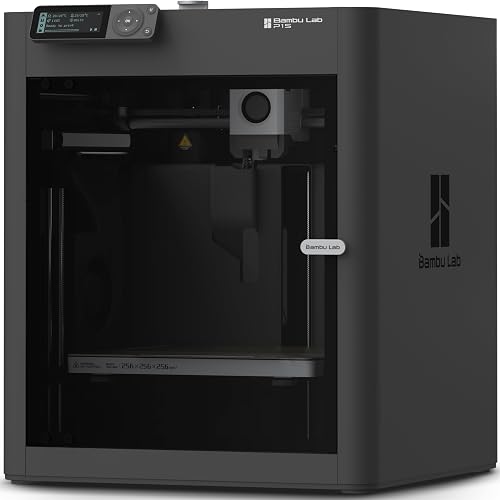

Elegoo Centauri Carbon vs Bambu P1S: which printer should you buy?
Pick the Centauri Carbon for its specified 256 x 256 x 256 mm build volume and intended use with carbon fiber reinforced filament; pick the P1S if you expect to use its optional AMS for multicolor or multi-material printing. These strengths suit different projects, so start with the parts and materials you plan to print.
The Centauri Carbon has a 320°C brass-hardened steel nozzle and an enclosed chamber with enhanced cooling. The P1S has an enclosed design, and carbon and glass fiber reinforced polymer is not recommended for it.
The P1S supports up to 16 colors with an AMS connected. The AMS is required for that capability, so count it as part of the printing setup you may choose to add, not a built-in multicolor feature.
If you're weighing another Bambu model, our Bambu Lab P1S vs P2S comparison covers that decision. For a broader brand comparison, see Bambu Lab vs Flashforge.
How does the build space affect your choice?
The Centauri Carbon has a specified 256 mm build cube; the P1S build volume isn't specified here. If you need room for a particular part, measure it and check current P1S documentation before deciding.
A 256 mm cube can give you room for a large one-piece model or several smaller parts in one print. A larger build area can also make it easier to arrange parts, but it doesn't guarantee every model will fit: consider orientation, supports and the space needed around the model on the plate.
Start by measuring your largest likely print, not an imagined future project. If your normal jobs are small brackets, desk items or small models, a large build volume may not change your day-to-day work.
Also measure the printer's outer dimensions and the path to its work surface. A machine that fits a shelf on paper still needs room for the enclosure, controls and access during setup and use.
Which printer matches the filament you plan to use?
Choose the Centauri Carbon if carbon fiber reinforced filament is central to your work; choose the P1S for its stated range of common materials, including PLA and PETG. Check the needs of the specific filament before printing.
The Centauri Carbon is described for advanced materials, including carbon fiber reinforced filament. Its 320°C brass-hardened steel nozzle and enclosed chamber with enhanced cooling are relevant to that use, though the filament itself must still be compatible with the printer and your intended settings.
The P1S is described as ideal for PLA, PETG, TPU, PVA, PET, ABS and ASA, and capable with PA and PC. Carbon and glass fiber reinforced polymer is not recommended for it.
For either machine, read the filament maker's temperature and handling guidance before loading a new material. A material name alone doesn't settle the right nozzle, bed, enclosure or ventilation setup.
If your first projects will use standard PLA or PETG, either printer may fit. Our PLA vs PETG guide explains the practical differences between these common starting materials.
How does the Elegoo Centauri Carbon vs Bambu P1S multicolor option work?
The P1S can print up to 16 colors when paired with a Bambu Lab AMS; the AMS is required. Choose that route if you have specific models that benefit from color or multiple materials.
Multicolor printing can reduce the need to paint a finished model, but it adds a material-management step. Think about how often you will use color changes and whether you are comfortable preparing models and managing the extra filament involved.
The Centauri Carbon's product information doesn't describe an equivalent multicolor system. If color is a priority, compare the P1S option with other multicolor 3D printers for beginners and confirm which extra equipment each workflow needs.
If most of your prints will be one color, don't let a maximum color count decide the purchase by itself. Pick the machine whose material range and build space suit your actual models.
What should you expect during setup and monitoring?
The Centauri Carbon arrives assembled and pre-calibrated, while the P1S has a stated 15-minute setup. Both include automatic bed leveling, which helps reduce the amount of manual bed adjustment at the start.
The Centauri Carbon also has touchscreen controls, a built-in chamber camera and dual LED lighting. The camera supports real-time monitoring and time-lapse capture, which may be useful when a print will run while you're elsewhere in the home.
Plan for more than the advertised setup time. Unpack the printer, place it on a stable work surface, connect it, load filament and follow the instructions for the first calibration and print.
Before starting, check that the print area is clear and that the chosen filament is dry and loaded correctly. Our 3D printer setup guide walks through first-day tasks, and what you need to start 3D printing at home helps you plan the basic supplies.
Do their speed figures tell you which is faster?
Neither has a stated maximum speed advantage here: both reach up to 500 mm/s and 20,000 mm/s² acceleration. Those figures describe a ceiling, not the time every print will take.
A detailed part, a tall object or a material that needs slower settings can take longer than a simple, low-detail model. For a useful estimate, consider the shape, layer settings, filament and quality you want rather than comparing only the top speed.
The Centauri Carbon pairs its speed claim with a high-flow hotend, a rigid die-cast aluminum frame, automatic vibration compensation and pressure advance. These features are intended to support high-speed printing, but you should still use settings suited to the material and model.
The P1S also has the same stated maximum speed and acceleration. Treat speed as a secondary tie-breaker after checking build space, filament fit and whether you want the AMS workflow.
Will either printer fit your home workspace?
Measure the work surface and route to it before choosing. The Centauri Carbon measures 15.67 x 15.9 x 19.29 in, and the P1S measures 15.31 x 18.03 x 15.31 in.
Those are outer dimensions, so leave room to reach the controls and follow the printer's placement guidance. Both weigh close to 39 lb, which makes it sensible to plan where the printer will live before carrying it upstairs or across a room.
If the printer will sit near a desk or shared living space, think about when it will run and how the sound may affect other people. Our guide to reducing 3D printer noise offers practical placement ideas.
What setup and use mistakes should you avoid?
Match the filament to the printer before starting, and don't treat the maximum speed as a default setting for every model. A few simple checks can prevent avoidable setup problems.
First, confirm that the filament is supported or suited to the machine. The P1S's carbon and glass fiber reinforced polymer limitation matters if composite material is on your shopping list, while the Centauri Carbon's description for carbon fiber reinforced filament still requires a compatible spool and careful setup.
Next, choose a sensible first print. A simple model makes it easier to check placement and adhesion.
It also helps you confirm basic settings before you move on to a large or detailed part. Use the recommended profile for the filament and adjust one setting at a time if a print needs correction.
Keep the build plate clean and handle it as directed by its manufacturer. Avoid changing several settings at once, since it becomes harder to tell which change helped when a print fails.
Finally, don't choose a printer based on color capability or build volume unless you expect to use it. Extra capacity helps when it solves a real project need; otherwise, material compatibility and a straightforward routine matter more.
Who should choose each printer?
Choose the P1S if multicolor printing through an AMS is part of your plan; choose the Centauri Carbon if you need its specified build cube or intend to print compatible carbon fiber reinforced filament. Each can suit a first-time buyer, but neither is the right fit for every project.
The P1S makes sense for buyers who want an enclosed printer, automatic bed leveling and the option to add an AMS. It's a weaker fit if you need carbon or glass fiber reinforced polymer, or if you won't use multicolor and its other strengths don't match your materials.
The Centauri Carbon fits buyers who want its 256 mm build cube, built-in camera or stated composite-filament capability. Skip it if you don't need that space or material range and would rather use the P1S's optional AMS workflow.
If you're new to 3D printing, think about the models you want to make, where the printer will sit and how much material variety you need. Our home 3D printer guide can help turn those needs into a shorter shortlist.
Elegoo Centauri Carbon vs Bambu P1S: what's the decision rule?
Pick the P1S if you want optional 16-color printing with an AMS and your materials fit its supported range; pick the Centauri Carbon for carbon fiber reinforced filament and a specified 256 mm build cube. That is the clearest way to choose between the Elegoo Centauri Carbon vs Bambu P1S.
Check the outer dimensions before ordering either printer, then confirm that your planned filament and largest parts fit the machine. If neither printer's strengths match your work, use our fast 3D printer guide to compare other speed-focused options.
Frequently asked questions
Is the Elegoo Centauri Carbon or Bambu P1S better for beginners?
Either may suit a beginner who wants an enclosed FDM printer with automatic bed leveling. The Centauri Carbon arrives assembled and pre-calibrated, while the P1S has a stated 15-minute setup.
Choose by the materials and features you plan to use, then follow the printer instructions before your first print.
Can the Bambu P1S print in multiple colors?
Yes, the P1S can print up to 16 colors when connected to a Bambu Lab AMS. The AMS is required for that capability, so decide whether you expect to make multicolor or multi-material prints before choosing the P1S for this workflow.
Can the Centauri Carbon print carbon fiber filament?
The Centauri Carbon is described for carbon fiber reinforced filament and has a 320°C brass-hardened steel nozzle. Use a compatible filament and follow the printer and filament instructions, since a high-temperature nozzle alone does not make every composite filament suitable.
Which printer has a larger build volume?
The Centauri Carbon has a specified 256 x 256 x 256 mm build volume. The P1S build volume isn't specified here, so check current manufacturer documentation and measure your planned parts before choosing based on size.
Are the Centauri Carbon and P1S equally fast?
Both are described as reaching up to 500 mm/s, with acceleration up to 20,000 mm/s². Actual print time depends on the model, material and settings, so treat those as maximum capability figures rather than guaranteed everyday speeds.


