Bambu Lab P1S vs P2S: Is the Newer Printer Worth It? (October 2026)
Choose the P1S Combo for an enclosed multicolor setup with automatic bed leveling, or the P2S Combo for built-in filament drying and added workflow features. Both include an AMS.
On this page (9 sections)
- Bambu Lab P1S vs P2S: what are the main differences?
- Which printer is the better value for your needs?
- Does the P2S print faster than the P1S?
- Which Combo handles multicolor printing?
- Which filaments do the P1S and P2S support?
- How should you set up and care for either Combo?
- What common buying mistakes should you avoid?
- Should you choose the P1S Combo or the P2S Combo?
- How we scored these Bambu Lab printers
Choose the P1S Combo for an enclosed multicolor setup with automatic bed leveling, or the P2S Combo if you want built-in filament drying and added workflow features. In this Bambu Lab P1S vs P2S comparison, the newer P2S has the higher stated maximum speed, but its strongest reason to buy is the extra handling and monitoring features.
Both products here are Combo versions that include an AMS. The P2S printer by itself does not support multicolor printing, so choose the Combo if color printing is part of your plan.

Bambu Lab P1S vs P2S: what are the main differences?
The P2S adds filament drying, AI failure detection and adaptive airflow, while the P1S pairs an enclosure with automatic bed leveling and an AMS. Both Combos are described as ready to print in 15 minutes.
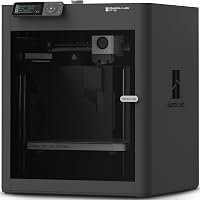
The P1S Combo includes an AMS and supports up to 16 colors when connected to it. Its enclosed body is intended to improve print performance with advanced filaments.
Automatic bed leveling handles a key setup step.
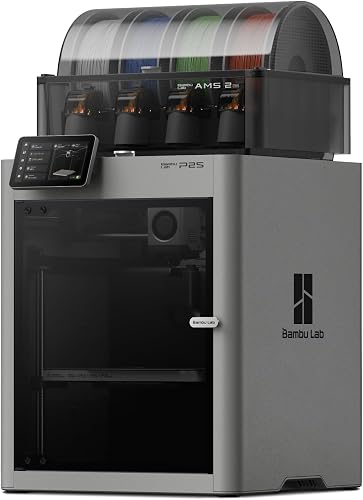
The P2S Combo pairs the printer with an AMS 2 Pro, which includes filament drying up to 65 °C. It also adds AI failure detection, quick-swap nozzles, automatic calibration and an adaptive airflow system.
The P2S has a stated maximum speed of 600 mm/s, compared with 500 mm/s for the P1S. These headline limits can help distinguish the models, but a specific print's duration still depends on its shape, material and settings.
For more detail on the older model, see our Bambu Lab P1S review. If print speed is high on your list, our guide to fast 3D printers explains other factors to weigh.
Which printer is the better value for your needs?
The P1S Combo is the better fit when you want an enclosure and AMS; the P2S Combo earns its place when you will use drying or its added workflow tools. Decide based on features that will solve a recurring problem, not on the newer model's name alone.
A built-in dryer can help if you regularly print moisture-sensitive filament or want spool preparation within the same workflow. The P2S Combo's AMS 2 Pro supports drying up to 65 °C, and you should follow the filament maker's guidance for temperatures.
AI failure detection may appeal if you want an added check during a print. It cannot guarantee a successful result, so choose suitable settings and inspect important parts before relying on them.
The P1S Combo supports several familiar materials, including PLA, PETG, TPU, PVA, PET, ABS and ASA. That makes it a sensible choice if those cover your projects and you would rather avoid paying for drying or detection features you do not expect to use.
Our Bambu Lab vs Flashforge comparison can help if you are weighing brands as well as models. For a first printer, start with the questions in our guide to choosing a 3D printer.
Does the P2S print faster than the P1S?
The P2S has a higher stated maximum speed, 600 mm/s versus 500 mm/s for the P1S. That difference is useful context, but it does not predict how much time every model will save.
Print speed depends on the model, material, layer height and other settings. A small part may finish quickly on either printer, while a large or detailed model can take much longer.
The P1S also has a stated acceleration of 20,000 mm/s². The P2S information does not give a matching acceleration figure, so the maximum speed numbers do not make a complete performance comparison.
If reducing print time is a priority, compare the settings and materials you plan to use. Our guide to how long a 3D print takes explains why print size and detail affect the clock along with a printer's speed limit.
Is the P2S speed upgrade useful for beginners?
The P2S speed limit may matter if you print often, but setup and material choices are more useful first priorities for many beginners. Its automatic calibration and AI failure detection add workflow support, while the P1S has automatic bed leveling.
Neither maximum speed guarantees fewer failed prints. Start with a well-supported model, use a suitable filament and follow the setup instructions before changing print settings.
Which Combo handles multicolor printing?
Both Combos can handle multicolor printing through the included AMS, but the P2S must be the Combo version. The P1S Combo supports up to 16 colors when connected to its AMS.
The P2S Combo comes with AMS 2 Pro. Along with multicolor and multimaterial printing, it includes filament drying up to 65 °C, giving it a role in spool preparation too.
Color changes can add complexity to a print, so consider whether you will make multicolor models often. If most of your projects are single-color parts, enclosure, filament choices or setup features may matter more than an AMS.
For another look at multicolor options, see our guide to multicolor 3D printers for beginners. If you are deciding between compact and full-size printers instead, our Bambu Lab A1 Mini vs A1 comparison covers how footprint and build space shape that choice.
Which filaments do the P1S and P2S support?
The P1S Combo is described as ideal for PLA, PETG, TPU, PVA, PET, ABS and ASA, and capable with PA and PC. Carbon and glass fiber reinforced polymer are not recommended for this model.
The P2S has adaptive airflow that balances cooling and heat retention, including the ability to maintain a 50 °C chamber for engineering-grade materials. This gives you a chamber-control feature, but it is not a complete list of supported filaments.
Choose filament by the material and printer guidance rather than assuming an enclosure makes every spool suitable. Higher-temperature materials can need different handling and print settings.
If you are choosing between common starter materials, our PLA vs PETG guide explains the everyday tradeoffs. Match the filament to the part's job, then check the printer's guidance before loading it.
How should you set up and care for either Combo?
Plan the printer's location, verify the Combo components and begin with a suitable model and filament. Both are described as ready to print in 15 minutes, but setup time does not include learning software or choosing print settings.
Leave room to open the enclosure and reach the AMS and other components you need to access. A stable surface and convenient access to the printer make loading filament and handling finished prints easier.
Before the first print, follow the model's setup steps and use automatic bed leveling on the P1S or automatic calibration on the P2S. Choose a familiar filament and a model suited to it rather than starting with an unusual material or a complex multicolor project.
Keep filament stored appropriately and follow its maker's drying guidance. The P2S Combo's AMS 2 Pro can dry filament, but that does not mean every spool needs the same temperature or drying time.
For first-day steps, use our 3D printer setup guide. Our filament drying guide can help you decide when drying belongs in your routine.
What common buying mistakes should you avoid?
The most common mistake is choosing by a single headline feature instead of matching the printer to your regular materials and projects. Check the version, workflow and space needs before deciding.
First, do not assume the P2S printer by itself supports multicolor printing. The Combo includes the AMS 2 Pro required for that workflow.
Second, do not buy the P2S solely for its higher maximum speed if you rarely print or use simple models. The difference in stated limits does not tell you the time saved on a particular job.
Third, do not assume the P1S supports every advanced filament because it is enclosed. Its stated ideal materials and capable materials differ, and carbon or glass fiber reinforced polymer is not recommended.
Finally, do not treat a 15-minute setup claim as the full learning curve. Leave time to learn model preparation, material selection and basic printer care.
Our home 3D printer guide covers the broader space and routine questions.
Should you choose the P1S Combo or the P2S Combo?
Pick the P1S Combo if you want an enclosed multicolor printer with automatic bed leveling and support for familiar filaments; pick the P2S Combo if you will use drying, failure detection or adaptive airflow. This is the clearest buying rule for the Bambu Lab P1S vs P2S decision.
Choose the P1S if your plans center on PLA, PETG or other named materials, occasional multicolor prints and a straightforward enclosed setup. Skip it if built-in filament drying or the P2S workflow features are central to your routine.
Choose the P2S if you want the AMS 2 Pro's drying capability, AI failure detection, quick-swap nozzles and adaptive airflow. Skip the extra features if you mainly make simple single-color prints and would not use them.
Before you decide, check the printer's footprint against your available work area and think through how often you will print, which materials you expect to use and whether you need multicolor output. For a broader comparison of printer types, read our plain guide to 3D printers for home use.
How we scored these Bambu Lab printers
The P1S scores 9.1 for combining an enclosure, AMS and automatic bed leveling; the P2S scores 8.9 for its drying and workflow features. The P1S is the stronger fit for a straightforward enclosed multicolor setup, while the P2S's added tools suit buyers who will use them regularly.
The scores reflect how each Combo's stated features match this comparison's buying needs. The P2S's higher speed limit is one factor, but it does not outweigh features that may be unnecessary for a buyer's routine.
| Product | Best for | Setup | Speed | Filament | Our score |
|---|---|---|---|---|---|
| Bambu Lab P1S Combo | enclosed multicolor | Set up in 15 minutes | Up to 500 mm/s | PLA, PETG, TPU, PVA, PET, ABS, ASA | 9.1 |
| Bambu Lab P2S Combo | spool drying | Ready to print in 15 minutes | Up to 600 mm/s | 8.9 |
Frequently asked questions
Is the Bambu Lab P2S better than the P1S?
The P2S adds built-in filament drying in its AMS 2 Pro, AI failure detection and adaptive airflow. The P1S Combo offers an enclosed design, automatic bed leveling and an AMS for multicolor printing, so it may fit better if you do not need the P2S features.
Can the P1S and P2S print in multiple colors?
The P1S Combo includes an AMS and supports up to 16 colors when connected to it. For the P2S, choose the Combo version with AMS 2 Pro for multicolor printing.
The P2S printer on its own does not support it.
Does the P2S print faster than the P1S?
The P2S has a stated maximum speed of up to 600 mm/s, while the P1S is up to 500 mm/s. Those are maximum figures, not a promise that every model will finish faster, since settings, material and design affect print time.
Which printer is easier to start with?
Both Combos are described as ready to print in 15 minutes and include setup features. The P1S has automatic bed leveling, while the P2S adds automatic calibration and AI failure detection, which may suit you if you want more automated checks.
Is the P2S worth upgrading from the P1S?
Consider the P2S if you will use filament drying, AI failure detection, quick-swap nozzles or adaptive airflow. If your P1S handles your usual prints and you do not need those features, the P2S's higher stated speed alone is a limited reason to switch.