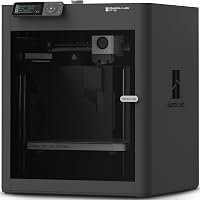
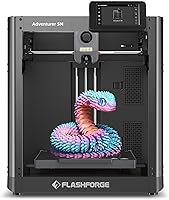
Creality Ender 3 V3 SE vs Bambu Lab A1: Which Is Better? (October 2026)
Choose the Bambu Lab A1 for automatic calibration and optional multicolor printing; choose the Creality Ender 3 V3 SE for direct-drive support for PLA, PETG and TPU.
On this page (7 sections)
Choose the Bambu Lab A1 for automatic calibration and optional multicolor printing; choose the Creality Ender 3 V3 SE for direct-drive support across PLA, PETG and TPU. In this Creality Ender 3 V3 SE vs Bambu Lab A1 comparison, the main beginner difference is how much setup help and material flexibility you want.
Both offer automatic help with leveling. The A1 handles several calibration processes automatically, while the Ender 3 V3 SE pairs CR Touch auto leveling with automatic Z-offset calibration.


Creality Ender 3 V3 SE vs Bambu Lab A1: which is easier to start?
The A1 handles more calibration processes automatically; both printers offer features that reduce manual first-layer work. That can make the A1 a better fit if you want the printer to manage more calibration.
Bambu Lab says the A1 automatically calibrates Z-offset, bed leveling, vibration resonance and nozzle pressure for each print job. It also has a touchscreen interface.
The Ender 3 V3 SE uses CR Touch auto leveling and automatic Z-offset calibration. Its setup can be assembled in a few steps, according to Creality.
You'll still need to follow the setup instructions and choose suitable slicer and filament settings.
Neither printer removes every beginner task. You still need to prepare a model, select suitable material settings, place filament correctly and keep the build surface ready for printing.
What does full-auto calibration change for a beginner?
The A1 handles more named calibration steps automatically, which can reduce the adjustments you need to manage before printing. That may help if you want a more guided start.
Auto calibration does not guarantee every print will work. A model's design, material settings and build-plate condition can still affect the result.
The Ender 3 V3 SE's automatic leveling and Z-offset also address common first-layer setup work. If those are your main concerns, its features may be enough without the A1's broader set of automatic checks.
Our step-by-step 3D printer setup guide covers practical first-day tasks for either machine. You can also read what you need to start 3D printing at home before buying supplies.
Which printer gives you more room to grow?
The Ender 3 V3 SE supports three named filament types; the A1 offers an optional path to multicolor printing. Think about what you want to make after your first few PLA prints.
The Ender 3 V3 SE's Sprite direct-drive extruder supports PLA, PETG and TPU. That gives you a stated path to try different materials, with settings suited to each one.
The A1's multicolor printing requires AMS lite. You can choose the A1 Combo or buy AMS lite separately, so account for that extra component if multicolor printing is part of your plan.
These are different kinds of flexibility. The Ender 3 V3 SE has named filament options; the A1 offers a multicolor route with AMS lite.
Is multicolor printing worth planning for?
Choose the A1 if you have projects in mind that need several colors in one print. Multicolor printing may involve extra filament changes and waste, depending on the model.
If your first projects are practical single-color objects, multicolor may not be a reason to choose the A1 yet. You can start with one filament color and decide later whether AMS lite fits your projects.
For a first spool, PLA vs PETG for beginners explains the basic tradeoffs between those two materials. The Ender 3 V3 SE also supports TPU, while the product information here doesn't specify a matching material list for the A1.
How do the print areas and physical sizes compare?
The A1 has a stated 256 x 256 x 256 mm build volume; the Ender 3 V3 SE's build volume isn't specified here. Compare the objects you plan to print with the A1's stated build volume.
The A1's build volume is 256 x 256 x 256 mm. The model's shape and orientation still matter, since a tall object may fit differently from a wide one.
The Ender 3 V3 SE measures 15 x 19.6 x 15 inches. The A1 measures 21.76 x 20.83 x 12.87 inches, so compare their footprints and heights with your setup area.
Don't treat the printer's outer dimensions as the only space requirement. Leave room to reach the screen, load filament, remove prints and perform routine cleaning.
Our 3D printer for home use guide covers placement and household fit. Measure your printer area before ordering and include working room around it.
Which one is quieter and easier to maintain?
Both printers have noise-reduction features, and the A1 has a quick-swap nozzle. The Ender 3 V3 SE has a 32-bit silent mainboard; the A1 uses active motor noise canceling.
These features address noise, but they don't provide a shared measurement for direct comparison. The room, table and print settings can also affect how noticeable a running printer is.
The A1's 1-clip quick-swap nozzle is designed to make nozzle changes convenient. The Ender 3 V3 SE's flexible PC spring steel build plate allows printed models to be removed quickly with minimal effort.
Both features address routine tasks beginners may encounter. Removing a finished print and changing a nozzle are separate jobs, so consider which matters more for the projects you expect to print.
What should you consider before choosing?
Choose based on the feature you'll use most: the A1's automatic calibration, or the Ender 3 V3 SE's direct drive and stated filament range. A longer feature list only helps if it matches your plans.
Pick the A1 if you value full-auto calibration and want the option to add AMS lite for multicolor prints. Its stated 256 x 256 x 256 mm build volume may also suit projects that need more room.
Pick the Ender 3 V3 SE if you want to try PLA, PETG and TPU with a direct-drive extruder. Its auto leveling, automatic Z-offset and flexible build plate address setup and print-removal tasks.
For more comparisons, see our Bambu Lab A1 Mini vs A1 guide if you're deciding how much build space you need. Our Bambu Lab vs Flashforge comparison can help if you are still choosing between printer brands.
Which beginner printer should you buy?
Choose the A1 for more automatic calibration and optional multicolor printing; choose the Ender 3 V3 SE for a direct-drive setup with PLA, PETG and TPU support. If you're still unsure, start with the projects you want to make and the amount of setup you want to manage.
A beginner who wants the printer to handle more calibration steps will likely prefer the A1. Someone who wants to try a stated range of filament types may prefer the Ender 3 V3 SE.
For a broader shortlist, visit our best 3D printers for the money guide. Then use our 3D printer buying checklist to confirm the machine fits your space and plans.
Sources
Frequently asked questions
Is the Bambu Lab A1 easier for beginners than the Ender 3 V3 SE?
The A1 offers automatic calibration, including Z-offset and bed leveling, plus a touchscreen interface. The Ender 3 V3 SE also has auto leveling and automatic Z-offset calibration, which can reduce first-layer adjustments.
If you want more calibration handled automatically, the A1 is the clearer fit.
Can the Ender 3 V3 SE print TPU?
Yes. The Ender 3 V3 SE's Sprite direct-drive extruder supports PLA, PETG and TPU.
Use recommended settings for the material you choose, since one profile may not suit every filament.
Does the Bambu Lab A1 print in multiple colors?
The A1 supports multicolor printing with AMS lite, which is required for that feature. Choose the A1 Combo or buy AMS lite separately if you want to print in multiple colors.
Which printer has the larger build volume?
The A1 has a stated build volume of 256 x 256 x 256 mm. A matching build-volume figure for the Ender 3 V3 SE isn't available in the product information here, so consider the objects you plan to print when comparing them.
Which printer should a first-time buyer choose?
Choose the A1 if automatic calibration, a touchscreen and the option to add multicolor printing matter most. Choose the Ender 3 V3 SE if direct-drive feeding and support for PLA, PETG and TPU matter more.
For either printer, plan space for setup and access.