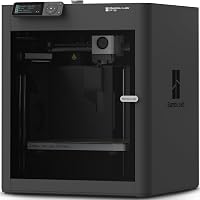
Creality K2 Plus vs K2 Pro: Which to Buy? (November 2026)
Pick the Creality K2 Plus Combo if you print large models or full plates in one go. Pick the K2 Pro Combo if your prints fit inside 300 x 300 x 300mm and you would rather save the floor space.
On this page (11 sections)
- Creality K2 Plus vs K2 Pro: the quick verdict
- K2 Plus vs K2 Pro side by side
- Build volume decides more prints than any other spec
- Speed and motion hardware: where the extra money goes
- Multicolor: the CFS setups are close
- Chamber heating, cameras and the parts that keep a print on track
- Setup, space and what lands on your desk
- Materials and maintenance on both machines
- Who should buy the K2 Plus?
- Who should buy the K2 Pro?
- Verdict: which Creality printer should you buy?
Pick the Creality K2 Plus Combo if you print large models or full plates in one go. Pick the K2 Pro Combo if your prints fit inside 300 x 300 x 300mm and you would rather save the floor space.
In this Creality K2 Plus vs K2 Pro comparison, the winner for most readers is the K2 Plus. It carries a 350 x 350 x 350mm build volume, faster motion and room for four CFS units, and those extras decide more prints than the smaller frame saves.
The two printers share a brand, a multicolor system and a heated chamber. The differences are size, speed and what ships in the box.
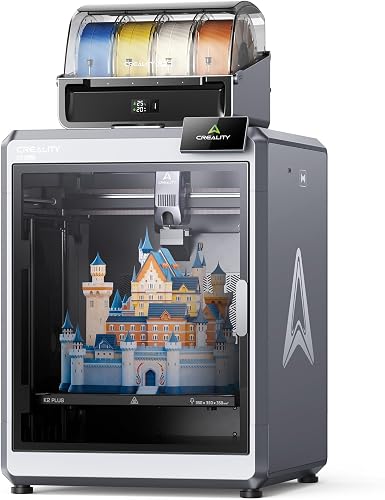

Creality K2 Plus vs K2 Pro: the quick verdict
The K2 Plus wins for most buyers because its build volume and motion system do more for real prints. The K2 Pro is the sensible choice when your models already fit a 300mm cube.
The K2 Plus scores 8.3 here and the K2 Pro scores 6.5. Our score weighs specs, features and buyer feedback against what you're shopping for, and the large format, faster acceleration and four-unit color path push the K2 Plus ahead.
The K2 Pro still has a place. Its smaller cabinet asks less of your desk, its top speed matches the K2 Plus on paper, and it keeps the same multicolor and heated-chamber features.
If your largest model fits 300mm in every direction, the extra size on the K2 Plus buys you nothing.
The deciding question is not which printer has more features. It is whether your print queue contains models or plates that need the bigger cube.
If yes, the K2 Plus is the pick. If no, the K2 Pro saves space and still covers multicolor work.
K2 Plus vs K2 Pro side by side
The two printers line up closely on speed and materials; size and motion hardware set them apart. The table below puts the key numbers next to each other.
| Product | Best for | Build volume | Max speed | Colors | Our score |
|---|---|---|---|---|---|
| Creality K2 Plus Combo | large multicolor prints | 350 x 350 x 350mm | 600mm/s | Up to 16 with four CFS units | 8.3 |
| Creality K2 Pro Combo | smaller desks | 300 x 300 x 300mm | 600mm/s | Up to 16 with CFS | 6.5 |
Both machines print at up to 600mm/s. The difference sits in acceleration: the K2 Plus reaches 30,000mm/s² while the K2 Pro lists 20,000mm/s².
Higher acceleration means the head gets to speed faster and spends less time slowing into corners.
Both hold a chamber up to 60°C and both use a hardened steel hotend tip rated to 350°C. ASA, PPA and carbon-fiber filaments sit inside that range on either printer.
Both run a dual AI camera setup. One camera watches the chamber for failures and the other watches the nozzle for flow.
Both auto-level the bed before a print.
The K2 Plus also uses step-servo motors on all axes and two independent Z motors with four linear rods. Its frame is cast from aerospace-grade aluminum alloy.
Those are engineering choices that show up as steadier motion on tall or wide prints.
Build volume decides more prints than any other spec
The K2 Plus prints 350 x 350 x 350mm and the K2 Pro prints 300 x 300 x 300mm. That gap is roughly 59 percent more usable volume on the K2 Plus.
Big volume is not about showing off. It changes how you plan a job.
A helmet, a large prop or a functional part that would need splitting into pieces on the K2 Pro can print in one piece on the K2 Plus. Fewer pieces means fewer seams, less gluing and less sanding.
The K2 Plus is also built for batch work. Small models fit across its plate in larger groups, so one start covers more of an order or a print farm run.
Creality points out that large models need no splitting and small models print in calmer batches.
The K2 Pro's 300mm cube is not small by home-printer standards. Many popular models, from desk organizers to figures to brackets, fit well within it.
If your print history stays under 300mm on every axis, the smaller plate costs you nothing.
Measure your tallest and widest recent prints before you choose. A model that clears 300mm in one direction is the clearest signal that the K2 Plus is the right buy.
Speed and motion hardware: where the extra money goes
Both printers list 600mm/s top speed, but the K2 Plus accelerates faster and uses step-servo motors across all axes. In practice that shows up on jobs with many direction changes.
Acceleration matters more than top speed on real models. A print full of corners and short moves never holds 600mm/s for long.
At 30,000mm/s², the K2 Plus gets back to speed sooner after each turn, which shortens print time on detailed parts.
The K2 Plus runs FOC step-servo motors on the XYZ axes and the extruder. Creality rates its flow at 40mm³/s, so the hotend keeps up with the motion system rather than becoming the bottleneck.
The K2 Pro also uses FOC step-servo motors and linear rails, and it reaches the same 40mm³/s flow. Its 20,000mm/s² acceleration is still quick, just less aggressive than the K2 Plus.
This is a real difference only if you print a lot. A hobbyist running a few models a week will notice the speed on long jobs.
Someone printing daily will notice it more in the calendar than in any single print.
Multicolor: the CFS setups are close
Both printers handle up to 16 colors through the CFS filament system. The K2 Plus is designed for four CFS units chained together, and the K2 Pro Combo arrives with a CFS unit in the box.
The CFS reads an RFID filament tag and picks up its color and type. It selects, switches and relays filament on its own.
When a spool runs out, it can switch to a similar one already loaded so a long print does not stall.
The K2 Pro package includes one CFS, a 500g Hyper RFID filament spool and a hardened steel nozzle. That gets you into multicolor work out of the box.
Adding more units later is how you reach 16 colors on either printer.
For a buyer who mostly prints single-color functional parts, this section matters little. For anyone printing signs, figures or display pieces, the CFS saves the painting step.
Our guide to the best fast 3D printer covers other machines with quick color switching if you want to compare brands.
Chamber heating, cameras and the parts that keep a print on track
Both printers run an active chamber up to 60°C and both ship with dual AI cameras. That combination covers the two main failure paths: warping and filament flow problems.
A heated chamber holds the air around the part steady. ASA and PPA shrink as they cool, and uneven cooling is what lifts corners off the plate.
With the chamber at a steady temperature, those materials behave better on either printer.
The AI cameras do different jobs. The chamber camera watches for spaghetti failures and idling, so a failed print can be caught before it wastes a full spool.
The nozzle camera tunes flow rate in real time. That cuts underfeeding and overfeeding without you adjusting slicer settings.
The K2 Plus adds a detail here: two independently driven Z motors adjust bed tilt before auto-leveling runs. It also uses a "Matrix" frame in die-cast aluminum alloy to cut resonance.
Less resonance means cleaner walls on tall prints.
The K2 Pro's answer is probing only where the model sits. It levels the print area it needs rather than the whole plate, which shortens setup.
It also has a quick-swap hotend and automatic filament cutting, both handy for maintenance and material changes.
Setup, space and what lands on your desk
The K2 Pro takes less room, and that may be the only reason to choose it. Check your bench before you order either printer.
The K2 Plus weighs 70.4 lb and measures 16.1 x 15.4 x 18.7 inches as a cabinet. The K2 Pro weighs 61.6 lb and measures 17 x 20 x 18 inches.
The numbers do not sort neatly. The K2 Plus is heavier but its cabinet is more compact in two dimensions.
The build volume still sets the real footprint, because the gantry has to travel across the full plate. Plan for more working space around the K2 Plus so the head can move and you can reach the door.
Both printers connect over WiFi or LAN and run Creality OS. Both work with Creality Print and Cura.
Both support remote monitoring, over-the-air updates and power-loss recovery.
Setup on either machine starts with unboxing and frame checks. Our 3D printer buying checklist walks through the questions to answer before a printer lands in your room, including power, noise and where the spools will live.
Materials and maintenance on both machines
Both printers handle the same demanding materials, so filament choice is not the deciding factor. PLA, ABS, ASA, PPA-CF and PET-CF all sit inside the shared chamber and nozzle limits.
The hardened steel nozzle tip on both machines matters for abrasive filaments. Carbon-fiber and glass-fiber blends wear down a brass nozzle quickly.
A hardened tip keeps the hotend working across many spools.
The K2 Pro lists a quick-swap hotend and automatic filament cutting. Those shorten the time spent on a nozzle change or a stuck spool.
The K2 Plus carries the same high-flow hotend and hardened tip, with the dual Z motors and cast frame as its extra hardware.
Maintenance routines look similar on both. Wipe the plate, check the belts and keep the chamber vents clear.
For buyers stepping up from a smaller printer, the Elegoo Centauri Carbon vs Bambu P1S comparison shows how enclosed, fast machines from other brands stack up.
Who should buy the K2 Plus?
Buy the K2 Plus if your models run large, your plates run full or you want the faster motion hardware. It is the printer for buyers who would use the extra volume rather than admire it.
Prop makers, cosplay builders and anyone printing helmets or large functional parts fit here. So do small print farms that want more parts per start.
A 350mm cube lets those jobs run as one piece or one batch.
The faster acceleration also suits detailed models with many short moves. If print time is money for you, the K2 Plus earns its place.
Skip it if your desk is tight or your largest model already fits 300mm. Paying for volume you never use is the one mistake this comparison can help you avoid.
Who should buy the K2 Pro?
Buy the K2 Pro if your prints fit the 300mm cube and desk space is the tighter limit. It keeps multicolor, chamber heating and dual cameras without the larger frame.
Hobbyists printing figures, organizers, brackets and desk items fit here. A first multicolor printer also fits, since the Combo includes one CFS unit, a spool and a hardened steel nozzle.
The K2 Pro still prints at 600mm/s and still reaches 16 colors with extra CFS units. What it gives up is build volume and some acceleration, not the feature list.
Skip it if you already know your next three projects need more than 300mm on a side. In that case the K2 Plus saves you from splitting models or buying a second printer later.
If you are still deciding between brands as well as models, our Anycubic Kobra X vs Creality SparkX i7 comparison covers two more multicolor options.
Verdict: which Creality printer should you buy?
The Creality K2 Plus Combo is the better buy for most readers. The 350mm cube, step-servo motion and four-unit color path do more for real print queues than the K2 Pro's smaller footprint saves.
The K2 Pro is not a bad printer. It shares the speed rating, the heated chamber, the dual cameras and the multicolor system.
It simply trades volume and acceleration for a smaller frame and a lower place in this Creality K2 Plus vs K2 Pro matchup.
Use one rule to decide. If your largest print fits inside 300mm on every axis and your desk is short on space, take the K2 Pro.
If any project needs more room, or you print full plates often, take the K2 Plus and give it the bench space it needs.
Frequently asked questions
Is the K2 Plus worth it over the K2 Pro?
Yes for most buyers who print large models. The K2 Plus adds a 350mm cube, step-servo motors with 30,000mm/s² acceleration and room for four CFS units, and those extras matter more than the smaller footprint of the K2 Pro.
How big is the K2 Plus build volume compared with the K2 Pro?
The K2 Plus prints up to 350 x 350 x 350mm and the K2 Pro up to 300 x 300 x 300mm. That is about 59 percent more usable volume on the K2 Plus, which helps with large parts and full plates.
Do both printers do 16-color printing?
Both support up to 16 colors with the CFS filament system. The K2 Plus is set up for four CFS units hooked together, and the K2 Pro Combo ships with a CFS unit in the box.
Which printer is better for a small room?
The K2 Pro fits a smaller room because its frame is smaller and its cabinet weighs less. Measure your desk or bench first and leave space around the printer for filament, airflow and access to the door.
Can either printer handle ASA and other engineering filaments?
Yes. Both printers hold an active chamber temperature up to 60°C, and both use a hardened steel hotend tip rated to 350°C, so ASA, PPA and carbon-fiber blends are within their material range.