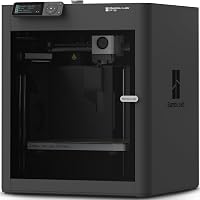
Bambu Lab P1S vs Creality K1C: Which to Buy? (November 2026)
Pick the Creality K1C if raw speed and a budget-friendly price tier decide it; pick the Bambu Lab P1S if you want an enclosed, fully automatic printer with multi-color options. In this bambu lab p1s vs creality k1c matchup, most first-time home buyers land on the P1S.
On this page (6 sections)
Pick the Creality K1C if speed and a lower price tier decide it; pick the Bambu Lab P1S if you want an enclosed printer with automatic calibration and multi-color options. For most people setting up a home 3D printing corner, the P1S is the better first printer.
This bambu lab p1s vs creality k1c comparison weighs the two machines that dominate the mid-range home market. The K1C prints faster on paper and handles carbon fiber filament out of the box.
The P1S adds a full enclosure, a bigger build volume and the easier path to multi-color printing.
We checked the specs and features for both, then scored each one against what a home buyer actually needs. Neither printer is a bad buy; the right one depends on your space, your patience for setup and whether you plan to print in several colors.
 Best for textured bottom faces
Comgrow Double Sided PEO PET Build Plate

How do the Bambu Lab P1S and Creality K1C differ at a glance?
The K1C wins on speed and the P1S wins on build volume, enclosure and multi-color support. Here is how the two machines line up on the points that change a buying decision.
| Feature | Bambu Lab P1S | Creality K1C |
|---|---|---|
| Frame | Fully enclosed | Open frame |
| Build volume | 256 x 256 x 256 mm (about 10 in cubed) | 8.66 x 8.66 x 9.84 in |
| Top speed | 500 mm/s | 600 mm/s |
| Acceleration | 20,000 mm/s² | 20,000 mm/s² |
| Extruder | Direct drive with hardened steel nozzle | Direct drive, 300 °C, clog-free |
| Multi-color | Yes, with AMS units | No native multi-color kit in this configuration |
| Camera | Built in | Built in, with AI failure detection |
| Assembly | Mostly assembled | Assembled and tested before shipping |
| Price tier | Mid-range | Budget to mid-range |
The two printers run the same acceleration figure. The K1C's higher top speed shows up most on large, simple models; on smaller prints the difference is smaller than the numbers suggest.
The enclosure is the bigger split. A closed chamber holds heat and keeps dust and drafts away from the print, while an open frame is easier to watch and to reach into.
One more row worth noting is the extruder temperature ceiling: the K1C's direct extruder is rated to 300 °C, which is what opens up carbon fiber filament. The P1S pairs its direct drive with a hardened steel nozzle, so it is built to stand up to abrasive filament too.
Why does the P1S suit most home buyers?
The P1S is the easier printer to live with because the enclosure and the larger build volume remove two common first-year frustrations. It also gives you a clear upgrade route into multi-color printing.
The chamber means you can print engineering materials that shrink or warp in open air, without building a tent around the printer. It also dulls some of the fan and motor noise that comes with fast motion, though neither maker publishes a decibel figure here.
The build volume is the more everyday win. At 256 mm on each axis, the P1S gives you roughly 10 inches of clearance in every direction.
The K1C's 8.66 x 8.66 inch footprint and 9.84 inch height are close, but models that just fit on the P1S can be too tight on the K1C. A tall lamp shade or a helmet shell is where that gap stops being theoretical.
Bambu Lab also sells multi-color units for the P1S. If you expect to print signs, decorations or tabletop figures in more than one color, that path matters more than a small speed gap.
Our Bambu Lab P1S review goes deeper on how the printer behaves day to day.
Why does the Creality K1C win on speed and price?
The K1C is the faster printer and the cheaper one, which makes it the stronger pick when throughput matters more than an enclosure. Creality built it to print hard materials without upgrades.
Creality says the K1C reaches 600 mm/s and 20,000 mm/s² acceleration, which it describes as 12 times faster than a normal 3D printer. Those figures assume the right filament and model, so treat them as a ceiling rather than a typical result.
The extruder is the real differentiator. The clog-free direct drive pairs a bolster spring and ball plunger to grip filament without slipping, and the steel-tipped copper nozzle is integrated with a titanium alloy heatbreak.
Creality says that setup reaches 300 °C and handles PLA-CF and PET-CF for jigs, fixtures and prototypes.
Auto calibration covers Z offset, bed leveling and input shaping at startup. Add the AI camera that spots spaghetti failures and foreign matter, and the K1C is a hands-off machine once it is running.
Our Elegoo Centauri Carbon vs Bambu P1S comparison covers how a third rival stacks up against the P1S on the same points.
What does the K1C's hotend upgrade buy you?
The Creality 2025 K1 series hotend kit is the spare to keep for long print runs. Its ceramic block heats 360 degrees around the nozzle to 300 °C, and the enlarged nozzle chamber reaches a flow rate of up to 32 mm³/s.
The all-metal throat unscrews for fast swaps, and Creality says the titanium alloy, copper alloy and hardened steel combo lasts 6 times longer than the older part. That matters if you plan to print carbon fiber filament regularly, since abrasive filament wears a nozzle faster than plain PLA.
The split cooling design reduces heat transfer through the hotend body. It fits the K1C, K1, K1 SE and K1 Max, so the kit carries over if you add a second Creality machine later.
Before ordering, check the hotend module port on your printer, because the new version uses buckled terminals for the thermistor and ceramic heating ring.
How does the K1C's cooling handle fast prints?
Creality built three separate fans into the K1C, and each one does a different job. The hotend fan fights heat creep so filament does not soften before it reaches the nozzle.
The part cooling fan hardens fresh extrusion through a special air duct, which helps layers bond and refines the surface texture. An auxiliary fan on the chamber side assists with overall cooling and cuts stringing and warping on bridges and overhangs.
That three-fan setup is why the K1C can hold its high speed on models with overhangs. On an open frame with no chamber heat to fight, the airflow has a clear path to the print.
It also means the K1C arrives ready for the fast profiles Creality ships, without adding a part cooler first.
How much does the enclosure change your setup?
An enclosed printer needs less fuss in the room; an open printer is easier to reach into and to watch. The P1S's full frame keeps drafts, dust and curious hands away from the print.
A chamber changes where you put the printer. You can tuck a closed unit against a wall or on a shelf without worrying about a draft cooling one side of the model.
With the K1C, a doorway or air vent nearby can cause lifting on long flat parts, so you pick the spot with more care.
The K1C's open design makes loading and unloading filament simpler, and you can see the whole print without opening a door. That is also why the AI camera helps: with no chamber door in the way, it gets a clear view for spaghetti detection.
A chamber door can fog or reflect light, so an open frame is the friendlier home for a monitoring camera.
Neither printer needs a dedicated room. Both want a sturdy, level surface and enough space to reach the spool and the screen.
If your desk is in a shared living space, the enclosure edge goes to the P1S. If the printer lives in a garage or workshop where you are the only one near it, the open frame costs you nothing.
Which printer is easier to set up and keep running?
Both arrive nearly ready to print, but the P1S asks less of you over the first month because its auto routine covers more checks. The K1C still gets you printing within minutes of unboxing.
Creality says the K1C is assembled and tested before shipping. The boot-up guide works like a new smartphone's, and Creality claims 3 minutes from unboxing to power-on.
Auto Z offset, auto leveling and auto input shaping handle the calibration, so there is no paper-slide leveling test.
The P1S also runs automatic calibration. Bambu Lab designed its workflow around the screen and app, with preset profiles for its own filament.
For a first printer, fewer decisions during setup usually means fewer failed first prints. The K1C leans on the same idea, with its own startup routine doing the leveling and shaping checks before the first job.
Build plates worth adding to the P1S
The Comgrow PEO PET double-sided build plate is the plate to add if you want texture on the bottom of your prints. One side has a diamond PEO pattern and the other a carbon fiber PET finish, both on spring steel that flexes prints off without a scraper.
Clean it with isopropyl and a lint-free towel before each print, since a trace of oil kills adhesion. Comgrow recommends 60 to 65 °C for PLA and 70 to 80 °C for PETG on this plate.
Bambu Lab owners need to turn off build plate position detection in the printer settings for this plate to grip properly. The plate measures 257 x 257 mm and weighs 15.2 ounces, so it sits flat on the bed without adding meaningful mass to the motion system.
The BIQU CryoGrip Pro Glacier plate is the better choice when you want to pull a print the moment it finishes. The hollow handle stays cool even when the bed has been at 100 °C, so you can swap plates and keep printing without a cooldown wait.
BIQU says the Glacier grips PLA best at 45–55 °C and PETG at 60–70 °C. It also fits ABS and PA.
BIQU notes the Glacier's PLA and PETG grip is weaker than its Frostbite plate, so pick it for easy release and hot-bed work rather than maximum stick. The built-in AR code lets Bambu Lab machines verify the plate type, and BIQU says you can choose your own code so high-temperature jobs do not throw errors.
Its seven-layer cobalt oxide coating is built to resist bending and corrosion, so the plate should outlast the print that made you buy it.
Keeping the K1C fed and clean
The K1C's direct extruder takes standard 1.75 mm filament. Its AI camera and auto calibration mean you spend less time watching the first layer and more time planning the next print.
Keep spare nozzles on hand if you print carbon fiber filament. The hotend kit above covers the whole K1 series, so one spare fits whichever Creality machine you own.
Which printer should you buy?
Buy the Bambu Lab P1S for a home setup where the printer shares a room with people and you want multi-color printing later. Buy the Creality K1C when speed and a lower budget matter more than an enclosure.
Here is the short version. Pick the P1S if you want a closed chamber, a 256 mm build volume and the option to add multi-color units.
Pick the K1C if you print carbon fiber filament, care about throughput and want the lower price tier.
If you are still weighing brands, our Bambu Lab vs Flashforge comparison looks at which maker suits a beginner. The Bambu Lab P1S vs Creality K2 Combo comparison covers the step up to a bigger Creality machine.
For most readers starting a home 3D printing setup, the P1S is the printer to buy. The enclosure and the extra build room pay off across years of printing, and the K1C's speed advantage only shows on jobs where every minute counts.
Buy the K1C only when that speed is the reason you are shopping.
Frequently asked questions
Does the Bambu Lab P1S come fully assembled?
The P1S ships mostly assembled; you fit the few separate parts and run its setup routine before the first print. The Creality K1C arrives assembled and tested too, so neither printer needs a full build from loose parts.
Can the Creality K1C print carbon fiber filament?
Yes. Creality says the K1C's direct extruder and hardened steel-tipped copper nozzle handle PLA-CF and PET-CF, and the hotend reaches 300 °C.
Its nozzle uses a titanium alloy heatbreak to block heat creep during long high-temp jobs.
Which printer is quieter, the Bambu Lab P1S or the Creality K1C?
Neither maker publishes a noise figure for these two models in the data we compared, so we can't call a winner on sound. Ask about decibel levels where you buy if the printer will sit in a shared room, and plan a sturdy stand either way.
Do both printers level the bed automatically?
Yes. The K1C runs auto Z offset, auto leveling and auto input shaping during its startup calibration.
The P1S handles bed leveling and first-layer checks through its own automatic routine, so neither asks you to slide paper under the nozzle.
How big are the build volumes of these two printers?
The Creality K1C builds within 8.66 x 8.66 x 9.84 inches. Bambu Lab lists the P1S build volume at 256 x 256 x 256 mm, which works out to about 10 x 10 x 10 inches, so the P1S offers more room on all three axes.