Bambu Lab A1 Combo vs P1S: Which to Buy? (November 2026)
Pick the P1S Combo for an enclosed, fast printer that handles ABS and ASA; pick the A1 Combo for open-frame printing at a lower cost. The bambu lab a1 combo vs p1s choice comes down to your materials and your room.
On this page (9 sections)
- Which printer should most people buy?
- Bambu Lab A1 Combo vs P1S side by side
- Does the enclosure decide it for advanced filaments?
- Which is faster in real prints?
- How much room does each printer need?
- Which is easier to set up and live with?
- Who should buy which printer?
- How does the P1S compare with other enclosed printers?
- Verdict: which printer wins for most people?
Pick the P1S Combo for an enclosed, fast printer that handles ABS and ASA; pick the A1 Combo for open-frame printing at a lower cost. The bambu lab a1 combo vs p1s choice comes down to your materials and your room.
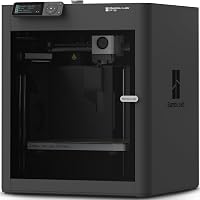
The P1S Combo ships with the AMS and a fully enclosed body. It's rated at 500 mm/s and 20,000 mm/s² acceleration.
The A1 Combo is the open-frame option with AMS lite.
Our score weighs specs, features and buyer feedback against what you're shopping for. The P1S Combo scores higher overall because it covers more materials and runs faster.


Which printer should most people buy?
Most people should buy the P1S Combo. The enclosed body is the deciding feature, not a nice extra.
It holds heat around the print, so ABS and ASA behave better than they do on an open frame.
The P1S Combo is rated for PLA, PETG, TPU, PVA and PET as ideal filaments. ABS and ASA are also in that ideal group.
PA and PC are listed as capable.
The A1 Combo is the printer to buy when your work stays in PLA, PETG and TPU and you'd rather spend the difference on filament. Open-frame printers are easier to reach into and simpler to clear when a print fails.
The gap isn't about print quality on easy materials. Both machines level the bed automatically and both handle multi-color work.
The split is what happens when the material gets fussy.
Bambu Lab A1 Combo vs P1S side by side
The P1S Combo is the enclosed, faster machine; the A1 Combo is the open, lower-cost one. Here are the facts that separate them.
| Product | Best for | Enclosure | Max speed | Setup time | Our score |
|---|---|---|---|---|---|
| Bambu Lab P1S Combo | advanced filaments | Fully enclosed | 500 mm/s | About 15 minutes | 9.1 |
| TOPCUBE 3D Printer Enclosure for Bambu Lab | the A1 Combo | 9.7 | |||
| BIQU CryoGrip Pro Glacier 257x257mm Panda Build | easy part release | 9.6 | |||
| UniTak3D PEI Build Plate for Bambu Lab | spare plate for either printer | 9.5 |
| Feature | Bambu Lab P1S Combo | Bambu Lab A1 Combo |
|---|---|---|
| Body | Fully enclosed | Open frame |
| Rated speed | 500 mm/s | Not stated here |
| Acceleration | 20,000 mm/s² | Not stated here |
| Multi-color | AMS, up to 16 colors | AMS lite |
| Setup | About 15 minutes | Not stated here |
| Ideal filaments | PLA, PETG, TPU, PVA, PET, ABS, ASA | PLA, PETG, TPU |
| Bed leveling | Automatic | Automatic |
| Build plate size | 257x257 mm | 257x257 mm |
The build plate size is the one spec both share exactly. That's why the same 257x257 mm plates fit either printer.
Everything else about the two machines pulls in a different direction.
The P1S Combo's enclosure is part of its frame. It isn't a cover you fit later.
That means the cabinet was designed around the motion system, and the printer's listed weight of 40.8 lb reflects a real steel box rather than a printer with a tent around it.
Does the enclosure decide it for advanced filaments?
Yes. If ABS or ASA is on your list, the enclosure decides it.
ABS shrinks as it cools, and moving air is the enemy of a clean ABS print.
A closed cabinet keeps the air around the part steadier.
The P1S Combo is fully enclosed and lists ABS and ASA as ideal. That's the combination to look for when you plan to print parts that need heat resistance or a smooth acetone finish.
An open printer can print ABS, but the room does more of the work. Drafts from a door, an air vent or a nearby fan all reach the part.
A cover helps, which is where the TOPCUBE enclosure earns its place.
What the TOPCUBE enclosure adds to the A1 Combo
The TOPCUBE 3D Printer Enclosure for Bambu Lab is built around the A1 Combo's shape. It has an AMS lite cable inlet and a four-way pneumatic interface, so the AMS lite stays connected with the cover on.
TOPCUBE says the internal temperature stays under 40°C during long prints. That matters because too much heat around the mainboard is a real risk when you cover an open printer.
The materials are fire-resistant, and the cover keeps dust and pet hair out of the print area.
The cover also addresses the filament side of ABS. TOPCUBE lists PLA, TPU and ABS as the filaments it's aimed at, and its job is to let odors and particles settle inside rather than spread through the room.
That's a comfort point as much as a print-quality one.
Noise drops from about 60 to 40 decibels in TOPCUBE's testing. Setup takes about 5 minutes.
Check the 838x588x588 mm outer size against your desk before you order. A large clear window and an LED strip keep the bed visible in a dim room, so you don't lose sight of the print once the cover is on.
Even with a cover, the A1 Combo isn't the same as a factory-enclosed printer. The P1S Combo was designed as a sealed box from the start, so there's no add-on to fit or remove when you switch materials.
The TOPCUBE cover also adds its own footprint around the printer, while the P1S Combo's cabinet is already part of its size.
Which is faster in real prints?
The P1S Combo is the faster printer on paper. Bambu Lab rates it at 500 mm/s with 20,000 mm/s² acceleration.
That's the headline speed, and it's what makes the P1S attractive for batches of small parts.
The A1 Combo's speed figures aren't part of this comparison. The practical difference shows up on long jobs.
A fast machine finishes a plate of brackets in less time, so a busy week of printing feels shorter.
Speed isn't free in quality terms. Both machines will slow down for materials that need more cooling time.
ABS on the P1S Combo wants a warm chamber and slower walls, so the 500 mm/s headline won't apply to every print.
The acceleration figure matters as much as top speed. High acceleration shortens the time spent changing direction on detailed models, which is where slow printers lose minutes without anyone noticing.
A rated 20,000 mm/s² means the machine reaches its target speed quickly on short moves, so a plate of small parts benefits more than a single large print would.
How much room does each printer need?
The P1S Combo needs more room because its cabinet is a closed box. It measures 15.31 x 18.03 x 15.31 inches and weighs 40.8 lb.
Leave clearance around it for airflow and for the AMS on top.
The A1 Combo is open, so you can reach the bed from more angles. That helps when you're pulling a failed print or swapping a plate mid-project.
Think about the room, not just the desk. An enclosed printer near a window or a cold wall still works, but the chamber has to warm up first.
An open printer in a drafty room will show it on tall ABS parts.
The TOPCUBE enclosure changes the A1 Combo's footprint. Its outer size is 838x588x588 mm, so the covered printer needs noticeably more desk than the bare machine.
Factor that in if the A1 Combo's open frame was the reason it fit your space.
Build plates you can share between the two
Both printers use a 257x257 mm plate, so plates carry over if you switch machines later. That's a small but real saving.
The BIQU CryoGrip Pro Glacier fits the P1S and the A1. It's rated for PLA at 45–55°C and PETG at 60–70°C.
The hollow-out handle stays cool enough to grab right after a print, so you can swap plates and keep going.
BIQU notes that the Glacier grip is lower than its Frostbite plate for PLA and PETG. It's still a strong first-layer plate, and the seven-layer cobalt oxide coating resists peeling when you flex it.
The plate also carries its own AR code for X1 build plate scanning, and BIQU says you can set your own code so high-temp prints don't throw a cool plate error.
The UniTak3D PEI Build Plate has a textured side rated to 300°C and a smooth side rated to 200°C. The textured face handles PLA, ABS, PETG, TPU and more without glue.
The smooth face needs a glue stick for most filaments except PLA. Peel the protective film off the smooth side first, and level the plate again after you flip it.
A spare plate is the simplest upgrade for either printer. While one plate cools on the desk, the other is already printing.
Which is easier to set up and live with?
The P1S Combo sets up in about 15 minutes and then stays put. Bambu Lab says setup takes about 15 minutes, and automatic bed leveling handles the first layer without manual screws.
The enclosed body also means fewer loose parts to keep clean. Filament dust and cat hair stay on the outside of the cabinet instead of settling on the bed.
The A1 Combo is open, so the bed collects dust between projects. A quick wipe before each print is part of the routine.
The upside is access: reaching a dropped clip or a stuck part takes seconds.
Noise is the other daily difference. The P1S Combo's cabinet muffles motor and fan noise.
The A1 Combo is louder in an open room, which matters if the printer sits near where you work or sleep.
If the A1 Combo is the printer you want but the noise bothers you, the TOPCUBE cover is the fix. It's rated to bring the noise down to about 40 decibels.
Multi-color: AMS vs AMS lite
The P1S Combo includes the AMS and is rated for up to 16 colors. That's a four-spool unit, and the full 16-color figure comes from linking multiple AMS units.
The A1 Combo pairs with AMS lite, which also runs multi-color work. The TOPCUBE cover has an AMS lite cable inlet, so the feeder stays connected with the cover on and you don't have to unplug it to close the printer up.
The practical split is print length. A long multi-color print runs for hours, and a sealed cabinet holds temperature more steadily over that time.
An open frame with a cover gets closer, but the cabinet is the more consistent setup for marathon jobs.
Who should buy which printer?
Buy the P1S Combo if you print ABS or ASA, want the fastest motion in this pair, or need a printer that runs unattended in a shared room. The enclosure and the AMS make it the better long-term machine for functional parts and multi-color projects.
Buy the A1 Combo if your materials are PLA, PETG and TPU. It's the friendlier first printer: open frame, easy access and a lower cost that leaves budget for filament and a plate.
Pick the A1 Combo and add the TOPCUBE enclosure if you want some of the P1S's benefits without the full price. You get steadier air and less noise, though not the factory-sealed cabinet or the 500 mm/s rating.
Skip the P1S Combo if desk space is tight or you only ever print PLA. The enclosed cabinet and the AMS take room you may not have.
The 40.8 lb weight also matters if the printer has to move between rooms.
How the A1 Mini fits in
If the A1 Combo looks right but your desk is small, the smaller A1 is worth a look. Our comparison of the Bambu Lab A1 Mini vs A1 covers the build volume and space differences between the two open-frame options.
How does the P1S compare with other enclosed printers?
The P1S Combo competes most directly with other enclosed CoreXY machines at a similar price. Two worth checking are the Elegoo Centauri Carbon and the Creality K2 Combo.
Our Bambu Lab P1S vs Creality K2 Combo comparison looks at build size, multi-color support and enclosure design. The K2 Combo is the larger machine, while the P1S Combo stays compact.
The Elegoo Centauri Carbon vs Bambu P1S matchup covers the cheaper enclosed option against the Bambu. The Centauri Carbon is the budget route into a sealed printer.
For the full picture on the P1S on its own, our Bambu Lab P1S review goes through the AMS, the filament range and what the enclosure means day to day.
Verdict: which printer wins for most people?
The P1S Combo wins the bambu lab a1 combo vs p1s matchup for most buyers. The enclosure, the 500 mm/s rating and the AMS cover more materials and more projects than the A1 Combo can match out of the box.
The A1 Combo is still the right buy for a lot of people. If you print PLA and PETG, want easy access to the bed and would rather put the savings into filament, it does the job well.
Adding the TOPCUBE cover closes some of the gap for ABS and noise.
The decision rule is simple. Pick the P1S Combo if ABS, ASA or speed is on your list.
Pick the A1 Combo if PLA, PETG and TPU are your whole world and desk space is limited. Either way, grab a spare 257x257 mm plate so a finished print never stops the next one.
Frequently asked questions
Is the P1S worth it over the A1 Combo?
Yes, if you print ABS or ASA or want faster motion. The P1S Combo is fully enclosed, rated at 500 mm/s and set up in about 15 minutes.
Pick the A1 Combo instead if your materials are PLA, PETG and TPU and you want to spend less.
Can the A1 Combo print ABS?
It can, but an open frame makes ABS harder to control. ABS shrinks as it cools, so drafts and uneven room temperature can cause warping.
Adding a cover like the TOPCUBE enclosure gives the A1 Combo steadier air around the print and helps keep the internal temperature under 40°C.
How many colors can each printer print?
The P1S Combo includes the AMS and is rated for up to 16 colors. The A1 Combo pairs with AMS lite, which also runs multi-color work.
The P1S has the edge for long multi-color prints because its enclosed body holds temperature more steadily.
Do both printers fit the same build plates?
Yes. Both use a 257x257 mm plate, so plates like the BIQU CryoGrip Pro Glacier and the UniTak3D PEI plate fit either machine.
A spare plate means you can keep printing while a finished one cools.
Which printer is quieter?
The P1S is enclosed, which helps contain motor and fan noise. The A1 Combo is open, so its noise carries further.
The TOPCUBE enclosure is rated to cut noise from 60 to 40 decibels when fitted to the A1 Combo.