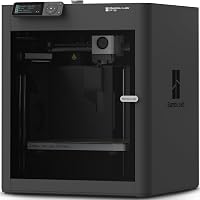
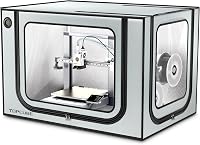
Qidi Plus 4 vs Bambu Lab P1S: Which to Buy? (November 2026)
Choose the Qidi Plus 4 if you need a bigger 300 mm build area and a sealed chamber for high-temp filament, and pick the Bambu Lab P1S for the more polished, beginner-friendly workflow. For most first-time buyers the P1S wins overall, while the Qidi Plus 4 is the better fit when print size and engineering materials matter more than hand-holding.
On this page (10 sections)
- Qidi Plus 4 vs Bambu Lab P1S: the quick verdict
- The two printers side by side
- Build volume decides it for large models
- Chamber and material range favor the Qidi for engineering filament
- Speed and print quality in everyday use
- Setup and workflow: where the P1S pulls ahead
- Build plates and desk space you'll need to plan for
- Who should buy the Qidi Plus 4?
- Who should buy the Bambu Lab P1S?
- So which should you buy?
Choose the Qidi Plus 4 if you need a bigger 300 mm build area and a sealed chamber for high-temp filament, and pick the Bambu Lab P1S for the more polished, beginner-friendly workflow. For most first-time buyers the P1S wins overall, while the Qidi Plus 4 is the better fit when print size and engineering materials matter more than hand-holding.
This Qidi Plus 4 vs Bambu Lab P1S comparison is for people choosing their first enclosed printer or moving up from a basic open-frame machine. Both are CoreXY machines in sealed cabinets, so they are closer than the spec sheets first suggest.
The real split comes down to build area, material range, and how much setup work you want.
We compared the specs and how each machine is built to be used. We have not run these printers ourselves, so everything here rests on what the makers publish and how the two machines are designed.


Qidi Plus 4 vs Bambu Lab P1S: the quick verdict
The Bambu Lab P1S is the better all-round buy for most people, and the Qidi Plus 4 is the better buy when size or material range is the deciding factor. Neither is a bad printer; they just reward different owners.
The P1S scores 9.4 and the Qidi Plus 4 scores 9.0. The gap is small and it reflects workflow polish more than raw ability.
The Qidi's 300 mm platform is a real advantage that the P1S simply cannot match.
If your projects fit inside 256 mm and you want to print rather than tune, the P1S is the safer purchase. If you keep hitting the edge of a smaller bed or you want a chamber that handles hotter materials, the Qidi Plus 4 earns its place.
It helps to weigh the two strengths against each other rather than treating them as equal. A bigger bed only pays off on models that actually use the space, while an easier workflow pays off on every single print you start.
That is why the smaller, smoother machine takes the overall nod for a typical buyer.
The two printers side by side
Both are enclosed CoreXY machines with heated beds and auto bed leveling, so the headline differences are build size, chamber capability and how much the workflow asks of you. Here is how the specs line up.
| Feature | Qidi Plus 4 | Bambu Lab P1S |
|---|---|---|
| Build area | 300 x 300 mm | 256 x 256 mm |
| Chamber | Fully enclosed | Fully enclosed |
| Motion | CoreXY | CoreXY |
| Best for | Large parts and engineering filament | First printers and everyday PLA/PETG |
| Workflow | More manual | Polished and beginner-friendly |
| Desk footprint | Larger | Smaller |
| Our score | 9.0 | 9.4 |
The build area difference is the big one. A 300 x 300 mm plate covers about 900 square centimeters, against roughly 656 on the 256 mm P1S.
That is a meaningful jump in usable area, not a rounding error.
Both machines are sealed, so neither needs a separate enclosure for ABS or ASA. The Qidi is built to push further into high-temp territory, while the P1S is tuned around the materials most home users actually load.
What the spec sheet does not show
Both machines land in the same broad class: sealed, fast, CoreXY. The columns that matter are the ones without a clean number, such as how much of the chamber capability you will actually use and how much tuning the machine expects from its owner.
The Qidi's advantages are concentrated in size and material range. The P1S's advantages are spread across every print, in the form of profiles and settings that are already close to right.
That distribution is the real difference between the two.
Build volume decides it for large models
If you regularly print parts bigger than 256 mm across, the Qidi Plus 4 is the clear pick and the P1S cannot compete. This is the single most decisive spec in the matchup.
A 300 mm platform lets you print helmets, large brackets, drone frames and full-size functional parts in one piece. On the P1S, those jobs either need splitting into parts or scaling down.
Splitting a model is not free. Every seam needs alignment, glue or fasteners, and each join is a weak point.
A bigger bed removes that work entirely for models that fit within 300 mm.
Think honestly about your typical projects. If most of what you print fits inside 200 mm, the extra area on the Qidi will mostly sit unused and the P1S becomes the easier call.
The area math in practice
The step from 256 mm to 300 mm adds about 244 square centimeters of usable plate. In real terms that is roughly the footprint of a large phone plus some margin, enough to turn a two-part print into a single piece.
That matters most on flat parts like panels, chassis plates and large brackets. A flat part that exceeds the smaller bed is the hardest kind to split cleanly, because the seam runs across a face you want to stay smooth.
A bigger bed removes that problem in one move.
Chamber and material range favor the Qidi for engineering filament
Both chambers help with ABS and ASA, but the Qidi Plus 4 is set up for a wider spread of high-temp engineering plastics. The P1S covers the common enclosed-material jobs without fuss.
An enclosed chamber keeps the part warm and slows cooling, which reduces warping on materials that shrink as they solidify. That is why both machines handle ABS better than an open-frame printer.
The Qidi goes further into materials like PC and other high-strength filaments that want a warmer chamber. The P1S prints ABS and similar materials well, but its focus is on reliability rather than the hottest engineering plastics.
For most home users this is a modest advantage. Pick the Qidi for material range only if you already plan to print structural or heat-resistant parts, not as an insurance policy.
When the extra headroom actually pays off
The chamber advantage only shows up on jobs that need it. A PLA or PETG print does not care how warm the cabinet can get, and a well-tuned ABS print rarely needs the ceiling either.
The Qidi earns its keep on structural parts that hold load or see heat, such as brackets, jigs and housings for warm environments. If your print list is mostly decorative or everyday items, that headroom will sit idle and the P1S stays the better value.
Speed and print quality in everyday use
Both machines print fast for a sealed CoreXY design, and the P1S is the more predictable of the two on default settings. Speed matters less than whether the first layer and profiles work without tinkering.
CoreXY motion keeps the toolhead light, so both machines can move quickly without shaking the frame. That is the same layout used by many fast desktop printers.
The P1S ships with well-tested profiles for common materials. You slice, send and print, and the result is usually close to what you expected.
That reliability is a big part of its score.
The Qidi can match it on speed, but getting the best out of it takes more tuning. Its settings reward owners who enjoy dialing in temperature and flow for each filament.
Why consistency beats peak speed
Raw speed figures are easy to quote and hard to feel in daily use. What you notice instead is how often a print finishes without a failed first layer or a lifted corner.
The P1S wins that comparison on defaults, because its profiles are already close to right for the materials most people load. The Qidi closes the gap once you put in the tuning time, but the gap only closes after that work is done.
Setup and workflow: where the P1S pulls ahead
The P1S is the easier printer to live with, especially in the first week. Setup, first prints and ongoing maintenance are more forgiving for a new owner.
Out of the box, the P1S workflow is close to plug-and-print. The slicer, profiles and machine settings line up, so there are fewer surprises between unboxing and a good first layer.
The Qidi Plus 4 asks more of you. Expect to spend time leveling, tuning and learning its menu system before it sings.
That is fine for a tinkerer and frustrating for someone who just wants to print.
If you value your time more than your appetite for tuning, this section alone justifies the P1S. If learning the machine is part of the hobby for you, the Qidi's extra controls are a feature rather than a chore.
Our Bambu Lab P1S review covers that workflow in more depth.
A first week on each machine
On the P1S, the first week is mostly printing. You run the initial setup, slice a test model with the stock profile, and the machine does the rest while you learn its menu.
On the Qidi, the first week is part printing and part learning. You will spend time on bed leveling and on reading how the machine responds to your filament before you trust it with a long job.
That is a fair trade for the control it gives you, as long as you know you are making it.
Build plates and desk space you'll need to plan for
Plate size follows the printer, so your spare plates and your desk space both change with the choice. Budget for one matching plate and clear room around the machine.
The Qidi takes a 300 x 300 mm plate. A double-sided textured PEI sheet in that size, like the G-Hubble 310x310mm two-pack, gives you a spare while one cools.
A 310 mm plate also fits the Voron 300 and several Creality CR-10 models.
The P1S takes a 257 x 257 mm sheet. The BIQU CryoGrip Pro Glacier build plate is a good upgrade for PLA and PETG, with strong first-layer grip and a smooth bottom finish.
A smooth or textured spare in the same size is worth having.
Desk space matters too. The 300 mm Qidi frame is larger than the 256 mm P1S cabinet, so measure before you buy.
Leave clearance at the sides and back for airflow, and keep the front free for loading and unloading. For a broader read on workflow and materials, our Bambu Lab vs Flashforge comparison is a useful next step.
Matching the plate to the material
The plate you pair with each machine should follow the filament you print most. A textured sheet suits PLA and PETG well and hides the first-layer lines on the bottom face.
A smoother sheet gives a cleaner bottom finish for display parts.
The P1S's 257 mm plate has more third-party options in that size because the printer is so widely used. The Qidi's 300 mm plates are fewer in number, so buy your spare early rather than waiting for a print to fail first.
Who should buy the Qidi Plus 4?
Buy the Qidi Plus 4 if build size or engineering materials are the reason you're shopping. It is the machine for owners who know what they want to print and need the room to do it.
The 300 mm platform is the main draw. It covers large functional prints and single-piece props without splitting seams.
The enclosed chamber adds the ability to run hotter materials when your projects call for them.
It also suits buyers who treat setup as part of the hobby. The extra tuning is a cost you accept in exchange for control over the machine and its material range.
Skip it if you are new to 3D printing and just want reliable prints. The smaller, easier P1S will get you printing sooner and with fewer headaches.
Signs the Qidi is your machine
You already have a folder of models that exceed 256 mm. You print structural parts that see load or heat.
You are comfortable changing settings and reading the results. Any one of these makes the Qidi worth the extra setup.
Who should buy the Bambu Lab P1S?
Buy the Bambu Lab P1S if you want an enclosed printer that works without a learning curve. It is the better first printer for most people, and the better everyday machine for PLA and PETG.
The 256 mm build area covers most home projects, and the sealed chamber means ABS and ASA are on the table too. Its polished workflow is what sets it apart: fewer failed first layers, fewer profile surprises.
It also fits tighter spaces. The smaller cabinet leaves more room on a desk or shelf than the Qidi's larger frame.
Skip it if your work depends on large single-piece prints or the hottest engineering plastics. In those cases the Qidi Plus 4's extra size and chamber headroom are worth the setup effort.
If you're also weighing a step down, the Elegoo Centauri Carbon vs Bambu P1S comparison shows how a cheaper open-frame machine stacks up.
Signs the P1S is your machine
You want your first enclosed printer to just work. Your models mostly fit inside 256 mm.
You would rather spend your time printing than tuning. If most of that sounds like you, the P1S is the lower-risk purchase.
So which should you buy?
For most readers the answer to Qidi Plus 4 vs Bambu Lab P1S is the Bambu Lab P1S, because it's the easier printer to set up and keep running. It earns the overall win on workflow, reliability and day-to-day use, not on raw specs.
The Qidi Plus 4 is still the right buy in two clear cases: you need a 300 mm build area, or you plan to print engineering filaments that want a warmer chamber. In those situations its size and material range outweigh the extra tuning.
A simple rule helps. If your models fit inside 256 mm and you want to print more than you troubleshoot, buy the P1S.
If you keep bumping into bed limits or you want the chamber headroom for high-temp materials, buy the Qidi Plus 4. Pick your build plate in the matching size at the same time so your first week is not spent waiting on a spare.
Frequently asked questions
Which printer is better for a total beginner?
The Bambu Lab P1S is the easier first printer. Its setup, slicing profiles and first-print experience are more polished, so you spend less time tuning and more time printing.
The Qidi Plus 4 rewards tinkering but asks more of a new owner.
Can both printers print ABS and other high-temp filaments?
Both have enclosed chambers, so both can print ABS and similar materials. The Qidi Plus 4 is set up for a wider range of engineering filaments with higher chamber temperatures, while the P1S covers the common enclosed-material jobs most home users run.
Do the build plates matter when choosing between these two?
They do, because plate size follows the printer. The Qidi takes a 300 x 300 mm plate like the BIQU CryoGrip Pro Glacier, while the P1S takes a 257 x 257 mm sheet.
Budget for at least one spare plate in the matching size.
Which one should I buy for a small apartment desk?
The Bambu Lab P1S is the tighter fit. Its 256 x 256 mm build area comes in a smaller cabinet than the Qidi Plus 4's 300 mm frame.
Measure your desk and leave clearance around the machine for airflow before you order either one.