Bambu Lab P1S vs P2S Combo: Which Is Better? (November 2026)
The Bambu Lab P1S Combo is the better overall pick for most buyers because it delivers multicolor printing in a smaller, lighter package. Choose the P2S Combo for higher stated speed, automatic calibration, AI failure detection and AMS 2 Pro filament drying.
On this page (11 sections)
- Bambu Lab P1S vs P2S Combo: what is the quick answer?
- How do the P1S Combo and P2S Combo compare side by side?
- Which combo is better for a small workspace?
- Does the P2S Combo print faster?
- Which combo handles multicolor printing better?
- Which printer is easier to set up and manage?
- Which combo offers better filament control?
- Who should buy the Bambu Lab P1S Combo?
- Who should buy the Bambu Lab P2S Combo?
- What should you consider before choosing?
- Bambu Lab P1S vs P2S Combo: which should you buy?
The Bambu Lab P1S Combo is the better overall choice for most people because it combines enclosed printing, automatic bed leveling and multicolor support in a smaller body. The P2S Combo is the better specialist pick for higher stated speed, automatic calibration, AI failure detection and AMS 2 Pro drying.
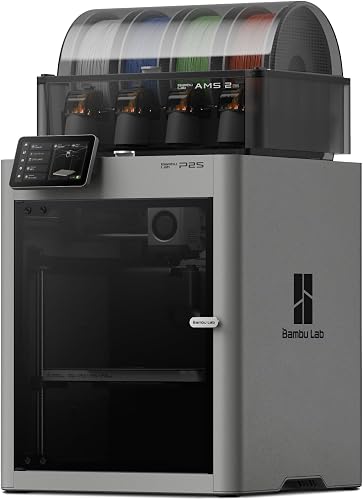
Both are enclosed Bambu Lab combo packages built around multicolor 3D printing. The P1S Combo includes the P1S 3D Printer and AMS, while the P2S Combo includes the P2S 3D Printer and AMS 2 Pro.
This comparison uses the stated features, dimensions and supported materials. We did not test either printer in person, so the decision comes from how each package fits your workspace, materials and printing routine.

Bambu Lab P1S vs P2S Combo: what is the quick answer?
Pick the Bambu Lab P1S Combo for the best balance of size, multicolor printing and everyday value. Its 15.31 x 18.03 x 15.31 inch body is easier to place than the P2S Combo, and the enclosed design plus automatic bed leveling covers the core needs of many home makers.
Choose the P2S Combo when its newer workflow features directly match your priorities. It reaches a stated 600mm/s, includes automatic calibration and AI failure detection, and adds filament drying up to 65°C through AMS 2 Pro.
The score difference is intentional. The P1S Combo scores 9.1 because it wins the overall fit for this search.
The P2S Combo scores 8.9 because it offers more advanced workflow features but takes up more room and weighs more.
If you are still comparing the base machines without the multicolor packages, our Bambu Lab P1S vs P2S comparison focuses on the printer choice itself.
How do the P1S Combo and P2S Combo compare side by side?
The P1S Combo wins on compactness and stated acceleration, while the P2S Combo wins on top speed and newer automation features. Both packages are designed for enclosed, multicolor FDM printing.
| Feature | Bambu Lab P1S Combo | Bambu Lab P2S Combo |
|---|---|---|
| Package | P1S 3D Printer and AMS | P2S 3D Printer and AMS 2 Pro |
| Stated printing speed | 500mm/s | 600mm/s |
| Acceleration | 20000 mm/s² | Not used for this comparison |
| Multicolor support | Up to 16 colors with AMS | Multicolor with AMS 2 Pro |
| Printer body | Enclosed design | Adaptive airflow system |
| Calibration | Automatic bed leveling | Automatic calibration |
| Extra workflow features | Set up in 15 minutes | AI failure detection and quick-swap nozzles |
| Filament handling | AMS package | Filament drying up to 65°C |
| Dimensions | 15.31 x 18.03 x 15.31 in | 18 x 22 x 18 in |
| Weight | 40.8 lb | 47.5 lb |
The P2S Combo is wider, deeper and taller. It also weighs 6.7 lb more, which matters when the printer needs to move through a doorway or onto a sturdy work surface.
Which combo is better for a small workspace?
The P1S Combo is the better choice for a smaller desk, shelf or workshop corner. Its cabinet is smaller in every listed dimension than the P2S Combo.
The P1S Combo measures 15.31 inches wide, 18.03 inches deep and 15.31 inches high. The P2S Combo measures 18 inches wide, 22 inches deep and 18 inches high.
That difference adds up in daily use. You need room for the printer itself, access around it and space for the multicolor hardware included with each package.
A shelf that fits the P1S Combo may not fit the P2S Combo once you account for usable working space.
The P1S Combo also weighs 40.8 lb, compared with 47.5 lb for the P2S Combo. Both are substantial machines, but the lighter P1S package is easier to plan around when your setup is temporary or your workbench is shared.
Measure the route to your printing area before delivery. Include doorways, turns and the final position, rather than measuring only the open shelf.
Does the P2S Combo print faster?
The P2S Combo has the higher stated top speed at 600mm/s. The P1S Combo reaches 500mm/s and lists 20000 mm/s² acceleration.
Speed matters most when you print often, use larger objects or want shorter waits between design changes. The P2S Combo is the clear choice if the highest stated speed is your main requirement.
The P1S Combo still belongs in the high-speed conversation. Its stated 500mm/s speed and 20000 mm/s² acceleration give it a fast specification, while its smaller body makes it easier to keep close to your design workspace.
A higher top speed does not automatically make every print finish faster. Objects, layers, color changes and the chosen material all affect the full job.
Think of the speed figures as the ceiling of each machine's stated capability, then choose the workflow you will use most.
For most home users, the P1S Combo's 500mm/s is already enough to make the smaller package the more balanced pick.
Which combo handles multicolor printing better?
Both combos are built for multicolor printing, but the P1S Combo has the clearer stated color capacity. Its AMS setup supports up to 16 colors, and Bambu Lab says connecting Bambu Lab AMS is required for that capability.
The P2S Combo pairs the printer with AMS 2 Pro for smooth multicolor and multimaterial work. The P2S printer by itself does not support multicolor printing, so the Combo package matters when that is your goal.
The practical choice depends on what you value in the color workflow. Choose the P1S Combo when a stated capacity of up to 16 colors is the deciding feature.
Choose the P2S Combo when filament drying and the newer AMS 2 Pro package matter more than the listed color count.
Multicolor printing also changes how you plan a project. Color changes add planning to the model, and multiple materials require a clear storage and labeling routine.
Keep colors easy to identify, load the needed spools before starting and leave enough working room around the printer.
Which printer is easier to set up and manage?
The P1S Combo has the simpler stated setup promise, while the P2S Combo offers more automated workflow tools. The P1S Combo is designed for setup in 15 minutes, with automatic bed leveling.
The P2S Combo is also ready to print in 15 minutes. It adds automatic calibration, AI failure detection and quick-swap nozzles, which gives it the stronger feature set for buyers who want more help during routine printing.
That does not make the P1S Combo a bare-bones option. Automatic bed leveling removes a key setup task, and the enclosed body gives the printer a contained format for the supported materials.
The P2S Combo is the better match for a beginner who wants more automated checks around a print. The P1S Combo is the better match for someone who wants a straightforward, compact package and is comfortable managing the basic print workflow.
Give either machine a stable, level home. Keep the area clear enough to load filament, remove finished work and perform ordinary cleaning without shifting the printer.
Which combo offers better filament control?
The P2S Combo wins for filament handling because AMS 2 Pro includes built-in drying up to 65°C. That feature gives the package a stronger reason to choose it when filament storage and readiness are central concerns.
The P1S Combo supports a broad group of materials. It is ideal for PLA, PETG, TPU, PVA, PET ABS and ASA, and it is capable with PA and PC.
Carbon and glass fiber reinforced polymer is not recommended.
The P2S Combo adds smart airflow that balances cooling and heat retention. Its stated system can maintain a 50°C chamber for engineering-grade materials, while a carbon filter supports the enclosed airflow design.
Choose the P1S Combo for common filament choices and a smaller machine. Choose the P2S Combo when drying up to 65°C, adaptive airflow and a 50°C chamber are more useful to your projects.
Material choice should follow the printer's supported range. Start with the material you use most, then consider whether the added handling features of the P2S Combo justify its larger cabinet.
Who should buy the Bambu Lab P1S Combo?
Buy the Bambu Lab P1S Combo if you want the strongest all-around package for compact multicolor printing. It suits home makers, first-time enclosed-printer buyers and anyone who wants a smaller machine with a clear material range.
The P1S Combo includes the P1S 3D Printer and AMS. Its enclosed design improves print performance for advanced filaments, and automatic bed leveling makes the initial routine less demanding.
The up-to-16-color capability gives the package room for detailed multicolor projects. That makes it a sensible pick for models where appearance matters, especially when you want the color system included rather than added later.
Its limits are clear from the comparison. It does not have the P2S Combo's higher stated 600mm/s speed, AI failure detection, quick-swap nozzles or AMS 2 Pro drying.
Carbon and glass fiber reinforced polymer is also not recommended.
Our Bambu Lab P1S review is the next useful read if the P1S is already your front-runner.
Who should buy the Bambu Lab P2S Combo?
Buy the Bambu Lab P2S Combo if speed, automated checks and filament drying matter more than a compact setup. It suits makers who expect a more feature-rich workflow and have room for its 18 x 22 x 18 inch body.
The P2S Combo includes the P2S 3D Printer and AMS 2 Pro. It reaches a stated 600mm/s and includes AI failure detection, automatic calibration and quick-swap nozzles.
Its filament system is the main reason to step up. AMS 2 Pro dries filament up to 65°C, while the printer's adaptive airflow can balance cooling and heat retention and maintain a 50°C chamber for engineering-grade materials.
The trade-off is physical size and weight. At 47.5 lb, it is heavier than the 40.8 lb P1S Combo, and the cabinet needs more room in every listed dimension.
The P2S Combo is not the overall winner for this comparison because the P1S Combo fits more buyers. It is the focused pick for advanced workflow features and a larger, more capable filament setup.
If brand choice is still open, our Bambu Lab vs Flashforge comparison explains how the two brands differ for beginners.
What should you consider before choosing?
Choose by your workspace first, then by the feature that will affect every print. A smaller printer that fits your room and materials is more useful than a faster printer that crowds the work area.
Use this rule:
- Pick the P1S Combo for the smaller body, lower weight, up to 16 colors and automatic bed leveling.
- Pick the P2S Combo for 600mm/s speed, AI failure detection, quick-swap nozzles and AMS 2 Pro drying.
- Pick the P1S Combo for the higher overall score and the better fit for most buyers.
- Pick the P2S Combo when its 65°C filament drying and 50°C chamber directly match your projects.
Plan the complete setup, not only the printer cabinet. You need room to place materials, manage spools, remove prints and keep the work surface stable.
Think about how often you will use multiple colors. If multicolor printing is occasional, the smaller P1S package may be the easier daily choice.
If every project depends on prepared filament and automated workflow tools, the P2S Combo earns its larger footprint.
Bambu Lab P1S vs P2S Combo: which should you buy?
The Bambu Lab P1S Combo is the overall winner for most people shopping the Bambu Lab P1S vs P2S Combo. Its 9.1 score reflects the compact enclosed design, automatic bed leveling, up-to-16-color capability and broad supported filament range.
Choose the P2S Combo when you have the room and will use its advantages often. The 600mm/s speed, AI failure detection, automatic calibration, quick-swap nozzles, adaptive airflow and AMS 2 Pro drying make it the better specialist tool.
The decision is simple: P1S Combo for balanced multicolor printing, P2S Combo for speed and filament control. If you are choosing between a smaller setup and a more automated one, let your workbench and regular materials settle the question.
Frequently asked questions
Do both Bambu Lab combos support multicolor printing?
Yes. The P1S Combo pairs the P1S printer with AMS and supports up to 16 colors.
The P2S Combo pairs the P2S printer with AMS 2 Pro, while the P2S printer by itself does not support multicolor printing.
Which Bambu Lab combo is smaller?
The P1S Combo is smaller at 15.31 x 18.03 x 15.31 inches. The P2S Combo measures 18 x 22 x 18 inches, so allow more room for its cabinet and for practical access around the printer.
Which combo is faster?
The P2S Combo has the higher stated speed at 600mm/s. The P1S Combo reaches 500mm/s and lists 20000 mm/s² acceleration, so compare the complete print workflow instead of judging speed alone.
Which filaments work with the P1S Combo?
The P1S Combo is ideal for PLA, PETG, TPU, PVA, PET ABS and ASA. It is capable with PA and PC, while carbon and glass fiber reinforced polymer is not recommended.
Does the P2S Combo dry filament?
Yes. Its AMS 2 Pro has built-in filament drying up to 65°C.
That makes the combo a better fit when keeping filament ready to print is a central part of your workflow.


