Bambu Lab A1 Mini vs Flashforge Adventurer 5M: Which Is Better? (November 2026)
The Flashforge Adventurer 5M wins this matchup for most beginners who want speed and a standard build size, while the Bambu Lab A1 Mini suits buyers who want a smaller, quiet printer tied to the Bambu ecosystem. The score gap is narrow: 8.6 for the Adventurer 5M against 8.2 for the A1 Mini.
On this page (9 sections)
- The quick verdict: which printer wins?
- The two printers side by side
- Build volume decides more prints than speed does
- Speed and print quality: what the numbers mean
- Setup and first prints: which is easier to start?
- Noise and footprint in a home or apartment
- Software and ecosystem: Bambu Handy vs Flash Studio
- Which starter printer should you buy?
- The verdict: speed and size vs quiet and compact
The Flashforge Adventurer 5M is the better starter printer for most readers, thanks to its 220 mm cube build volume and 600 mm/s travel speed. The Bambu Lab A1 Mini wins on compact, quiet desk use and on how little setup it asks of a beginner.
This bambu lab a1 mini vs flashforge adventurer 5m comparison puts the two side by side on the points that actually change your first months of printing: build size, speed, setup, noise and the software around each machine.
Both are open-frame printers aimed at people buying their first machine. Neither needs an enclosure to start, and both handle the everyday filaments most beginners use.

The quick verdict: which printer wins?
The Adventurer 5M takes the overall win on score and capability, while the A1 Mini is the better fit for small spaces and quiet homes. Pick by your desk and your typical model size before anything else.
The score gap is 8.6 to 8.2. That is close enough that the right printer for you depends on what you print and where the printer will sit.
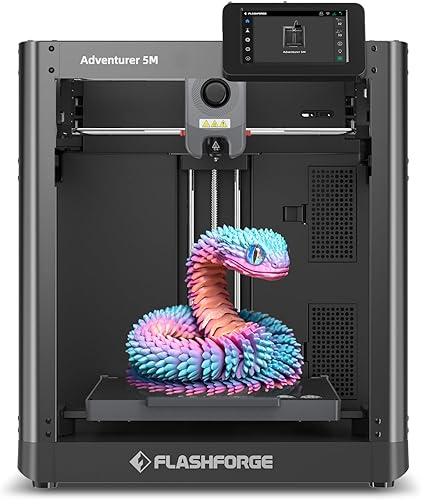
The Adventurer 5M brings a 220 x 220 x 220 mm build volume, a CoreXY frame, automatic bed leveling and 600 mm/s travel speed. The A1 Mini brings automatic calibration, a compact body, quiet operation and the Bambu app and model library.
If your list of first projects includes anything larger than a small desk toy, the Adventurer 5M's extra room decides it. If your printer lives on a shelf beside your monitor, the A1 Mini is the easier housemate.
The two printers side by side
The Adventurer 5M is the bigger, faster machine; the A1 Mini is the smaller, quieter, more connected one. Here is how the specs line up.
| Feature | Flashforge Adventurer 5M | Bambu Lab A1 mini |
|---|---|---|
| Build volume | 220 x 220 x 220 mm | Compact plate, smaller than 220 mm |
| Frame | CoreXY, all metal | Open frame |
| Top travel speed | 600 mm/s | High speed, lower than 600 mm/s |
| Acceleration | 20000 mm/s² | Not a headline figure |
| Bed leveling | Fully automatic, one click | Automatic calibration |
| Extruder | 280°C direct drive | Direct drive |
| Nozzle changes | 3-second detachable nozzle | Standard swap |
| Bed surface | Dual-sided PEI | Textured build plate |
| App control | Flash Studio, mobile monitoring | Bambu Handy app |
| Model library | Flashforge ecosystem | MakerWorld |
| Weight | 22 lb | 12.1 lb |
| Extras in the box | Standard 0.4 mm nozzle | LED Lamp Kit |
The table shows the split clearly. One machine is built around speed and volume; the other is built around fitting into your life with as little friction as possible.
Both level their own beds. That shared feature matters, because a level first layer is the single biggest hurdle for a new owner.
The weight gap is real too. At 22 pounds, the Adventurer 5M stays put on a sturdy desk.
The A1 Mini's 12.1 pounds is easier to move, though you should still set either printer on a surface that won't wobble.
Build volume decides more prints than speed does
The Adventurer 5M's 220 mm cube fits more models in one piece, and that matters more than raw speed for most beginners. A print that fits is a print you finish.
A 220 mm cube gives you room for a full-size phone stand, a small planter, a bracket or a multi-part prop piece without splitting the model. Each split adds a print, a join and a chance for the pieces to fit badly.
The A1 Mini's smaller plate is not a flaw for every buyer. Miniatures, keychains, cable clips, small desk organizers and lamp parts all fit comfortably.
Its included LED Lamp Kit points at exactly that kind of small decorative project.
The deciding question is simple. Look at the three models you most want to print first.
If any of them needs more than a small plate, the Adventurer 5M saves you from scaling down or cutting the model into pieces.
If everything on your list is small, the plate size stops being a factor. Then the A1 Mini's other advantages take over.
For a deeper look at Bambu's own size options, the Bambu Lab A1 Mini vs A1 comparison covers what the larger A1 adds.
Speed and print quality: what the numbers mean
The Adventurer 5M is the faster printer on paper, with 600 mm/s travel speed and 20000 mm/s² acceleration on its CoreXY frame. Speed only helps when the print still comes out clean.
CoreXY moves the print head with belts rather than dragging the whole bed around. That lighter moving mass is why Flashforge can quote 600 mm/s and high acceleration without the model shaking loose.
A 280°C direct drive extruder and dual-fan cooling back that up. The direct drive pushes filament straight into the hotend, which suits flexible and tougher materials better than a long feed path.
The 32mm³/s high-flow nozzle and 35-second warm-up to 200°C keep the machine ready quickly. Nozzle swaps take about 3 seconds, and the printer accepts optional nozzles from 0.25 mm to 0.8 mm for finer detail or thicker layers.
The A1 Mini is also a fast printer for its size. Bambu positions it as high-speed and high-quality while staying quiet, which is the more useful claim in a home setting.
Its automatic calibration handles the bed mesh so the first layer lands without you tuning screws.
Neither printer guarantees a perfect print at full speed on day one. Start slower, get the first layer right, then push the speed up as you learn the filament.
Setup and first prints: which is easier to start?
The A1 Mini asks less of a first-time owner, because calibration, app control and a model library all come built in. The Adventurer 5M is still beginner-friendly, just with more machine to learn.
The A1 Mini's pitch is that you focus on creating instead of troubleshooting. Automatic calibration runs before printing, and the Bambu Handy app lets you manage jobs from your phone.
MakerWorld supplies ready-to-print models, so your first print doesn't require learning a slicer from scratch.
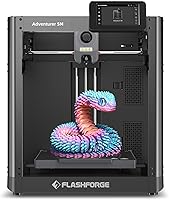
The Adventurer 5M runs the other way. One-click automatic bed leveling handles the first layer, and Flash Studio gives you remote monitoring and status alerts on your phone.
You still set up the CoreXY frame and learn the slicer, but the leveling step is handled.
For a buyer who wants the shortest path from box to first successful print, the A1 Mini is the friendlier machine. For a buyer who wants to learn the printer as well as the hobby, the Adventurer 5M teaches more along the way.
Both machines ask you to slice your own models eventually. Neither one removes that step, and that is fine.
A slicer is a skill worth having after the first week.
Noise and footprint in a home or apartment
The A1 Mini is the better apartment printer: it is smaller, lighter and built for quiet operation. The Adventurer 5M needs a sturdier, more permanent spot.
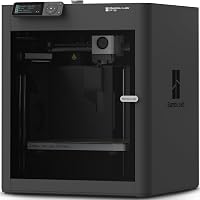
Bambu calls the A1 Mini quiet and compact, and its 12.1-pound weight and smaller body back that up. It can sit on a desk, a shelf or a side table without taking over the room.
The included LED Lamp Kit even turns printed parts into room décor.
The Adventurer 5M measures 15.83 x 14.29 x 17.64 inches and weighs 22 pounds. That footprint is not huge, but the machine is heavier and its CoreXY motion is louder when it runs at speed.
Plan a stable table away from where people sleep or watch TV.
Vibration compensation helps the Adventurer 5M keep quality up while moving fast. It does not make the machine silent.
If you print at night in a shared room, the A1 Mini's quieter running is the practical choice.
Think about where the printer will live for the next year, not just where it fits today. A printer that annoys the household ends up unused.
Software and ecosystem: Bambu Handy vs Flash Studio
The A1 Mini has the stronger software story for beginners, with MakerWorld models and the Bambu Handy app tied together. The Adventurer 5M counters with Flash Studio monitoring and firmware that updates regularly.
Bambu's ecosystem is the reason many people buy an A1 Mini. MakerWorld hosts a large library of ready-to-print models, and the Bambu Handy app manages jobs and printer status.
The loop from finding a model to printing it is short.
Flashforge's Flash Studio covers remote monitoring, progress checks and instant status alerts. FlashPrint slicing software gets monthly upgrades and firmware updates arrive regularly, so the software side keeps improving after you buy.
The practical difference is how much of the workflow happens in one place. Bambu bundles model discovery, slicing and control more tightly.
Flashforge gives you capable tools that you connect yourself.
Neither approach is wrong. A beginner who wants hand-holding will prefer Bambu's tighter loop.
A tinkerer who likes separate tools may not mind Flashforge's split.
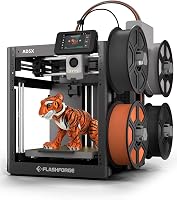
If you are weighing brands more broadly, the Bambu Lab vs Flashforge brand comparison looks at support, software and who each brand suits. For a multi-color twist on the Flashforge side, the Flashforge AD5X vs Adventurer 5M matchup covers the color option.
Which starter printer should you buy?
Buy the Flashforge Adventurer 5M if you want a standard-size build plate and fast printing from day one. Buy the Bambu Lab A1 Mini if your printer will live on a desk and your models are small.
Here is the split in plain terms.
Pick the Adventurer 5M if:
- You want to print models up to 220 mm on a side without splitting them.
- Speed matters, and you like the idea of a CoreXY frame and a 280°C direct extruder.
- You plan to try different nozzle sizes, from 0.25 mm detail to 0.8 mm speed.
- You have a sturdy desk and don't mind a louder machine at full tilt.
- You want remote monitoring and alerts through an app.
Pick the A1 Mini if:
- Your printer will sit on a desk, shelf or small table.
- You print small models: miniatures, accessories, lamp parts and gifts.
- Quiet operation matters more than top speed.
- You want a guided app and a big ready-to-print model library.
- You like the idea of the included LED Lamp Kit as a first project.
When neither is quite right
If you want Bambu's ecosystem but need more build volume than the A1 Mini offers, the Bambu Lab A1 Mini vs P1S comparison covers the step up. If you want Flashforge's speed with more than one filament color, the AD5X option is the one to read.
The verdict: speed and size vs quiet and compact
The Flashforge Adventurer 5M is the printer I would recommend to most first-time buyers, because 220 mm of build volume and 600 mm/s speed cover more projects without limits. The Bambu Lab A1 Mini is the better buy for a small, quiet desk setup where every model is small.
The bambu lab a1 mini vs flashforge adventurer 5m choice comes down to two questions. How big is the largest thing you want to print?
Where will the printer sit?
If the answer to the first is "bigger than a small plate," the Adventurer 5M wins. If the answer to the second is "on my desk in a shared room," the A1 Mini wins.
The scores line up with that split: 8.6 for the Adventurer 5M against 8.2 for the A1 Mini. Neither number is a knock on the other machine.
They simply reward different priorities.
Our score weighs specs, features and buyer feedback against what you are shopping for. If you are still deciding between printer types before picking a model, start with the starter printers category and work from your project list.
Frequently asked questions
Which is easier for a complete beginner, the A1 Mini or the Adventurer 5M?
The A1 Mini leans harder into beginner ease with automatic calibration and a guided app. The Adventurer 5M also levels its own bed in one click, so a beginner can start on either one, though its faster motion asks for a little more attention to the first layer.
Can the Bambu Lab A1 Mini print the same models as the Adventurer 5M?
Not always. The Adventurer 5M has a 220 mm cube, so models that fit within 220 mm on each axis print in one piece there.
The A1 Mini's smaller plate means bigger models need splitting or scaling down.
Do I need an enclosure for either printer?
No. Both are open-frame printers, so PLA, PETG and similar everyday filaments run fine without one.
An enclosure helps with draft-sensitive materials and with keeping dust off the machine, but neither printer requires it to get started.
Which printer is quieter in a small apartment?
The A1 Mini is built around quiet operation and a compact footprint, so it suits a desk or a corner of a living room better. The Adventurer 5M runs a CoreXY frame at high speed, which is louder when it moves quickly.
Which printer should I pick if I only print small models?
The A1 Mini. Small parts, miniatures and desk accessories fit its plate easily, and its automatic calibration means less fuss between prints.
The Adventurer 5M's extra size and speed matter less when every model is small.