Bambu Lab A1 Mini vs P1S: Which to Buy? (November 2026)
The P1S is the better printer for most people who can give it the space. The A1 Mini wins when your desk is small and PLA or PETG is all you print.
On this page (11 sections)
- The quick verdict: P1S for range, A1 Mini for room
- A1 Mini vs P1S: the two printers side by side
- Build volume and footprint: does the A1 Mini fit your desk?
- Speed and print quality: what the numbers mean
- Enclosure and materials: which filaments can each handle?
- Multi-color printing: AMS vs AMS lite
- Setup, software and noise in daily use
- Price tiers and what each combo adds
- Who should buy the A1 Mini?
- Who should buy the P1S?
- The verdict: which printer wins?
The Bambu Lab P1S is the better printer for most people who can give it the space. The A1 Mini is the smarter buy when your desk is small, your budget is tighter and PLA or PETG covers everything you print.
This bambu lab a1 mini vs p1s comparison is about fit rather than raw speed. Both printers share Bambu Lab's automatic bed leveling and the same easy workflow, so the real choice comes down to size, enclosure and how you plan to add color.

The quick verdict: P1S for range, A1 Mini for room
Pick the P1S Combo for the widest mix of materials and colors, and the A1 Mini for a compact first printer. The gap between them is about what you print, not how fast you learn the software.
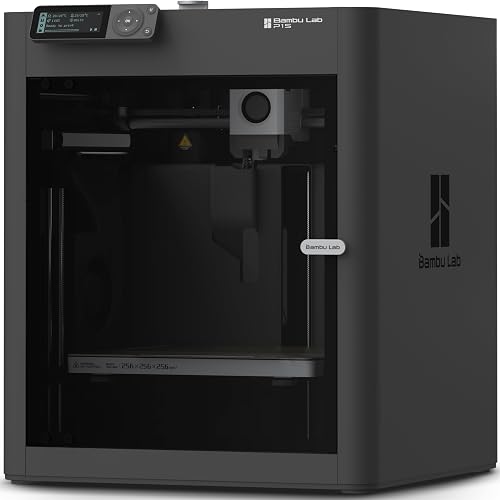
The P1S Combo pairs the enclosed P1S with the AMS for multi-color work. The A1 Mini is an open-frame printer built around small desks and beginners, and the LED Lamp Kit in the box gives you an easy first project.
If you have 18 inches of depth to spare and want one machine that grows with you, the P1S is the calmer long-term buy. If space is tight and your models are small, the A1 Mini keeps printing within reach.
The four listings split into two pairs for a reason. The P1S and P1S Combo are the same enclosed printer, one with the AMS and one without.
The A1 Mini and A1 Mini Combo are the same open-frame printer, one with AMS lite and one with an LED Lamp Kit instead. Buying the right half of the pair matters as much as picking the line.
A1 Mini vs P1S: the two printers side by side
The table below puts the headline specs next to each other. The P1S models lead on speed, enclosure and color count, while the A1 Mini models keep the footprint small.
| Product | Best for | Enclosure | Speed | Multi-color | Our score |
|---|---|---|---|---|---|
| Bambu Lab P1S Combo | multi-color printing | Fully enclosed | 500 mm/s | Up to 16 with AMS | 9.1 |
| Bambu Lab P1S | advanced filaments | Fully enclosed | 500 mm/s | Up to 16 with AMS, sold separately | 8.8 |
| Bambu Lab A1 mini | small desks | Open frame | AMS lite sold separately | 8.2 | |
| Bambu Lab A1 Mini Combo | color on a small desk | Open frame | Up to 4 with AMS lite | 6.6 |
The P1S and P1S Combo share the same enclosed body and the same speed rating. The A1 Mini and A1 Mini Combo share the open frame; the difference between them is the AMS lite and its color count.
Weight tells the same story. The P1S Combo weighs 40.8 pounds and the P1S weighs 38.9 pounds.
The A1 Mini Combo weighs 22 pounds, and the A1 Mini is lighter still as a bare printer. That matters if the printer will share a desk with a monitor.
Look closely at the acceleration figure, because it's the one spec that doesn't match across the four listings. The P1S and P1S Combo are rated at 20,000 mm/s².
The A1 Mini Combo lists 10,000 mm/s². If you plan to print tall, detailed models in a hurry, that number is the practical difference.
Where the two families actually differ
The A1 Mini pair brings features the P1S pair doesn't advertise. Active flow rate compensation on the A1 Mini Combo adjusts extrusion to keep lines consistent.
The 1-Clip quick swap nozzle makes maintenance easier. Noise cancellation keeps the Combo at 48 dB or less.
The P1S pair answers with the enclosure, higher acceleration and the full AMS color count.
Build volume and footprint: does the A1 Mini fit your desk?
The A1 Mini is the one to buy when the desk is the constraint. Its smaller cabinet sits easily beside a laptop, while the P1S needs a dedicated corner.
The P1S measures 15.31 x 18.03 x 15.31 inches. That footprint, plus clearance for the AMS on top in the Combo, turns a side table into a printer stand.
Plan for the full assembly, not just the printer.
A compact printer earns its place when you print keycaps, phone stands, brackets and small toys. Large helmets, big organizers and full-size props belong on a bigger machine.
If you're weighing the A1 Mini against its open-frame sibling, our Bambu Lab A1 Mini vs A1 comparison covers the size question in more detail.
Think about the whole station, not just the printer. A spool holder, a laptop and room to lift finished prints all compete for the same surface.
The A1 Mini leaves more of that surface free.
The depth figure nobody reads
Both families list the same 15.31 inch width and depth figures on the P1S side, and the A1 Mini Combo comes in at 16.77 x 14.82 x 19.5 inches. Read those numbers as a box, not a footprint.
You need clearance above for the AMS or AMS lite, and clearance in front to open the door or reach the plate. A 20 inch wide shelf is a comfortable home for the A1 Mini and a squeeze for the P1S with its color unit mounted.
Speed and print quality: what the numbers mean
The P1S is rated faster, at 500 mm/s and 20,000 mm/s² acceleration. The A1 Mini Combo's AMS lite setup is rated at 10,000 mm/s² acceleration.
That's the headline gap between the two lines.
Bambu Lab describes both as high-speed machines. In practice, acceleration shapes how quickly a printer reaches its top speed on small details.
The P1S should finish dense models and supports in less time.
The A1 Mini still brings active flow rate compensation and full-auto calibration on the Combo. Those features push consistent extrusion rather than raw pace.
For decorative prints and small functional parts, the speed difference rarely decides the purchase.
Both printers level the bed automatically. That removes the fiddliest part of older printers and explains why beginners get good first prints from either machine.
The A1 Mini's full-auto calibration goes a step further and handles the Z-offset as well, so there's less to check before the first layer.
Enclosure and materials: which filaments can each handle?
The P1S's enclosed body is the reason to choose it for ABS and ASA. The A1 Mini's open frame steers you toward PLA and PETG.
Bambu Lab lists PLA, PETG, TPU, PVA, PET, ABS and ASA as ideal for the P1S. It also calls PA and PC capable, and does not recommend carbon or glass fiber reinforced polymers.
The enclosure keeps warmth around the part, which helps with warping-prone materials.
The A1 Mini is a beginner-focused open printer. Its strengths are ease of use and quiet operation, not high-temperature filaments.
Keep ABS and ASA off the A1 Mini and use PLA or PETG instead.
This is the point where the bambu lab a1 mini vs p1s question usually resolves. If you want engineering materials, the enclosure decides it.
If your prints are decor and gifts, the open frame is fine.
What the filament list really tells you
Bambu Lab's ideal list for the P1S covers seven materials. PLA and PETG handle most everyday prints.
TPU covers flexible parts like phone cases and gaskets. PVA is a support material that dissolves in water, useful for complex overhangs.
PET sits close to PETG for tougher functional pieces. ABS and ASA are the outdoor and heat-resistant picks, and those are the two the enclosure exists for.
The A1 Mini line makes no such promise, so treat PLA and PETG as its working range.
Multi-color printing: AMS vs AMS lite
Both printers can print in color, but the combo boxes are the sensible way in. The P1S Combo includes the AMS for up to 16 colors.
The A1 Mini Combo includes AMS lite for up to four.
The AMS sits on the P1S and switches between filaments during a print. The AMS lite works the same way in principle for a smaller color set.
Multi-color support needs the unit connected; the printer alone prints one filament at a time.
Multi-color prints trade time and material for looks. Each color change uses filament, so a four-color model takes longer than the same shape in one color.
That's a real cost to plan for, especially on big prints.
Choose the P1S Combo if color is part of your plan and you want the largest palette. Choose the A1 Mini Combo if a few accent colors are enough.
Skip the AMS units entirely if you print in one material and spend the saved money on filament.
Setup, software and noise in daily use
Both machines arrive nearly ready, and the P1S sets up in about 15 minutes. The A1 Mini Combo takes about 20 minutes because of its pre-assembled design.
Bambu Lab's ecosystem covers both printers with the same app and model library. You browse models, slice and send prints over Wi-Fi from the same place, so switching machines doesn't mean learning new software.
Noise is the bigger difference in a shared room. The A1 Mini Combo is rated at 48 dB or less with active motor noise cancellation, which keeps it out of the way in a home office or bedroom.
The enclosed P1S also hides moving parts, which helps around pets and children.
Setup effort is modest on both. Unbox, remove the shipping restraints, run the calibration routine and print.
The enclosed P1S needs its panels in place first, so give it a little more table space while you work. The A1 Mini printer also includes the LED Lamp Kit, which gives a first-time owner a defined project instead of a blank plate.
Price tiers and what each combo adds
The combo boxes cost more because they include the color unit, so buy the bundle only if color matters. The printer-only models are the budget route into the same machines.
The P1S Combo pairs the printer with the AMS. The P1S ships as a single printer and leaves the AMS for later.
In the A1 Mini line, the Combo adds AMS lite, while the A1 Mini printer plus LED Lamp Kit targets beginners who want a first project.
Think about what you'd buy in the first three months. A beginner printing keychains and planters needs filament and maybe a nozzle, not 16 colors.
A maker selling multi-color gifts needs the AMS from day one.
There's a second reason to choose the printer-only version: upgrade path. If you aren't sure color is for you, buy the printer and add the color unit when a project demands it.
That spreads the spend and avoids paying for a feature you might not use.
Who should buy the A1 Mini?
Buy the A1 Mini if the desk is small, the models are small and PLA or PETG is your material. It's the lowest-friction way into 3D printing without giving up Bambu Lab's automatic calibration.
The A1 Mini printer with the LED Lamp Kit suits a beginner who wants a guided first project. Light-up models give you a reason to print and a result you can show off.
Automatic calibration means less time adjusting and more time making.
The A1 Mini Combo suits someone who already knows they want color. Four colors are enough for most decor, gifts and small figures.
The 20-minute setup and quiet running make it easy to live with.
Skip the A1 Mini if you plan on ABS, ASA or large single-piece models. The open frame and smaller cabinet will fight you on both.
In that case, the P1S is the honest recommendation.
Who should buy the P1S?
Buy the P1S when you need an enclosed printer and want one machine that covers everyday and advanced filaments. The P1S Combo is the better buy if color is on your roadmap.
The P1S alone suits the buyer who prints in one material and wants ABS or ASA for functional parts. It shares the enclosed body and speed rating of the Combo without paying for a color unit up front.
Our Bambu Lab P1S review goes deeper on what that enclosed design means day to day.
The P1S Combo suits makers who sell or gift multi-color prints. The AMS opens up to 16 colors and turns the printer into a small production tool.
Set-up time stays short, and the enclosed cabinet keeps the workspace tidy.
Skip the P1S models if you have no room for a dedicated printer corner. The cabinet and the AMS need more table than a compact desk offers.
Compare the P1S against its closest rival in our Elegoo Centauri Carbon vs Bambu P1S breakdown before you commit.
The verdict: which printer wins?
The P1S wins for most buyers because its enclosure and material range cover more ground. Choose the A1 Mini when space and simplicity matter more than filament options.
Our score weighs specs, features and how each printer fits what you're shopping for. The P1S Combo leads the group for its combination of enclosure, speed and the bundled AMS.
The P1S alone follows as the sensible single-material choice. The A1 Mini is the compact pick, and the A1 Mini Combo rounds out the list for small-space color.
Use this bambu lab a1 mini vs p1s decision rule: if your next print needs ABS, ASA or 16 colors, buy the P1S Combo. If your next print is a small PLA part and the desk is already full, buy the A1 Mini.
If you're still weighing the enclosed printer against another brand, our Flashforge AD5X vs Bambu P1S comparison covers that matchup.
Whichever you pick, buy filament for the material you'll actually print. A printer that fits your room and your materials gets used; the faster one that doesn't gets covered in dust.
Frequently asked questions
Does the A1 Mini need an enclosure for ABS?
Yes. The A1 Mini is an open-frame printer, so ABS and ASA are outside its comfort zone.
The P1S has a fully enclosed body that improves print performance with those filaments.
Can the A1 Mini print in multiple colors?
Yes, but only with the AMS lite. The A1 Mini printer alone prints one filament at a time.
The A1 Mini Combo bundles the AMS lite, while the P1S Combo bundles the full AMS for up to 16 colors.
How long does setup take on these printers?
Bambu Lab says the P1S and P1S Combo set up in about 15 minutes. The A1 Mini Combo takes about 20 minutes thanks to its pre-assembled design.
Both arrive largely put together, so you mainly handle calibration and the first print.
Which printer is better for a beginner?
The A1 Mini is the easier start because of its automatic calibration and small footprint. The P1S also levels its bed automatically, so beginners can handle it too, as long as they have room for the larger enclosed cabinet.
Which printer handles engineering filaments better?
The P1S. Its enclosed body is rated ideal for ABS and ASA and capable with PA and PC.
Neither printer is recommended for carbon or glass fiber reinforced polymers, so look elsewhere for those.