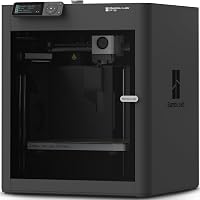
Anycubic Kobra X vs Elegoo Centauri Carbon 2: Which? (November 2026)
Pick the Anycubic Kobra X Combo for native 7-color prints and lower filament waste; pick the Elegoo Centauri Carbon 2 Combo for a stiffer CoreXY frame and 4-color CANVAS printing. In this anycubic kobra x vs elegoo centauri carbon 2 matchup, the higher-scoring Kobra X wins overall for most homes.
On this page (9 sections)
- Anycubic Kobra X vs Elegoo Centauri Carbon 2 at a glance
- Which printer gives you more colors?
- Which printer is faster?
- Which printer wastes less filament?
- How much setup does each printer need?
- Materials and print jobs for each combo
- How do these printers compare with nearby options?
- Who should buy which?
- The verdict: which printer wins?
Pick the Anycubic Kobra X Combo for native 7-color prints and lower filament waste; pick the Elegoo Centauri Carbon 2 Combo for a stiffer CoreXY frame and 4-color CANVAS printing. In this anycubic kobra x vs elegoo centauri carbon 2 matchup, the higher-scoring Kobra X wins overall for most homes.
The Kobra X carries a 9.7 score here and the Centauri Carbon 2 a 9.3. The gap comes down to color range, speed and waste, not build quality.
Both machines auto-calibrate and both ship as combos with multi-color systems. The Anycubic is the friendlier family machine.
The Elegoo is the faster, heavier printer with a die-cast aluminum frame.

 Best for stable high-speed printing
ELEGOO Centauri Carbon 2 Combo 3D Printer
Anycubic Kobra X vs Elegoo Centauri Carbon 2 at a glance
The Anycubic wins on color count and filament savings; the Elegoo wins on top speed and frame rigidity. The table below lines up the specs that decide the choice.
| Feature | Anycubic Kobra X Combo | Elegoo Centauri Carbon 2 Combo |
|---|---|---|
| Colors | 7 native, up to 19 | 4 via CANVAS |
| Speed | 2X multi-color speed | Up to 500 mm/s |
| Acceleration | Up to 20,000 mm/s² | |
| Motion system | CoreXY, dual 4260 stepper motors | |
| Frame | Die-cast aluminum frame and chassis | |
| Filament waste | 50% less | Smart detection and auto refill |
| Leveling | LeviQ 3.0 auto-leveling | Fully automated calibration |
| Monitoring | AI camera | All-around sensing |
| Noise | Under 48dB | |
| Weight | 29 lb | 42.6 lb |
The weight difference tells its own story. The 42.6 lb Elegoo is nearly 14 lb heavier than the 29 lb Anycubic, and that heft comes from the aluminum frame and chassis.
A heavier printer tends to shake less at speed.
What the table doesn't show
The table skips print volume, because neither set of specs lists a build size. Check each product page for the exact build volume before you order if your models are large.
That one practical step saves a return.
The table also leaves out price. This comparison stays on specs and use, so you can weigh the machines without a price snapshot that goes stale.
Which printer gives you more colors?
The Anycubic Kobra X wins this round with 7 native colors against 4 on the Elegoo. Color count is the single biggest split between these two combos.
The Kobra X runs seven colors out of the box with the ACE 2 Pro system. Anycubic says you can expand it to 19 colors with extra hubs.
Toys, decor and gifts in many shades fit the printer's wheelhouse.
The Centauri Carbon 2 prints four colors through its CANVAS system. CANVAS handles instant color switching and smart filament detection, with auto refill and tangle detection to keep jobs moving.
Four colors covers most household projects well.
When four colors is enough
Plenty of multi-color models use three or four filaments. A logo in three shades, a two-tone planter or a figure with a colored base all fit inside four.
Choose the Elegoo if your ideas rarely go past four colors and you value the CANVAS detection features more than extra slots. The auto refill keeps a spool from running dry mid-print.
When seven colors changes the job
Seven colors removes the need to pause and swap spools for many designs. A rainbow nameplate, a multicolor dragon or a set of color-coded parts prints in one run.
The 19-color path suits people who sell printed goods or make display pieces. It needs two 8-color hubs and one 2-color hub, so plan desk space and budget for the add-ons.
Which printer is faster?
The Elegoo leads on raw speed with a 500 mm/s top figure; the Anycubic leads on multi-color speed. The winner depends on whether your jobs use one color or several.
Elegoo lists up to 500 mm/s and acceleration up to 20,000 mm/s². A CoreXY system with dual 4260 stepper motors drives the X and Y axes, and low-friction metal linear guide rods keep motion smooth.
The die-cast aluminum frame and chassis hold vibration down at those speeds.
Anycubic claims 2X faster multi-color speed for the Kobra X. It finishes a colorful gift in hours instead of days, according to the brand.
That claim targets the slow part of multi-color printing: color changes and purge cycles.
The speed question that matters
If you mostly print single-color parts, the Elegoo's raw speed has room to show. Functional brackets, jigs and single-tone models run flat out.
If most of your queue is multi-color, the Anycubic's 2X claim speaks to your real bottleneck. Color changes dominate print time on those jobs, and faster switching shortens each one.
Which printer wastes less filament?
The Anycubic cuts filament waste by 50%, while the Elegoo focuses on keeping multi-color jobs running smoothly. Waste is the quiet cost of multi-color printing.
Every color change flushes some filament. A 50% reduction means more parts per spool and lower material costs over a year of printing.
Anycubic frames it as 2X savings and less downtime between prints.
The Centauri Carbon 2 makes no waste claim. It uses smart filament detection, auto refill and tangle detection.
Those features protect a print from failing, which is its own form of waste avoidance.
Who feels the waste gap most
Anyone printing lots of multi-color figures will notice the difference first. The purge per color change adds up across dozens of prints.
Single-color users feel it less. A printer that rarely changes colors has little purge waste to trim.
The Elegoo's detection features may matter more to them than the purge claim.
How much setup does each printer need?
Both printers calibrate themselves, so beginners can skip the manual leveling ritual. The differences sit in what each machine watches during a print.
The Kobra X uses LeviQ 3.0 auto-leveling. An AI camera watches for errors, which Anycubic says supports a high success rate.
That matters when you start a long print and walk away to handle family life.
The Centauri Carbon 2 runs fully automated calibration and monitoring. Elegoo describes the flow as load, tap print and walk away.
All-around sensing checks each print as it goes.
Setup in a family home
The Anycubic's sub-48dB noise figure helps here. Anycubic compares it to a library, so a printer in a living room or home office won't drown out conversation.
The Elegoo publishes no noise figure. Its heavier frame may help with stability, but you won't find a decibel claim to plan around.
If quiet matters, the Anycubic gives you a number.
Setup on a crowded desk
The Anycubic weighs 29 lb and measures 18.11 x 17.72 x 18.11 inches. It's easier to lift onto a shelf or move between rooms.
The Elegoo weighs 42.6 lb at 18.9 x 19.7 x 29.3 inches. That taller, heavier cabinet wants a permanent spot.
Plan the space before it arrives.
Materials and print jobs for each combo
Both handle everyday and engineering materials; the Anycubic's material list is the more detailed of the two. Your project types should drive this part of the choice.
The Kobra X prints PLA, PETG, TPU in 95A, 64D and 68D, PVA and ABS in single material. Its multi-material options include PLA + TPU 68D, PLA + PVA and TPU 68D + TPU 68D.
Flexible parts and water-soluble supports are within reach.
Elegoo describes a wide material range from basic to engineering-grade, made possible through process and temperature control. It doesn't name individual materials in the same detail.
Its CANVAS system covers four-color jobs across that range.
Family and gift printing
The Kobra X suits this best. Seven colors, fast multi-color speed and low waste line up with toys, decor and school projects.
Anycubic even lists fixing broken furniture parts as a use.
Fast functional printing
The Centauri Carbon 2 fits this better. The CoreXY motion, 20,000 mm/s² acceleration and rigid aluminum frame point at steady speed.
Parts that need to come off the bed quickly are its home ground.
How do these printers compare with nearby options?
Both combos sit in a crowded field, and a quick look at the neighbors sharpens the choice. The right pick depends on whether you value color range or frame rigidity more.
If the Elegoo caught your eye but you want a known baseline, the Elegoo Centauri Carbon vs Bambu P1S comparison sets the Centauri line against a popular rival. It helps you judge whether the Elegoo ecosystem fits your workflow.
Brand trust often decides a first printer. Our Bambu Lab vs Flashforge brand guide weighs support, ecosystem and beginner fit for two names you'll meet while shopping.
If desk space is the constraint, the Bambu Lab A1 Mini vs A1 size guide shows what a smaller footprint costs you. It's worth a read before you commit to a large cabinet.
The Anycubic family has its own alternatives. The Anycubic Kobra S1 Combo vs Bambu Lab P1S matchup compares another Anycubic combo against the same Bambu benchmark.
Who should buy which?
Choose the Anycubic Kobra X Combo for color-heavy family printing; choose the Elegoo Centauri Carbon 2 Combo for fast, rigid single-color work. One clear pick each, based on what you print.
Buy the Anycubic Kobra X Combo if…
You print toys, gifts and decor in several colors. Seven native colors and the 2X multi-color speed claim make those jobs quicker, and the 50% waste cut keeps spools lasting longer.
You want a quiet machine near living space. The sub-48dB figure and 29 lb weight make it easier to live with and move.
Beginners get LeviQ 3.0 auto-leveling plus an AI camera watching for errors.
Buy the Elegoo Centauri Carbon 2 Combo if…
Speed and stability top your list. The CoreXY motion, dual 4260 stepper motors and die-cast aluminum frame point at fast, steady prints, and 20,000 mm/s² acceleration backs the 500 mm/s top figure.
Four colors through CANVAS covers your designs. Smart filament detection, auto refill and tangle detection keep jobs running.
Fully automated calibration means you load, tap print and walk away.
The verdict: which printer wins?
The Anycubic Kobra X Combo wins this anycubic kobra x vs elegoo centauri carbon 2 comparison for most homes. Seven native colors, 2X faster multi-color speed and 50% less filament waste are the differences most people will feel every week.
The score gap, 9.7 against 9.3, reflects that fit. The Kobra X is the easier machine to recommend to a family that prints gifts and decor.
It's quieter, lighter and cheaper to run on multi-color jobs.
The Elegoo Centauri Carbon 2 Combo still earns its 9.3. Pick it when raw speed and a rigid aluminum frame matter more than color count.
Its 500 mm/s top figure and CoreXY motion suit functional parts and steady output.
So the decision rule is simple. Want more colors and less waste?
Take the Anycubic. Want speed and a stiffer frame?
Take the Elegoo. If you're still weighing brands, start with our Bambu Lab vs Flashforge brand comparison before you buy.
Frequently asked questions
How many colors does each printer handle?
The Kobra X Combo prints 7 colors natively and expands to 19 with extra filament hubs. The Centauri Carbon 2 Combo prints 4 colors through the CANVAS system.
If your projects lean on many colors, the Anycubic needs fewer add-ons to get there.
Which printer wastes less filament on multi-color prints?
The Kobra X Combo reduces filament waste by 50%, according to Anycubic. The Centauri Carbon 2 uses smart filament detection and auto refill but makes no waste claim.
For projects with lots of color changes, the Anycubic should stretch each spool further.
Do either of these printers need much setup?
Both handle setup for you. The Kobra X uses LeviQ 3.0 auto-leveling and an AI camera to watch for errors.
The Centauri Carbon 2 runs fully automated calibration and monitoring.
Load filament, start the calibration routine and begin printing.
Is the Elegoo Centauri Carbon 2 quiet enough for a bedroom?
The Kobra X operates under 48dB, which Anycubic compares to a library. The Centauri Carbon 2 publishes no noise figure.
If the printer will sit near where you sleep or work, the Anycubic gives you a stated number to plan around.