8 Best Resin 3D Printer for Miniatures (October 2026)
The best resin 3D printers for miniatures and small models include the Elegoo Mars 5 Ultra for detailed character minis, the Elegoo Saturn 4 Ultra 16K for larger miniature batches, and the Anycubic Photon Mono 4 Ultra for compact 10K detail.
On this page (7 sections)
- Best Resin 3D Printer for Miniatures
- Which resin 3D printer is best for miniatures?
- How do you choose the best resin 3D printer for miniatures?
- What do you need to set up a resin printer?
- How should you prepare and care for miniature prints?
- What common resin miniature printing mistakes should you avoid?
- Which miniature resin printer should you choose?
Best Resin 3D Printer for Miniatures
The Elegoo Mars 5 Ultra is the best resin 3D printer for miniatures here if fine character detail is your priority. Choose the Saturn 4 Ultra 16K for a larger batch area, or the Mars 5 for one-click automatic leveling.
Resin printers can capture small sculpt details, but the printer is only one part of the setup. You also need a place to handle liquid resin, wash prints and cure finished models.
If you’re new to the process, start with our guide to resin printers for beginners. For post-print cleanup, see how to wash and cure resin prints.
Our picks at a glance
-
1

-
2

-
3

Which resin 3D printer is best for miniatures?
The Mars 5 Ultra is the strongest fit for fine character detail, while the Saturn 4 Ultra 16K gives you a larger stated print area for batches. We compared each printer’s resolution, print size and workflow features to match different miniature projects.
Elegoo Mars 5 Ultra: Best for detailed character minis
- 9K mono LCD
- 18 μm XY resolution
- Tilt release
- AI camera
The 9K screen and 18 μm XY resolution suit small figures with fine surface details. Tilt release and an AI camera add workflow features for frequent printing.
Pros
- 18 μm XY resolution
- Tilt release technology
- AI camera monitors prints
Cons
- Resin printing needs a wash and cure workflow
- AI detection may vary by environment, model and resin
The Mars 5 Ultra is the leading choice when small character details matter most. Its 9K mono LCD and 18 μm XY resolution suit faces, clothing texture and surface features that can be lost on a coarser screen.
Tilt release technology helps models peel from the release film, and the AI camera monitors a print as it runs. Resin shortage alerts, leveling failure alerts and residue detection add checks during the workflow.
Choose it for individual figures and small groups where detail comes first. Skip it if your main goal is to arrange a large batch on one plate; the Saturn 4 Ultra 16K has a larger stated print size for that job.
Elegoo Saturn 4 Ultra 16K: Best for larger miniature batches
- 16K LCD
- 14 x 19 μm XY resolution
- 8.33 x 4.66 x 8.66 in print size
- Automatic leveling
The larger print area can fit multiple small models or a larger sculpt, while its 16K screen provides fine XY resolution. Automatic leveling and a heated resin tank are notable setup features.
Pros
- Larger print area
- 14 x 19 μm XY resolution
- Automatic leveling and heated resin tank
Cons
- Larger footprint than compact options
- A larger vat needs more planning when handling resin
The Saturn 4 Ultra 16K is the better fit for larger miniature batches or display sculpts. Its print area measures 8.33 x 4.66 x 8.66 in, leaving room to arrange several small models together.
The 16K screen has 14 x 19 μm XY resolution. Automatic leveling, a heated resin tank and an AI camera make it a feature-rich option for a buyer who wants extra print space and assisted setup.
The tradeoff is a larger printer and more resin handling. Measure the work surface and the space needed to remove the platform and move models safely before choosing this format.
Anycubic Photon Mono 4 Ultra: Best for compact 10K detail
- 10K screen
- 17 x 17 μm XY pixels
- Intelligent inspections
- 4.3-inch screen
A 10K screen with 17 μm pixels on each XY axis makes this a detail-focused compact choice. Its inspections cover items such as leftover resin and failed prints.
Pros
- 17 x 17 μm XY pixels
- Five intelligent inspections
- Simple screen interface
Cons
- Leveling is needed before printing
- The 7-inch screen gives less print area than the large-format picks
The Photon Mono 4 Ultra is a compact detail pick for buyers who want fine pixels and printer checks. Its 10K screen uses 17 x 17 μm XY pixels, and five inspections include checks for leftover resin and failed prints.
The 4.3-inch screen supports 8 languages. Leveling is still needed before the first print, so its checks do not remove the need to prepare the printer correctly.
Choose it for small figures where pixel detail matters and a guided interface is welcome. Skip it if you want one-click automatic leveling; the Mars 5 provides that setup feature.
Elegoo Mars 5: Best for simpler first setup

- 4K mono LCD
- One-click automatic leveling
- One-click self-check
- Residue detection
One-click automatic leveling and a pre-print self-check make this a straightforward option for a first resin printer. Its 4K screen offers less resolution than the higher-ranked choices.
Pros
- One-click automatic leveling
- Self-check before printing
- Residue detection
Cons
- 4K resolution is lower than other picks here
- Print area dimensions aren't stated
The Mars 5 suits a first-time resin printer buyer who values a guided setup over maximum screen resolution. One-click automatic leveling and a self-check before printing help reduce setup steps.
Its 4K mono LCD has lower resolution than the leading detail-focused choices here. Residue detection, resin shortage and leveling failure alerts, plus overheat protection, add safeguards during use.
Pick it for learning the resin workflow with automatic leveling. If you plan to print tiny faces, armor marks or other fine details, the Mars 5 Ultra or Photon Mono 4 Ultra is a better match.
Anycubic Photon P1 14K: Best for viscous resin options

- 14K mono LCD
- 16.8 x 24.8 μm XY pixels
- Auto-leveling
- Supports resin up to 8,000 cps
This 14K model combines auto-leveling with support for high-viscosity resins up to 8,000 cps. Its 10.1-inch screen is a larger option for small models.
Pros
- 14K screen
- Auto-leveling self-check
- Supports high-viscosity resin
Cons
- Its dimensions call for more workspace
- High-viscosity resin may be unnecessary for typical miniature prints
The Photon P1 14K is for a miniature maker who wants a larger screen and expects to use high-viscosity resin. It supports resin up to 8,000 cps, a capability most ordinary miniature projects may not need.
The 10.1-inch mono LCD has 16.8 x 24.8 μm XY pixel size. Factory-calibrated auto-leveling, a self-check and AI monitoring add assistance, while the printer’s dimensions call for a dedicated work area.
Choose it if the resin range is useful for your plans. Skip it if you only need a compact setup for standard small figures; the Mars 5 Ultra and Photon Mono 4 Ultra are more focused options.
Anycubic Photon Mono M7 Pro: Best for faster print workflows

- 14K mono LCD
- 16.8 x 24.8 μm XY resolution
- Dynamic temperature-controlled vat
- Resin auto-fill
The 14K screen and temperature-controlled vat pair with resin auto-fill for a more automated workflow. Anycubic gives different speed figures for high-speed and standard resin.
Pros
- 14K resolution
- Temperature-controlled resin vat
- Auto-fill and recycling
Cons
- Speed depends on resin and layer thickness
- Its dimensions call for a dedicated work area
The Photon Mono M7 Pro suits frequent printing where assisted resin handling is a priority. Its temperature-controlled vat and auto-fill with one-key recycling help reduce repeated manual steps.
Anycubic gives speeds of up to 170 mm/h with high-speed resin at a 0.1 mm layer thickness, and 130 mm/h with standard resin. Those figures depend on resin and layer thickness, so use them as a workflow comparison rather than a promise for every miniature.
Choose it when you plan regular print sessions and want the vat features. Skip it if you print occasionally and want a more compact printer with a simpler feature set.
Phrozen Sonic Mini 8K S: Best for small workbenches

- 8K mono LCD
- 22 μm XY resolution
- 16.5 x 7.2 x 17 cm print volume
- Open-source slicer support
Its stated print volume suits a workbench dedicated to small models. The 22 μm XY resolution is less fine than several higher-ranked options.
Pros
- Miniature-focused print volume
- 22 μm XY resolution
- Supports several slicers
Cons
- Smaller print volume than the Saturn models
- 8K resolution is lower than the 10K and 14K picks
The Sonic Mini 8K S is aimed at small workbenches and miniature-sized projects. Its stated print volume is 16.5 x 7.2 x 17 cm, and it supports Lychee, Chitubox and Tango slicers.
Its 22 μm XY resolution is less fine than several higher-ranked options, but it remains a dedicated small-model choice. Phrozen also highlights Z-axis calibration for accurate printing.
Pick it when your figures fit the stated volume and your bench is limited. Skip it if you want to print tall display pieces or broad batches; the Saturn models provide more build space.
Elegoo Saturn 3 Ultra 12K: Best for tall miniature batches
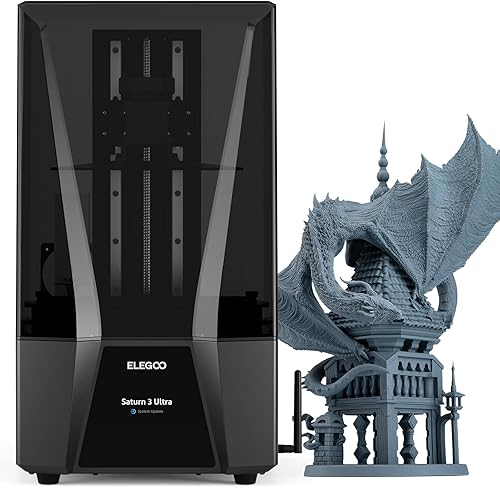
- 12K mono LCD
- 19 x 24 μm XY resolution
- 8.62 x 4.84 x 10.24 in build volume
- Wi-Fi file transfer
A tall build volume gives room for batches of miniatures or larger models. Its 12K screen and 19 x 24 μm XY resolution balance detail with space.
Pros
- Tall build volume
- 12K mono LCD
- Wi-Fi file transfer
Cons
- Its dimensions call for a dedicated spot
- Four-point leveling requires setup
The Saturn 3 Ultra 12K fits buyers who want a tall build area for batches or larger display models. Its 8.62 x 4.84 x 10.24 in volume gives more height than the Saturn 4 Ultra 16K.
The 12K mono LCD has 19 x 24 μm XY resolution, and Wi-Fi file transfer works on 2.4G and 5G networks. Its four-point leveling system needs initial setup.
Choose it if vertical room and batch capacity matter more than the newer assisted setup features in the Saturn 4 Ultra 16K. For finer XY resolution and automatic leveling, select the Saturn 4 Ultra instead.
How do you choose the best resin 3D printer for miniatures?
Start with the size and number of miniatures you expect to print, then compare XY detail and setup features. The right printer is the one that fits your models and workspace, not simply the one with the largest K number.
What does XY resolution tell you about miniature detail?
XY resolution describes the size of pixels across the screen, making it useful when comparing fine detail. For example, the Photon Mono 4 Ultra uses 17 x 17 μm pixels, while the Mars 5 Ultra is specified at 18 μm XY.
These numbers help narrow a choice, but they cannot predict every result. Sculpt quality, resin, orientation, supports and exposure settings all affect whether a tiny feature prints cleanly.
How much build area do you need for miniatures?
A compact build area is practical for single figures and small display models. A larger plate helps when you want to print several figures together, but it takes more bench space and can involve handling more resin.
Compare the Saturn 4 Ultra 16K and Saturn 3 Ultra 12K dimensions with your models, then measure around the printer as well. You need room to reach the vat and platform and to move prints to the cleanup area.
Do you need automatic leveling or print monitoring?
Automatic leveling helps simplify initial setup, while monitoring and detection features can flag certain problems. The Mars 5 includes one-click automatic leveling and a self-check; the Mars 5 Ultra adds an AI camera, resin alerts and residue detection.
These features support a careful workflow, but they do not replace checking the vat, build plate, resin and sliced file before each job. If fewer setup steps matter more than maximum detail, prioritize automatic leveling over a higher resolution label.
Does print speed matter for a miniature printer?
Speed matters most when you print often or run larger batches. The Photon Mono M7 Pro lists separate speeds for high-speed resin and standard resin, which shows why speed claims need to be read alongside the resin and layer conditions.
A single miniature can still require preparation, supports, printing and cleanup. Compare speed features only after you’ve confirmed that the printer’s detail and build area fit your models.
What do you need to set up a resin printer?
A resin printer needs a stable, suitable work area and a plan for washing and curing prints. Before you buy, make sure you can keep resin handling and cleanup organized rather than treating the printer as a self-contained appliance.
Use the printer’s setup guide to install the vat and platform, run any self-check, and follow the correct leveling steps for that model. Start with the manufacturer’s resin and slicer guidance, then use a small, simple model to learn the workflow before arranging a full plate of miniatures.
Our 3D printer setup steps cover first-day preparation. For a broader list of supplies, use our home 3D printing starter guide.
How should you prepare and care for miniature prints?
Good results begin before the print starts. Keep the vat and build plate clean, check for cured resin or debris, and confirm that the model is supported and positioned sensibly in the slicer.
Avoid pouring resin back into its container through an unfiltered path if it could carry debris from the vat. Follow the resin and printer instructions for handling, storage, washing and curing, and keep uncured resin away from skin and surfaces.
Wash and cure each print according to the resin’s instructions. Our resin wash and cure guide walks through the post-print steps.
What common resin miniature printing mistakes should you avoid?
The most common avoidable problems start with rushing setup or overlooking cleanup. Check the vat for debris, make sure the platform is installed and leveled as directed, and review supports before starting a longer job.
Do not assume a high K label guarantees crisp features on every model. Thin parts, unsupported details and poor orientation can still fail, so use a well-supported test model and adjust one setting at a time when a print does not come out as expected.
Another mistake is choosing a large printer without planning for its footprint and resin workflow. Measure both the printer space and the path from the printer to the wash and cure area before committing.
Which miniature resin printer should you choose?
Choose the Mars 5 Ultra for fine character detail, the Saturn 4 Ultra 16K for a larger batch area, or the Mars 5 for automatic leveling at setup. If your priority is a compact detail screen, choose the Photon Mono 4 Ultra; if you need a small workbench fit, consider the Sonic Mini 8K S.
Before buying, match the print area to your models and confirm that resin handling, washing and curing fit your workspace. If you are still deciding whether resin suits your first printer, read our beginner resin printer guide.
Our top 3 picks at a glance
-
1
-
2
-
3
Frequently asked questions
What resolution is good for resin miniatures?
For fine features, compare XY pixel size as well as the screen’s 4K, 10K or 14K label. Smaller XY pixels can help reproduce small details, but the model, resin and print setup also affect the result.
The printers here range from 17 μm XY pixels to 22 μm XY resolution.
Is a resin printer better than an FDM printer for miniatures?
Resin printers suit small figures when fine surface detail matters. FDM printers use filament and can be a better fit for larger parts or for people who want to avoid liquid resin cleanup.
Choose based on the models you plan to make and the handling steps you can support.
Do resin miniatures need washing and curing?
Yes. Resin prints need post-processing to remove uncured resin and cure the model.
Plan for washing and curing supplies, gloves and a work area for resin handling.
Our resin washing and curing guide explains the basic steps.
Should I choose a small or large resin printer?
Choose a compact printer if you mainly make single figures and have limited workspace. A larger build area helps when you want to print several miniatures at once or make larger models, but it takes more room and needs space for resin handling.