8 Best Filament Dryers for Home 3D Printing (October 2026)
The best best filament dryers for home 3D printing include the Creality Space Pi X4 Filament Dryer for large spool rotations, the SUNLU S4 Filament Dryer for multiple printers, and the Creality Space Pi Plus Filament Dryer for two-spool workflows.
On this page (6 sections)
The Creality Space Pi X4 is the best filament dryer for most home 3D printing setups here, with room for four standard 1 kg spools and settings up to 85°C. Choose the SUNLU S4 for multiple feed paths, or a two-spool dryer if you have fewer materials in rotation.
A dryer can help when filament has absorbed moisture, but the right choice depends on your spools, materials, printer path and available bench space. Start with our guide to how to dry 3D printer filament to identify signs of damp filament and learn the basics.
Our picks at a glance
-
1
 Best for large spool rotations
Creality Space Pi X4 Filament Dryer
8.6/10 our score
See it on Amazon -
2

-
3
 Best for two-spool workflows
Creality Space Pi Plus Filament Dryer
8.2/10 our score
See it on Amazon
How we chose these filament dryers
The best filament dryer for home use matches your spool count, material guidance and planned feed path. We compared capacity, temperature controls, timers, outlets and storage features to see which setups each model suits.
A broad temperature range gives you more settings to choose from, but you still need to follow the filament maker's drying guidance. Leave enough room for a large dryer's lid, controls and filament outlets, and check the path to your printer before placing it.
| Product | Best for | Capacity | Temperature range | Heating | Our score |
|---|---|---|---|---|---|
| Creality Space Pi X4 Filament Dryer | large spool rotations | 4 standard 1 kg spools or 2 large 2 kg spools | 50–85°C | Dual independent 200 W chambers | 8.6 |
| SUNLU S4 Filament Dryer | multiple printers | 4 1 kg spools | 35–70°C | 8.4 | |
| Creality Space Pi Plus Filament Dryer | two-spool workflows | 2 1 kg spools | 45–70°C | 8.2 | |
| Creality Space Pi Filament Dryer | preset-led drying | Not specified | 45–70°C | 8.0 | |
| Comgrow SH03 Filament Dryer | separate materials | Up to 4 1 kg spools | 45–85°C | Dual 200 W PTC modules | 7.9 |
| Comgrow SH02 Filament Dryer | two-spool presets | 2 1 kg spools | 40–70°C | 7.6 | |
| SUNLU S2 Filament Dryer | flexible timing | Not specified | 35–70°C | 7.4 | |
| Comgrow SH01 Filament Dryer | warm spool storage | 2 1 kg spools | 40–50°C | 7.1 |
The best filament dryers for home 3D printing
The right pick depends on whether you need four-spool storage, several feed outlets, a two-spool box or a routine for a single printer. These eight choices are ordered by score, with each model suited to a different kind of home setup.
Creality Space Pi X4 Filament Dryer: Best for large spool rotations
- Holds 4 standard 1 kg spools or 2 large 2 kg spools
- Dual independent 200 W heating chambers
- Temperature settings from 50–85°C
- Sealed storage between prints
The X4 combines four-spool capacity with two independent heating chambers and a sealed enclosure for storage between prints. Its temperature settings reach 85°C.
Pros
- Four standard spools fit at once
- Two independent heating chambers
- Sealed storage between prints
Cons
- Larger footprint than single-spool dryers
- Two chambers need more space than a single-spool dryer
The Creality Space Pi X4 suits a home workshop that keeps several spools in rotation. It holds four standard 1 kg spools or two large 2 kg spools in two independent heating chambers.
Creality sets the dryer from 50–60°C for materials such as PLA, PETG and TPU, and offers 80–85°C settings for materials including ABS, PET, PC, ASA, PA and PAHT. Match the setting to the filament maker's guidance rather than choosing a temperature based only on the dryer’s maximum.
The silicone-sealed enclosure is designed to limit moisture getting back in during pauses. An illuminated window lets you view the spools without opening the enclosure.
Choose the X4 if capacity, separate chambers and higher temperature settings fit your workflow. Skip it if you print from one spool at a time and have little bench space; a smaller dryer will be easier to place.
SUNLU S4 Filament Dryer: Best for multiple printers
- Dries up to 4 1 kg spools
- 8 filament outlet holes
- 3 circulation fans
- Temperature range 35–70°C
The S4 holds four 1 kg spools and has eight filament outlets for different loading angles or multiple printers. Three fans circulate air inside the dryer.
Pros
- Four-spool capacity
- Eight outlet holes
- Adjustable timer up to 99 hours
Cons
- Large exterior dimensions
- Temperature range tops out at 70°C
The SUNLU S4 is a strong fit for people who want several feed paths available at once. It holds up to four 1 kg spools and has eight filament outlet holes for different loading angles or multiple printers.
Three fans circulate air inside the dryer. The temperature range is 35–70°C, and you can set the timer from 0–99 hours.
At 460 x 220 x 310 mm externally, the S4 needs a clear space on a bench or shelf. Measure the spot and check that its outlets can face your printers without awkward filament routing.
Choose the S4 if you have multiple printers or change among several spools often. Skip it if you only need to dry one spool and don't expect to use its extra outlets.
Creality Space Pi Plus Filament Dryer: Best for two-spool workflows
- Holds 2 1 kg spools
- Double 360° hot-air heating
- Temperature range 45–70°C
- 4-inch touch screen
The Space Pi Plus fits two 1 kg spools and uses circulating hot air. One-key temperature settings cover up to 12 filament types.
Pros
- Two spools can dry together
- Four filament holes
- Touch screen supports Celsius and Fahrenheit
Cons
- Temperature range ends at 70°C
- Two-spool capacity may exceed a one-spool setup's needs
The Creality Space Pi Plus suits a two-spool routine with guided temperature choices. Its double 360° hot-air heating design and four filament holes support drying and feeding more than one spool.
The 4-inch touch screen offers one-key settings for up to 12 filament types, including PLA, ABS, PETG, TPU, PA and PC. You can also adjust the temperature from 45–70°C and switch the display between Celsius and Fahrenheit.
That range covers many common materials, but it may not fit every filament's drying instructions. Check the recommended temperature for the specific spool before using a preset.
Choose the Plus if two-spool capacity and clear controls matter more than a compact single-spool setup. For help choosing a first material, read our guide to PLA vs PETG filament.
Creality Space Pi Filament Dryer: Best for preset-led drying

- 110 W PTC heater
- Temperature range 45–70°C
- Timer up to 48 hours
- Settings for 12 filament types
The Space Pi has a 3.7-inch touch screen, settings for 12 filament types and a timer that can run up to 48 hours. Its heater circulates hot air inside the box.
Pros
- Settings for common and composite filament types
- Power-off memory
- Works with 1.75 mm and 2.85 mm filament
Cons
- Capacity is not specified
- Temperature settings end at 70°C
The Creality Space Pi suits buyers who want material presets and a long timer in a touch-screen dryer. It has settings for 12 filament types and a timer that can run up to 48 hours.
The temperature range is 45–70°C. Its power-off memory restores the previous material and temperature settings, and it supports 1.75 mm and 2.85 mm filament.
Capacity is not specified, so check that your spool dimensions fit before choosing it. You should also check where its filament outlet will sit relative to your printer.
Choose this model if presets and saved settings make your routine easier. Skip it if you need a stated multi-spool capacity or settings above 70°C; another pick is a clearer match.
If you are setting up a new workspace, our step-by-step 3D printer setup guide covers the broader first-day tasks around loading and feeding filament.
Comgrow SH03 Filament Dryer: Best for separate materials
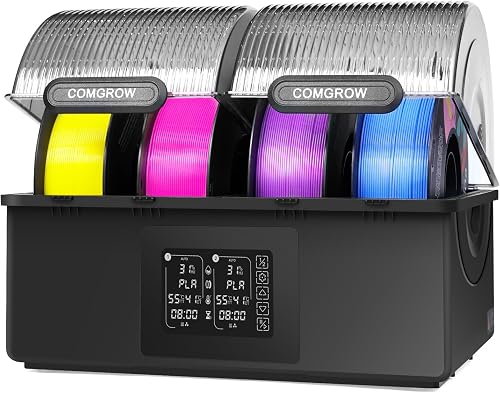
- Two independent chambers for up to 4 1 kg spools
- Temperature range 45–85°C
- Separate temperature and power controls
- Automatic drying mode
The SH03 separates its four-spool capacity into two chambers, each with temperature control and an on/off function. Automatic drying mode responds to internal humidity.
Pros
- Independent chamber settings
- Temperature range reaches 85°C
- Automatic drying mode
Cons
- The two-chamber design takes more room
- Its controls may be more than a basic setup needs
The Comgrow SH03 suits a workflow that benefits from controlling two chambers separately. It holds up to four 1 kg spools, split between two chambers, each with its own temperature and power controls.
Dual 200 W PTC heating modules cover 45–85°C. Automatic drying mode responds to internal humidity, then switches to storage mode after humidity falls below the set threshold and a countdown finishes.
A 360° circulation fan moves air through the chambers, and the adjustable drying duration reaches 98 hours. Those controls make the SH03 useful for separate material routines, but they add setup choices and the two-chamber design takes room.
Choose it if you regularly dry different materials and want separate chamber settings. Skip it if a simpler two-spool or single-spool routine covers your needs.
Comgrow SH02 Filament Dryer: Best for two-spool presets

- Holds 2 1 kg spools
- 150 W PTC heater
- Temperature range 40–70°C
- One-key settings for 9 filament types
The SH02 can dry two 1 kg spools together and offers one-key settings for nine filament types. Its temperature range is 40–70°C.
Pros
- Two-spool capacity
- Preset choices for nine filament types
- Sealing rings around the box and outlets
Cons
- Temperature range ends at 70°C
- Two-spool box needs more room than a single-spool unit
The Comgrow SH02 fits a two-spool routine with one-key material settings. It holds two 1 kg spools and offers presets for nine types, including PLA, TPU, PETG, ABS, ASA, PVA, PC, PA and PP.
Its 150 W PTC heater runs from 40–70°C, and the timer can reach 98 hours. Sealing rings around the covers and outlet openings help keep the enclosure closed, while two filament holes support feeding to printers.
Check the width of your spools and the distance to your printer before choosing a spot. Leave the outlets accessible so filament can travel to the printer without snagging.
Choose the SH02 if two spools and quick presets simplify your rotation. Skip it if you need four-spool capacity or a temperature range above 70°C.
SUNLU S2 Filament Dryer: Best for flexible timing

- Temperature range 35–70°C
- Timer from 0–99 hours
- Translucent lid
- Supports 1.75 mm, 2.85 mm and 3.00 mm filament
The S2 offers a wide timer range and a translucent lid so you can check the spool without opening the dryer. It supports several common filament diameters.
Pros
- Timer settings up to 99 hours
- Translucent lid
- Can feed filament while drying
Cons
- Capacity is not specified
- Temperature range ends at 70°C
The SUNLU S2 is a practical choice when you want flexible timing and a clear view of the spool. Its timer ranges from 0–99 hours, and its temperature can be adjusted from 35–70°C.
The translucent lid lets you check the spool without opening the dryer. It supports 1.75 mm, 2.85 mm and 3.00 mm filament, and can act as a spool holder while drying during printing.
Capacity is not specified, so verify that your spool fits before buying. Choose the S2 if its timing options and simple visual checks matter more than a stated multi-spool count; skip it if you need confirmed room for several spools.
If stringing is the issue you're trying to solve, drying is one possible step. Our guide to why a 3D printer strings covers other causes, including temperature and retraction settings.
Comgrow SH01 Filament Dryer: Best for warm spool storage

- Stores 2 1 kg spools
- Temperature range 40–50°C
- Timer from 6–12 hours
- Temperature and humidity display
The SH01 holds two 1 kg spools and displays temperature and humidity. Its temperature range is 40–50°C.
Pros
- Two-spool storage
- Temperature and humidity display
- Outlet can be plugged when not in use
Cons
- Maximum temperature is 50°C
- Timer choices are limited to 6–12 hours
The Comgrow SH01 suits a basic routine for warm spool storage and modest drying settings. It stores two 1 kg spools and displays temperature and humidity on its 2-inch LCD screen.
The temperature range is 40–50°C, and the timer offers 6–12 hours. During drying, leave the moisture outlet open so moisture can escape; plug the outlet when the dryer is not in use.
The SH01 has a narrower temperature range and shorter timer choices than the other models here. Choose it if those settings match the filament you use and you value the display; skip it if you need a longer cycle or more heat.
How should you choose the best filament dryer?
Choose a dryer by checking material temperature guidance, spool capacity and whether you will feed filament while it dries. Those practical details matter more than a long feature list.
Does a filament dryer need to match your filament?
Yes, the dryer needs a temperature setting that fits your filament maker's guidance. The SH01 reaches 50°C, several models reach 70°C, and the Space Pi X4 and SH03 reach 85°C.
Don't assume a higher setting is always better. Some materials can soften or deform if the temperature is too high, so check the instructions for the exact filament before starting a cycle.
How many spools should a home dryer hold?
One or two spools are enough for many single-printer setups. Four-spool models such as the Space Pi X4, SUNLU S4 and Comgrow SH03 make more sense if you rotate several materials or need more than one feed path.
Check spool dimensions as well as the number of positions. A stated capacity may apply to a particular size, such as standard 1 kg rolls, and a larger spool can take up more space.
Which features help when feeding filament to a printer?
Multiple outlets help when you want several feed paths, but the route from each spool still needs to be clear. The SUNLU S4 has eight outlets, while the Space Pi Plus has four filament holes and the SUNLU S2 is designed to act as a spool holder during printing.
Before you buy, picture where the dryer will sit and how the filament will reach the printer. Avoid sharp bends, tight turns and paths that rub against the printer frame.
Can a filament dryer double as a dry box?
Some dryers are designed to store filament in an enclosed space between prints. The Space Pi X4 has a silicone-sealed enclosure, and the Comgrow SH02 uses sealing rings around its covers and outlets.
A closed box helps limit exposure to room air, but it does not replace material-appropriate drying. Close outlets or covers as the model directs when you are not feeding filament, and store unused spools in a way that suits their material and your room conditions.
How do you set up and use a filament dryer?
Set up the dryer on a stable surface with room for airflow, access to the controls and a clear route to the printer. Then load the spool in the direction the manufacturer specifies and choose settings that match the filament guidance.
Before the first cycle, check that the spool turns freely and the filament reaches the outlet without catching. If you plan to print from the dryer, connect the feed path and confirm it moves smoothly before starting a long job.
Select the correct material preset only when it matches the filament you are using. If you set temperature and time manually, use the spool maker's guidance rather than copying a setting from a different material.
Keep the moisture outlet open during drying on models that require it. For the Comgrow SH01, the outlet needs to stay open while drying and should be closed when the dryer is not in use.
What common filament dryer mistakes should you avoid?
The most common mistakes are using the wrong temperature, blocking airflow or moisture outlets, and assuming a dryer fixes every print defect. A careful setup helps you avoid softening filament or chasing the wrong cause of a poor print.
Don't use the maximum temperature just because the dryer offers it. Match the setting to the material and spool instructions, especially when switching between PLA, TPU, nylon or other filament types.
Don't trap moisture in a model that needs an open outlet during a drying cycle. Check the dryer instructions for vents, seals and outlet plugs, then return removable plugs to their storage position when the cycle is done.
Don't route filament through a sharp bend or let it rub on a table edge. A spool that cannot turn freely can interrupt feeding even if the dryer is set correctly.
Finally, don't assume every string, clog or adhesion problem comes from damp filament. Check the filament's storage history and other parts of the print setup before changing dryer settings.
Which filament dryer should you choose?
Choose the Creality Space Pi X4 if you need four-spool capacity and settings up to 85°C. Pick the SUNLU S4 for several feed paths, the Space Pi Plus for a two-spool setup with guided presets, or the SUNLU S2 for flexible timing and a translucent lid.
For a dryer with separate chamber controls, choose the Comgrow SH03. For a basic two-spool box with a temperature and humidity display, the SH01 is the more modest option, provided its temperature range suits your filament.
The best filament dryer is the one that fits your material instructions, spool dimensions, bench space and feed path. If you are unsure whether moisture is causing a print problem, start with our guide to drying 3D printer filament.
Our top 3 picks at a glance
-
1
Best for large spool rotations
Creality Space Pi X4 Filament Dryer
8.6/10 our score
See it on Amazon -
2
-
3
Best for two-spool workflows
Creality Space Pi Plus Filament Dryer
8.2/10 our score
See it on Amazon
Frequently asked questions
Do you need a filament dryer for home 3D printing?
A filament dryer can help when a spool has absorbed moisture and you see symptoms such as stringing or popping. Some models can also feed filament to the printer while drying, which suits long prints or humid rooms.
Check the spool's storage history and the filament maker's drying guidance first.
A dryer won't correct unrelated issues such as a dirty build plate or unsuitable print settings.
Which filament dryer is best for a Bambu printer?
Choose a filament dryer for a Bambu printer by spool count and the feed route you need. The SUNLU S4 has four spool positions and eight outlets, while the Creality Space Pi Plus holds two spools and has four filament holes.
Check the route from the dryer to your printer for bends or snags before settling on a location.
Can filament dry while printing?
Yes, several dryers are designed to feed filament while it dries. The SUNLU S4 has eight outlet holes, and the SUNLU S2 can work as a spool holder during printing.
Route filament through the outlet and printer path with gentle bends, then check that the spool turns freely.
Use a drying temperature suited to the material.
How many spools should a filament dryer hold?
Choose capacity based on how many materials you want ready at once. One or two spools suit many single-printer routines, while a four-spool dryer fits a larger rotation or multiple feed paths.
Check spool size as well as count: the Space Pi X4 holds four standard 1 kg spools or two large 2 kg spools.


